Sound-objects are a specific type of time-objects handled by the Bol Processor. Whereas time-objects are designed to send timely commands to various devices, including robots, sound-objects produce sounds via MIDI and Csound drivers.
A new output format (event lists) makes it possible to connect the Bol Processor to the largest diversity of sound software devices.
🎶 The relocation or truncation of sound-objects, constraints on continuity, and the use of broken tempo (organum), bear similarities to the actions of human musicians during a performance. Virtuose performers need to break the rigidity of the beats in order to fully express the musicality of specific events.
All examples discussed here can be found in the Data project '-da.tryMiscObjects'. The time-setting of sound-objects uses an algorithm that has been documented in detail in previous publications.
Simple notes and sound-objects
In the Bol Processor, time-objects that produce (musical) sounds are of two types:
- Simple notes are expressed in English, Italian-French or Indian conventional notation as a note name followed by an octave number. For example, C4 in English notation designates the note C in the fourth octave, which is usually the #60 key in the middle of a piano keyboard. C4 is equivalent to do3 in Italian-French notation and sa4 in Indian notation.
- Sound-objects, which will be discussed here, are 'packages' of instructions (in MIDI or/and Csound formats) able to describe a set of instructions that may be likened to a 'musical gesture'.
The first version of the Bol Processor (BP1), released in 1980, dealt exclusively with sound objects representing the 'gestures' of Indian drummers and dancers. Within the current technical limitations, it produced and analysed musical items in text format, which the mussicologist could read or play on a drum. Read for example Analysis of tabla compositions.
Later, when the MIDI and Csound formats became available on small computers, handling simple notes and sound objects was introduced to expand the scope.
Editing sound-objects on BP3
Throughout this tutorial, we will become familiar with three types of sound object from a technological perspective:
- MIDI objects produced by MIDI code
- Csound objects produced by converting MIDI code to a Csound score
- Pure Csound objects defined in Csound scores
Open the '-da.tryMiscObjects' project, which is distributed in the 'ctests' folder. A line of buttons at the bottom of the edit window gives access to the connected files. For example, since '-so.tryObjects' is written at the top of the project, a button with the same name is visible. Clicking this button displays the full set of sound objects used by this project:
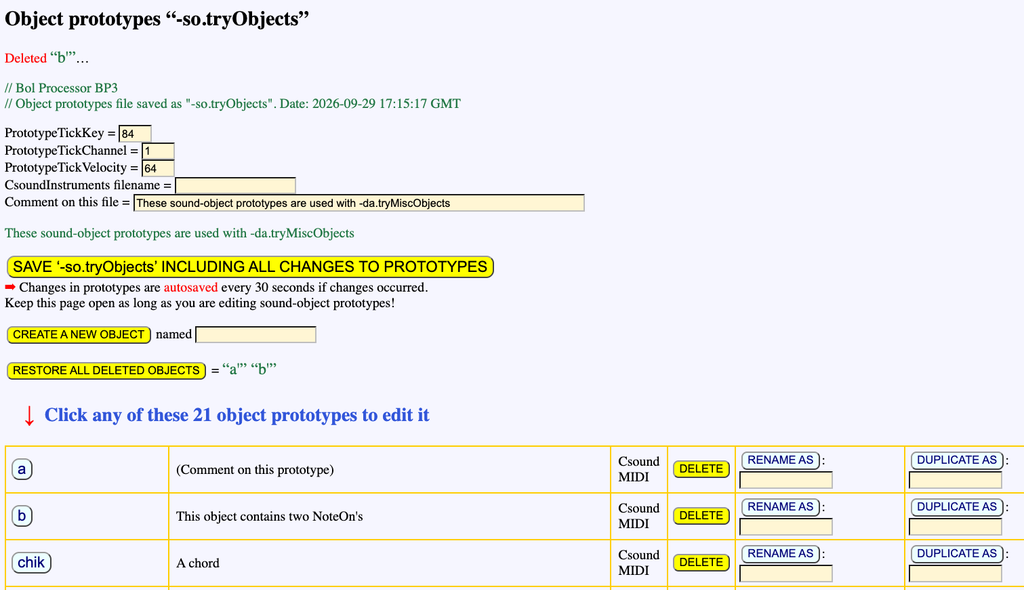
👉 This tab must never be closed if sound objects are to be modified or created. A javascript scheduler checks for modifications to the sound objects every 30 seconds, and automatically saves the updated '-so.tryObjects' file. A message on top of the '-so.tryObjects' page confirms it:

If you are in a hurry, you can of course click the SAVE '-so.tryObjects' button.
Every sound-object is of the MIDI or Csound type, or both.
Click any name of sound-object, e.g. 'cycle1', to open the sound-object editor in a new tab:
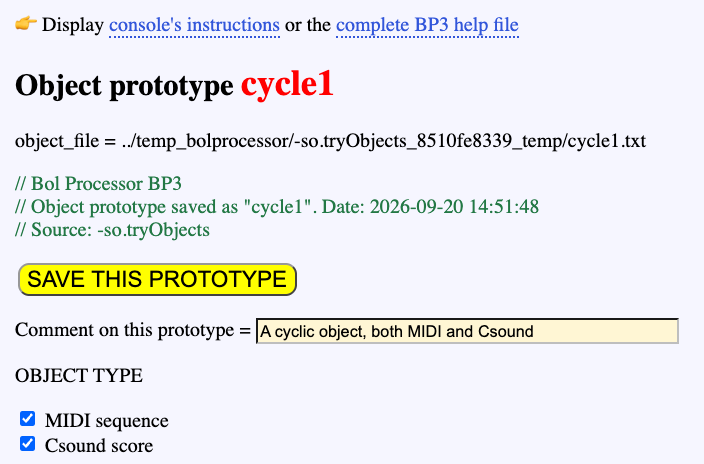
This sound-object contains both MIDI and Csound code, producing identical sequences of events, as the Csound score at the bottom of the page was automatically generated from the MIDI content.
You can modify the Csound score, save it, then save the prototype and wait for less than 30 seconds for it to be updated in the '-so.tryObjects' file.
The advantage of using Csound scores for sound-objects is that they can represent much more complex instructions than MIDI messages, as they can control any number of parameters (arguments) in a Csound instrument. The instrument number 'x' or label can be set using the _ins(x) command in the Bol Processor score. Alternatively, it can be made specific to this sound object by entering the instrument number in the 'Force to instrument' field.
The MIDI sequence can be played by clicking the PLAY button, and it can be exported as a MIDI file. Conversely, a new MIDI sequence can be uploaded to the sound-object. This sequence, for example, was created using the MIDI file output format in the Bol Processor.
An image of the sound-object is available at the bottom of its page:
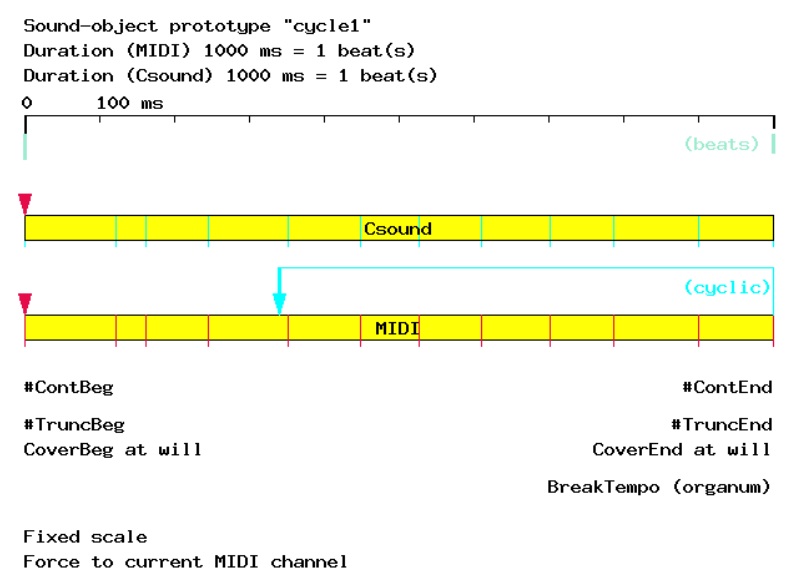
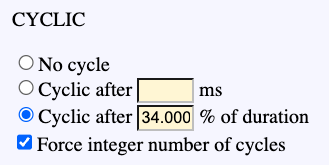
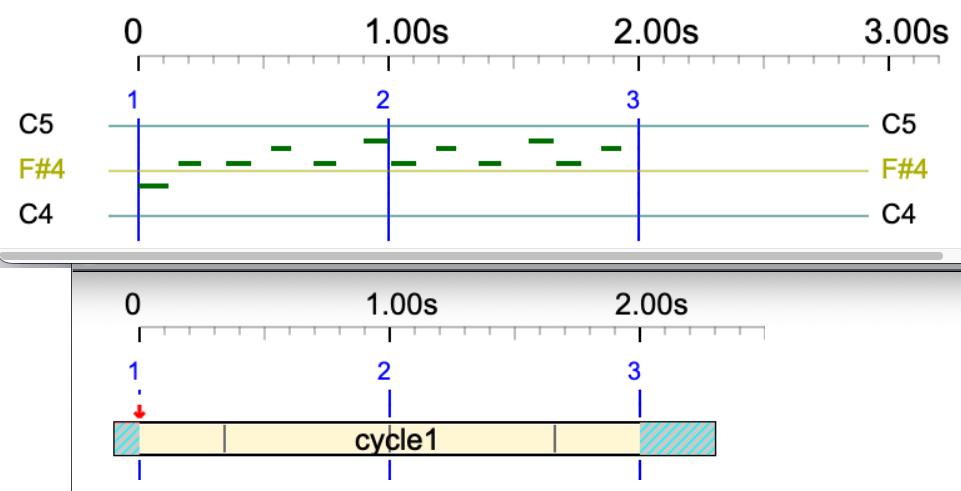
This image highlights a property of 'cycle1': as its name suggests, it is cyclic. This means that, if an extension is required but the 'Never rescale' option at the top of the page prevents this, it will fill the time interval with self-replications of its MIDI or Csound sequence. Replications are set to start at 34 % of its duration. This parameter can also be specified in milliseconds. Beware that if you enter a negative value or a value larger than the sound-object's duration, it will be set to 0. The same restrictions apply to parameters such as CONTINUITY, COVER, and TRUNCATE.
Creating a new sound-object
Let us create a sound-object labelled 'oscar' using a phrase of Oscar Peterson in the imported MusicXML score '-da.Watch_What_Happens_by_Oscar_Peterson'.
First click the EXPLODE button to split measures. Find one that you feel eligible as a sound-object. We selected measure #6:
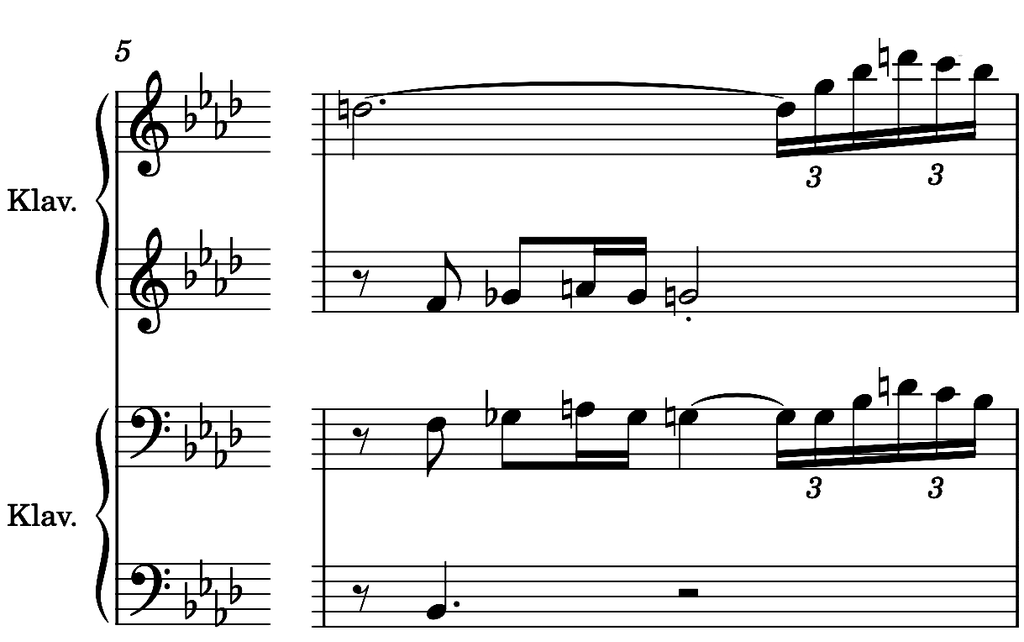
This is the Bol Processor score of this measure:
{_vel(64) _chan(1){4, {{3,D5&}{1,&D5 G5 Bb5 D6 C6 Bb5}, {3/2,- F4 Gb4}{1/2,A4 Gb4}{2,G4}}}, _vel(64) _chan(2){4,{{3/2,- F3 Gb3}{1/2,A3 Gb3}G3&{1,&G3 G3 Bb3 D4 C4 Bb3}, 1/2{3/2,Bb2}--}}}
To export this fragment as a MIDI file, first set the Fade-out time to zero in the settings, otherwise it will end with 2 seconds of silence. Then select the MIDI file output format and click 'PLAY' near the 6th item. Click 'download' to get a file named 'Watch_What_Happens_by_Oscar_Peterson.mid' which contains only the chosen measure.
Then go back to the '-so.tryObjects' page and create an object called 'oscar'. Add 'oscar' to the '-al.tryObjects' alphabet which can be accessed via the link near the bottom of the '-da.tryMiscObjects' page. As 'oscar' belongs to the terminal alphabet, it should start with a lowercase character. However, you can bypass this rule by typing it between single quotation marks.
Open the 'oscar' tab and click the choose file button near 'Create or replace MIDI codes loading a MIDI file'. This will allow you to upload the MIDI file. Then click 'SAVE THIS PROTOTYPE'.
The duration of this sound-object is now set to 1820 ms, which is 1.82 beats because its time reference Tref is set to 1000 ms (by default). All default properties are fit for this demo, we'll change a few of them later.
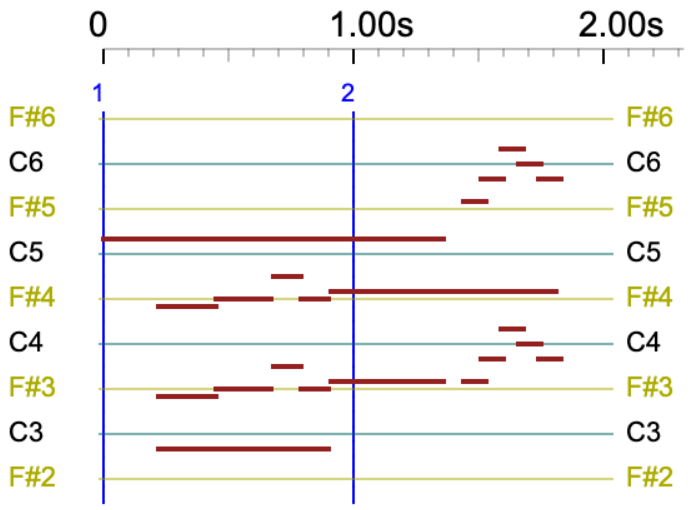
Don't forget to wait for at least 30 seconds so that the new object is saved along with the '-so.tryObjects' file. The return to '-da.tryMiscObjects', type 'oscar' in the edit field and play it in real-time MIDI or MIDI file. You will get the following pianoroll and sound:
Now, you can also create the equivalent Csound score of this object by clicking the 'CREATE Csound CODE from MIDI codes' button. Wait a few seconds for the processing to complete. You will get:
Click the 'SAVE THIS CODE' button, then 'SAVE THIS PROTOTYPE'.
The Csound code is only used when the output format is Csound. Real-time MIDI and MIDI files use the MIDI codes of sound-objects. For this reason, if a sound-object contains only Csound code, it won't produce any sound in MIDI.
Csound
An introduction to using Csound with the Bol Processor is found on the Csound checkup page.
Select the Csound score output format and play 'oscar'. You get the following:
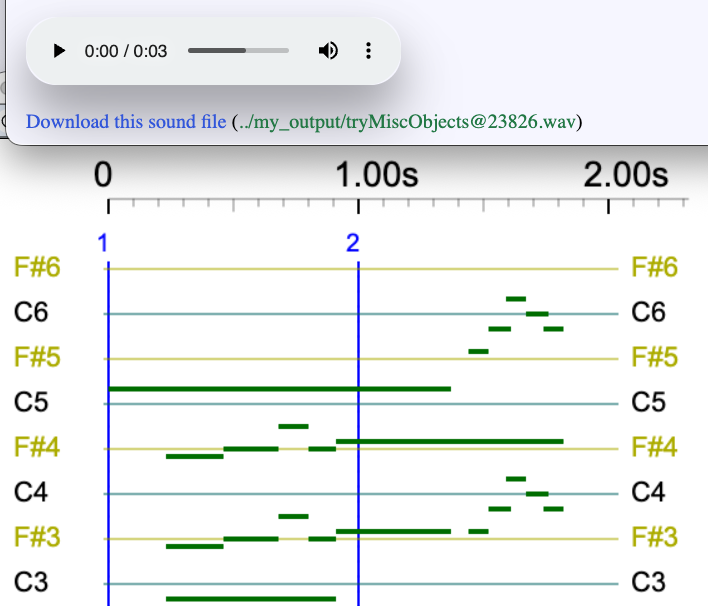
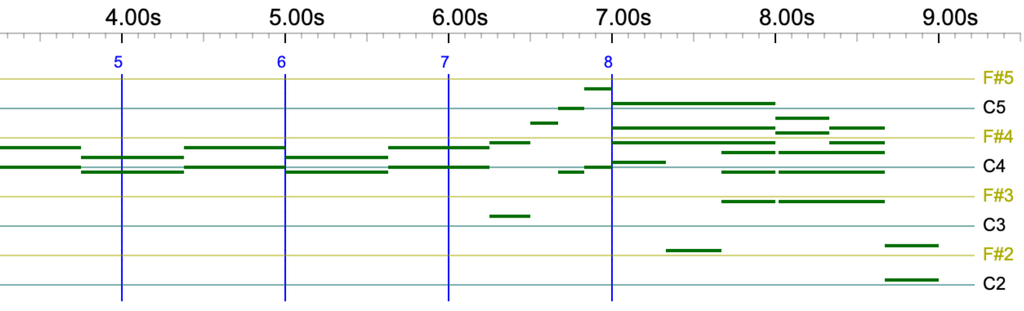
No MIDI output, as the Bol Processor produced a Csound score output which the Csound console converted to a sound file. The notes are drawn in green on the pianoroll instead of brown, indicating that Csound is being used instead of MIDI.
The MIDI code stored in 'oscar' was not used. Instead, the Csound score was used.
If the sound-object contains MIDI code and no Csound score, using it with the Csound output option will convert MIDI to Csound for this particular task.
What happens if a sound-object contains Csound score and no MIDI code? Try it by duplicating 'oscar' to 'oscar-purecsound' and click the 'SUPPRESS all MIDI codes' button on the 'oscar-purecsound' page. Don't forget to add 'oscar-purecsound' to the '-al.tryObjects' alphabet!
Now, playing 'oscar-purecsound' will produce the same output as 'oscar' with the 'Csound score output' option selected. However, you will not hear any sound if you play 'oscar-purecsound' with the real-time MIDI or MIDI file output option selected.
The Bol Processor can convert streams of MIDI codes into Csound scores. However, it cannot perform the reverse conversion for a simple reason: Csound uses events that are too complex for straightforward conversion to MIDI.
On this page, we use the minimum set of arguments in Csound scores (10) which makes them eligible for a sound rendering by the instruments described in the Csound resource '-cs.tryTunings'. A more sophisticated use is explained on the Csound objects page. A practical example using 13 arguments is proposed on the Sarasvati Vina grammar project.
MIDI channels and Csound instruments
Looking back at the Bol Processor score used to create 'oscar' reveals that it was calling both MIDI channels 1 and 2:
{_vel(64) _chan(1){4,{{3,D5&}{1,&D5 G5 Bb5 D6 C6 Bb5},{3/2,- F4 Gb4}{1/2,A4 Gb4}{2,G4}}},_vel(64) _chan(2){4,{{3/2,- F3 Gb3}{1/2,A3 Gb3}G3&{1,&G3 G3 Bb3 D4 C4 Bb3}, 1/2{3/2,Bb2}--}}}
This probably went unnoticed when the sound object was played on a MIDI device set to mix all 16 channels by default. However, MIDI channels can be used to redirect MIDI event streams to different devices. The _part() instruction also does this on the Bol Processor. Anyway, we need options for dealing with channels contained in a sound-object's MIDI code:
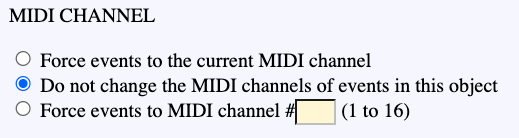
The 'Do not change…' option is declared as follows in 'tryObjects.json' (created when the output option is Event list):
"Default MIDI channel": {
"key": "DefaultChannel",
"value": "LOCAL_CH",
"unit": "enum"
},
MIDI channels are preserved as found in the sound object.
If the 'Force events to the current MIDI channel' option is selected, the MIDI channel will match the context of the event. The JSON declaration is:
"Default MIDI channel": {
"key": "DefaultChannel",
"value": "GLOBAL_CH",
"unit": "enum"
},
If the 'Force events to MIDI channel #' option is selected, the specified channel number is used. For instance, with a channel number of 6:
"Default MIDI channel": {
"key": "DefaultChannel",
"value": 6
},
The same process applies to Csound instruments. These can be specified using the _inst() command in the Bol Processor score, but instruments can also be set in each sound object:
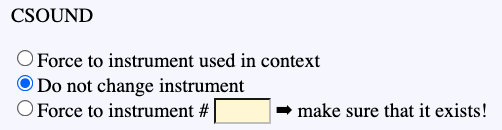
Here, for instance, instruments specified in the Csound score will be used. This is declared as follows in 'tryObjects.json':
Csound instrument mode": {
"key": "CsoundInstrumentMode",
"value": "LOCAL_CS",
"unit": "enum"
}
If the option 'Force to instrument used in context' is selected, it is declared as follows:
Csound instrument mode": {
"key": "CsoundInstrumentMode",
"value": "GLOBAL_CS",
"unit": "enum"
}
If an instrument is specified (and used for all events), it is declared as follows:
"Csound instrument #": {
"key": "CsoundInstr",
"value": 3
}
In the produced Csound score, instrument numbers appear in the first parameter. For instance, this line
i3 0.000 1.000 8.00 90.000 90.000 0.000 0.012 0.012 0.000 ; C4
sends a note 'C4' to a Csound instrument #3. This will work on three conditions:
- A Csound instrument file (such as '-cs.tryTunings') has been declared on top of the project;
- It contains an instrument #3;
- The arguments of instrument #3 match parameters found in the line.
Try for instance playing the same object with three different instruments:
_ins(1) oscar-purecsound -- _ins(2) oscar-purecsound -- _ins(3) oscar-purecsound
👉 Instrument #3 cannot play short notes. However, these are present in the output score, as shown below:
A Csound sound-object can also use several instruments specified on eaach line of its Csound score. Duplicate 'oscar-purecsound' to 'oscar-2instruments', select the 'Do not change instrument', then modify the Csound score as follows:
Notes F#4, F#3 A4 and D5 will be played with instrument #3, and other notes with instrument #1. Save this score, save the 'oscar-2instruments', click SAVE on the -'so.tryObjects' page, add 'oscar-2instruments' to the '-al.tryObjects' alphabet, and play:
oscar-2instruments
Isn't it beautiful? 😀
In this demo, we used instruments #1, #2 and #3 from the Csound instrument file named '-cs.tryTunings' because they each have 10 arguments that match the 10 parameters contained in the Csound scores. More complex instruments use more parameters.
This is still a small part of the sophistication of Csound, as Csound scores can handle an infinity of instruments with their specific parameters (example). You only need to design them…
Event list
Sound-objects are listed in event lists along with the parameters required for their instantiation. Indeed, the exported JSON file, e.g. 'tryObjects.json', is also used to this effect.
For example, the performance of
_ins(3) C4 - oscar-2instruments
produces an event list starting like this:
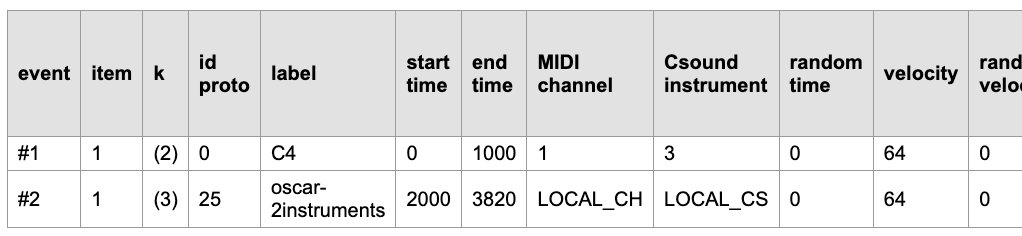
Here, the Csound instrument column displays instrument 3 for the 'C4' note. However, it states that 'oscar-2instruments' should use its own internal instrument assignments. These will be find in the Csound score stored in 'tryObjects.json'.
Duration of a sound-object
Type and play:
oscar - _tempo(1/3) oscar
The first instance of 'oscar' will play at the same speed as the captured fragment. The second instance will play at a third of the speed. This is possible because the property 'OK rescale' is selected. If you don't want to change the speed, regardless of the tempo of the performance, select 'Never rescale'.
When 'OK rescale' is selected, you can still prohibit the expansion or contraction of the duration, owing to the 'Expand' and 'Compress' options. Try to play the preceding example after unchecking 'Expand' or 'Compress', ot selecting 'Never rescale'.
A finer control of durations is possible. Select 'Dilation ratio range from' and set acceptable variations in range 0.5 to 2. Then play:
oscar - _tempo(4) oscar ---- _tempo(1/3) oscar
Speeds 4 and 1/3 won't be accepted and will be limited to 2 and 1/2:

Cover property
Now try this:
_tempo(0.5) oscar _tempo(1) oscar
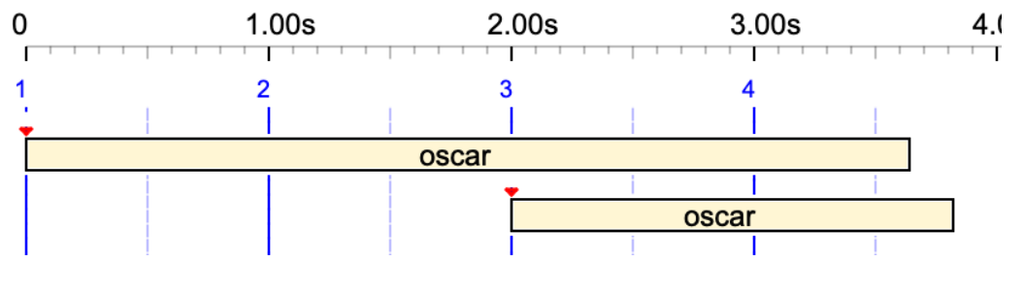
Oops!
The two occurrences overlap because the second one starts on the second beat (2.00 seconds). The small red triangle at the start of the object indicates its pivot, which we will discuss later. Its shape indicates that the object is relocatable. So, how can we make the second occurrence play after the first has finished?
The solution is to set the 'COVER END' property to 'Never cover':

The same can be achieved by setting the 'COVER BEGINNING' property to 'Never cover'.
Tied sound-objects
The concatenation sign '&' used to tie notes together in articulations (read tied notes) also applies to all kinds of sound-objects. For example:
oscar& C4 &oscar
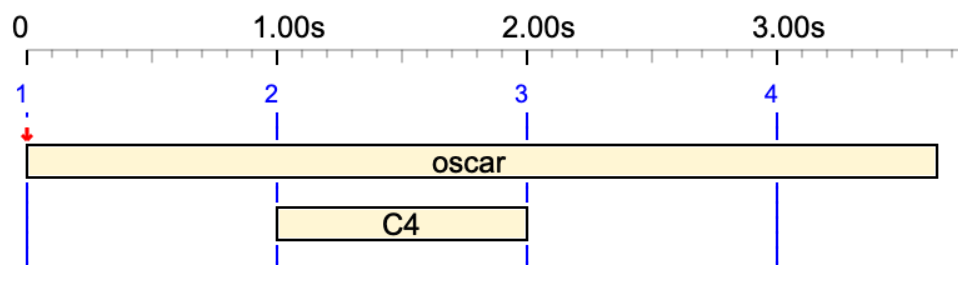
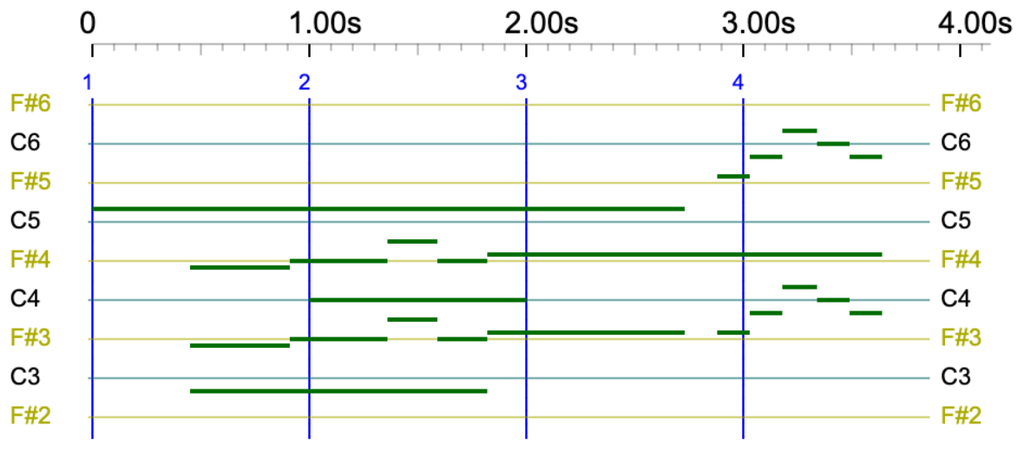
The symbolic duration of 'oscar' is extended to 2 beats, plus one beat in the middle to accommodate 'C4'. Given that the physical duration of its prototype is 1820 ms, its total duration is 3640 ms.
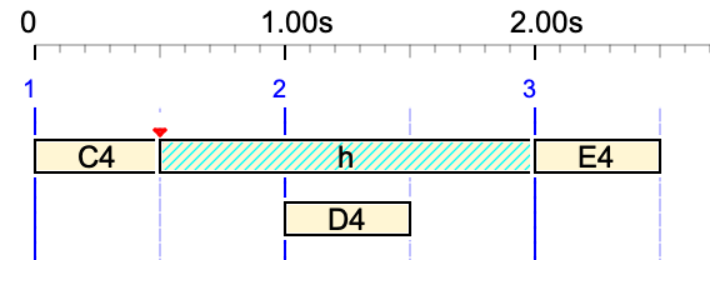
Below, the silent (undeclared) sound-object 'h' is used in a tie:
_tempo(2) C4 h& D4 &h E4
Pre-roll and post-roll
Note that the second occurrence in the preceding example moved exactly to the end of the first. Perhaps we need to set a safe silence of, say, 300 ms after each occurrence of 'oscar'. This can be achieved by setting the post-roll to 300 ms. Post-roll is the additional time given to a time object to finish its effect:
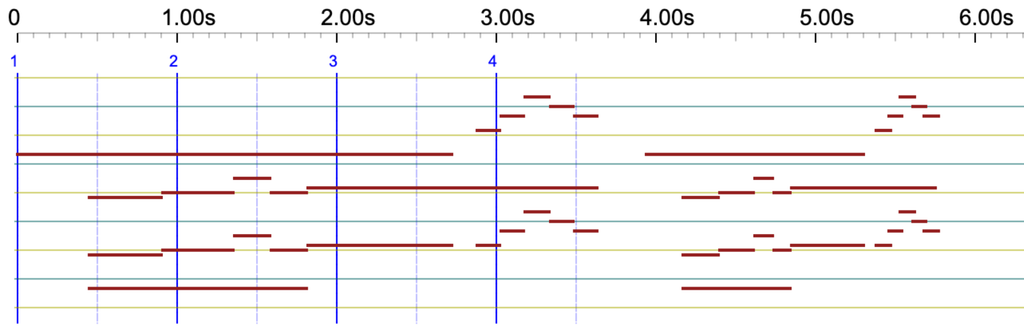

A similar effect can be achieved by setting a negative pre-roll, which introduces a silence at the beginning of the object. Two buttons at the bottom of the 'oscar' page make it easier to understand the concept of 'pre-roll' and 'post-roll' in terms of silences:

The pre-roll and post-roll of a sound-object can be positive or negative and are intended to frame a time interval outside the limits set by the object's first and last events. A positive post-roll means that there are 'things happening' at a given delay after the last event. A positive pre-roll indicates that 'things will happen' after a given delay following the first event. If the object has a 'Non-cover' property, the new limits will be used to calculate its location.
These delays are expressed in physical time (milliseconds), as it would make no sense for them to differ if the sound-object were played at a different speed.
Smooth time, smooth sound-object
Play the following on striated time (the default setting on '-da.trMiscObjects'):
oscar - _tempo(4/3) oscar - _tempo(2) oscar
The open the settings, uncheck the 'Striated time' option, save the settings, and play the same in smooth time.
The two results are shown below:
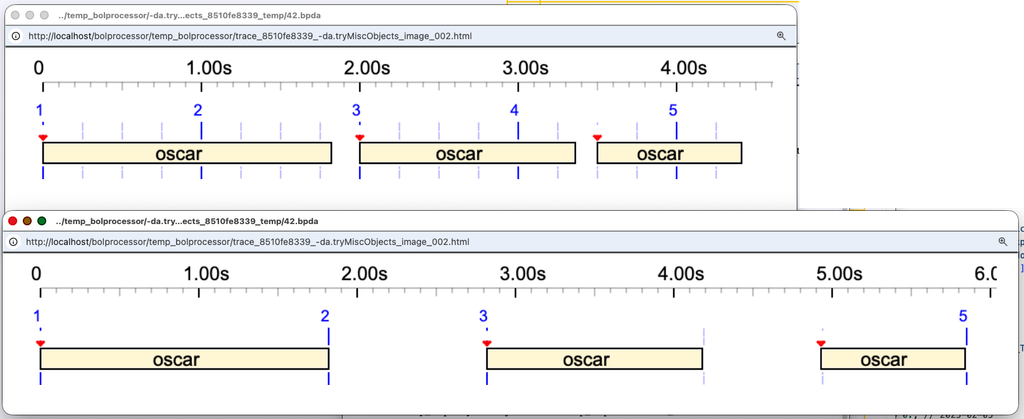
In striated time (top image), the pivot of each sound-object is set on a time streak (blue vertical line), and the time streaks are arranged according to the rhythmic structure.
In smooth time (bottom image), sound-objects and silences are located on the sole basis of their durations. For example, the first silence lasts for 1 second (the default setting), whereas the second silence, at tempo 4/3, lasts for 0.75 seconds.
A typical example of using smooth time is the arrangement of time patterns (empty time-objects) as shown in '-gr.tryTimePatterns' (read more):
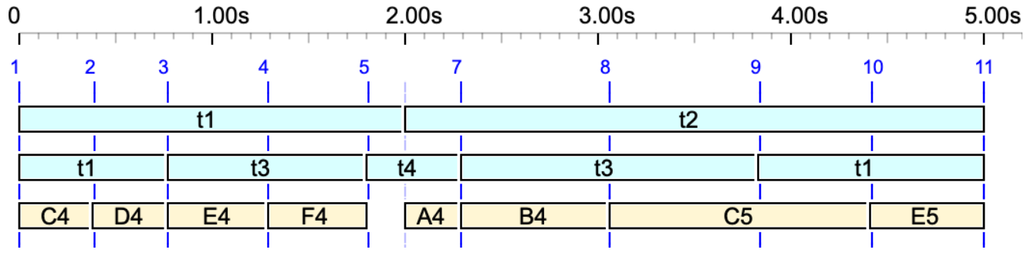
A smooth time-object is one whose Tref parameter is set to 0 ms. By default, this value is 1000 ms. This will be explained and demonstrated in future…
Silent sound-object
A silent sound-object is one in which both the MIDI and Csound contents are empty. It may be called a time-object since it does not deal with sound in its raw form. Since it does not deal with sound in its raw form, it may be called a time-object. However, once it is displayed in an event list, it may be used by other devices to produce any sequence of events.
Silent sound-objects can be created in three ways:
- A left-over variable
- A terminal symbol unrelated to a sound-object description
- A sound-object declared with empty MIDI and Csound contents
Check the three types in this example:
Thisvariable C4 gold gold h D4

Here, 'Thisvariable' is a left-over variable and 'h' is a terminal symbol not declared in '-so.tryObjects'. Both are played with a one-beat duration. However, 'gold' is declared in '-so.tryObjects' with a 'Tref' duration of 700 ms that cannot be rescaled, plus the 'force continuity in the beginning' property and 'relocate' properties.
The 'gold' silent sound-object can be given the same metrical and topological properties as other sound objects, creating a wide variety of situations.
Read the Silent sound-objects page for more details.
Smooth sound-object
The 'chik-smooth' silent sound-object has a 'Tref' duration of 0 ms. We call it a smooth sound-object. It 'adapts' to the current rhythmic structure by occupying 1 beat. Let us place the 'chik-smooth' pivot in the middle, allow it to be truncated and prevent its beginning from being covered. Now we play:
_tempo(2) chik C4 chik-smooth - _tempo(1) chik-smooth
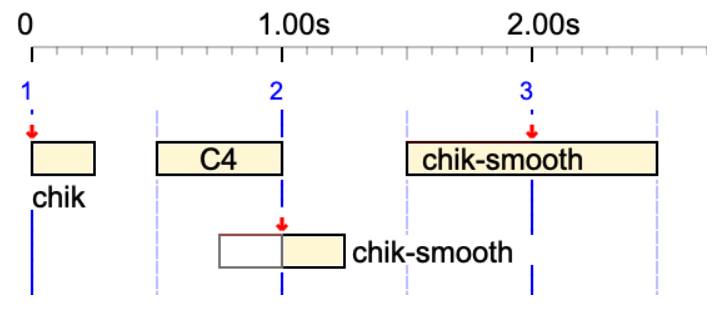
The duration of 'chik-smooth' is one beat, that is 0.5 s when the tempo is 2 and 1 s when the tempo is 1.
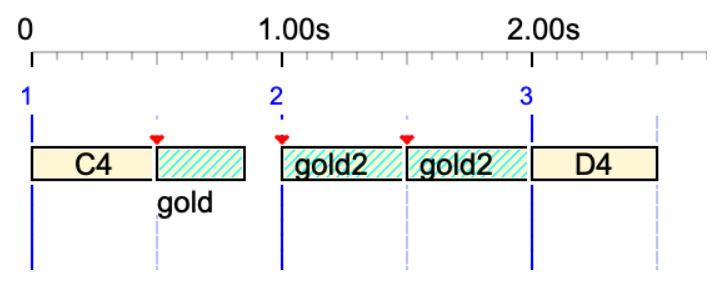
The 'gold2' silent sound-object has a 'Tref' duration of 0 ms. We call it a smooth silent sound-object. Let us play:
_tempo(2) C4 gold gold2 gold2 D4
Here, the 'gold2' sound-object has a duration of one beat, or 0.5 seconds. The 'gold' sound-object, instead, is played at half its nominal duration, or 350 ms.
Out-time sound-object
Play:
C4 << chik >> C5
The 'chik' sound-object, normally lasting 250 ms, is played with duration zero if written between <<>>:
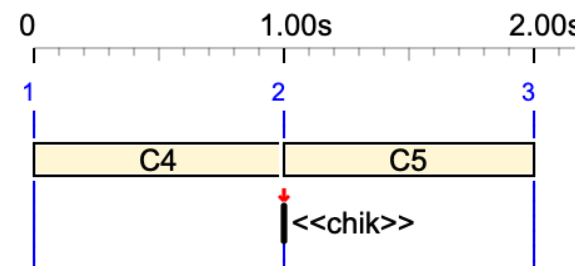
This is visible in the Csound score of this performance. Notes in 'chik' are {C3, F3, C4} :
i1 0.000 1.000 8.00 90.000 90.000 0.000 0.024 0.024 0.000 ; C4
i1 1.000 0.000 7.00 90.000 90.000 0.000 0.024 0.024 0.000 ; C3
i1 1.000 0.000 7.05 90.000 90.000 0.000 0.024 0.024 0.000 ; F3
i1 1.000 0.000 8.00 90.000 90.000 0.000 0.024 0.024 0.000 ; C4
i1 1.000 1.000 9.00 90.000 90.000 0.000 0.024 0.024 0.000 ; C5
s
Pivot
The concept of pivot was first introduced in the late 1980s by the Italian composer Marco Stroppa. It is discussed in detail in Bel's paper Two algorithms for the instantiation of structures of musical objects. The pivot is a specific point in time that indicates where a sound object should be placed.
By default, the pivot is located at the beginning of its sound-object. However, it can be set at various locations: beginning (pre-roll excluded), end (post-roll excluded), middle (pre-roll and post-roll excluded), first NoteOn, last NoteOff, middle of the NoteOn/NoteOff sequence. It can also be set to start at a given distance from the beginning, either as a percentage of the total duration (excluding pre-roll and post-roll) or as a fixed number of milliseconds.
This level of sophistication is necessary given that sound-objects — or, more generally, time-objects — are intended to drive all kinds of devices, including robots.
Try for instance:
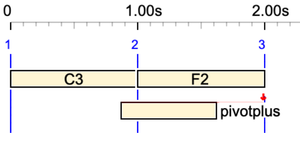
C3 F2 pivotplus
The 'pivotplus' sound-object has its pivot located at 150 % duration from its beginning. The pivot is displayed as a full red arrow, meaning that the object cannot be relocated: the time-setting algorithm will place it on a time streak according to the rhythmic structure wherever possible.
Now try:
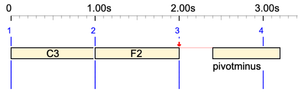
C3 F2 pivotminus
The 'pivotminus' sound-object has its pivot located at -50 % duration from its beginning.
Now, let's take another look at the eighteenth measure of 'Watch_What_Happens_by_Oscar_Peterson.mid' by Oscar Peterson, which has been used to create the 'oscar2' sound-object:
_chan(1){{4,{{1,F5 Bb3}{1/2,G4 F4}{1/2,A4 C5 E5}Db5{1,Bb4 Ab4 -}, 2{F4,Ab4}{1,G4 F4 -}}},_chan(2){4,{{1/2,F4}{1/2,Db3 D3 Eb3}{1/2,E3 D3}{1/2,- Cb4 C4}{1,Db4 G2 Eb4}{2/3,Eb4}{1/3,Ab2},-- 2/3{1/3,F3,Cb4}{2/3,F3,Cb4}{1/3,Db2}}}}
Note that it contains notes in MIDI channels 1 and 2. The image looks like this:
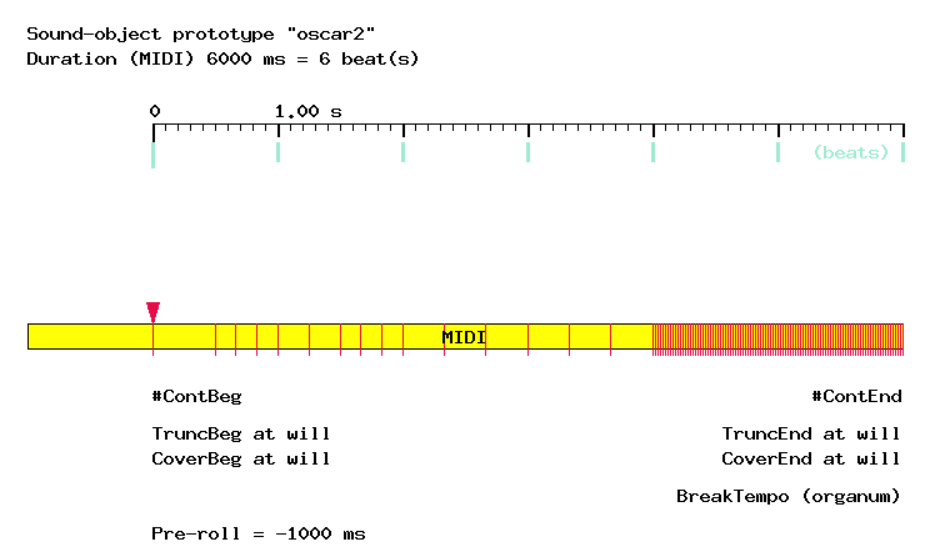
The numerous red lines from 4 to 6 seconds represent a series of MIDI messages that gradually decrease the volume. These can be deleted by a single click of the 'SUPPRESS volume control' button.
A pre-roll of -1000 ms has been added to introduce silence at the beginning of the object. However, the actual start of the object is at time 0, as indicated by its pivot (the red triangle).
The terminal symbol 'oscar2' has been added to the '-al.tryObjects' alphabet. If this had not been done, the machine would read "oscar2" as "oscar 2" and play 'oscar' followed by a two-beat silence!
The pivot is used to position 'oscar2' correctly in time. We will play for instance:
C4 _ _ oscar2
Let us set the position of the pivot at 800 ms of the beginning. This sets the first NoteOn (the first event of this object) to start 800 ms before the pivot location on the third beat:
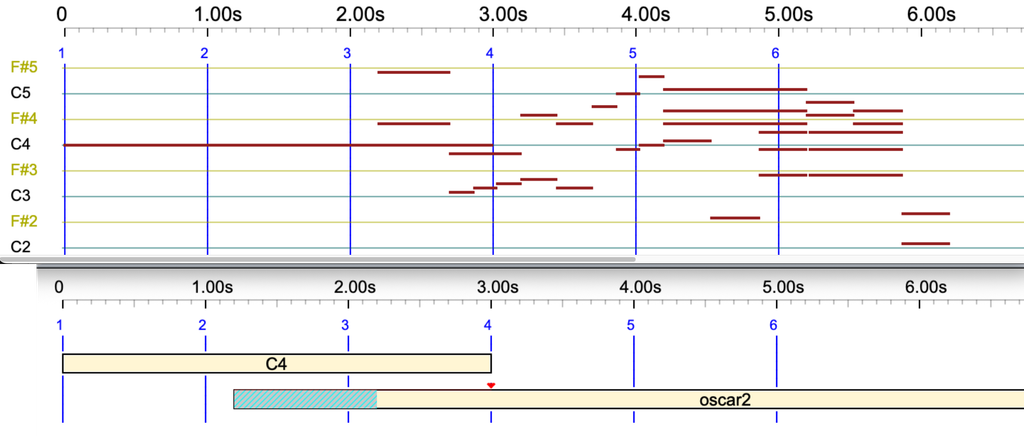
👉 Be warned that the volume decreases at the end of this example. Your sound device may remain silent after the first playback. To avoid this, check the 'Reset controllers' option in the settings.
Cyclic sound-object
Let's take another look at the 'cycle1' sound object, which loops from 34% of its starting point. Play:
cycle1 _
We are calling 'cycle1' on 2 beats, but its option 'Never rescale' is checked. It will reach the expected duration by repeating its sequence of events, starting from 34% of its duration, as instructed:
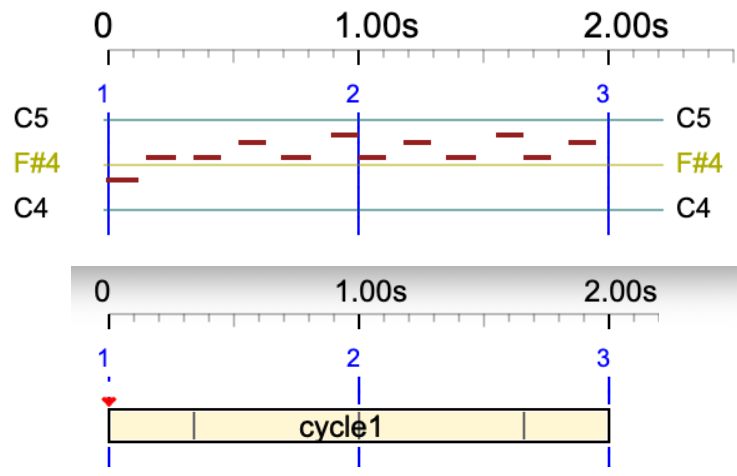
The notes in this sound object are 'E4, G4, G4, A4, G4, Bb5'. The first two notes, 'E4 G4', are in the 34% area and are not repeated. The repetition therefore starts at 1.00 s with 'G4 A4 G4 Bb5'. However, to keep the total duration at 2.00 s, the second repetition is incomplete.
Let us create a copy of 'cycle1', called 'cycle1-force', which should extend itself with an integer number of repetitions.
(Don't forget to add it to the '-al.tryObjects' alphabet!)
Now play:
cycle1-force _
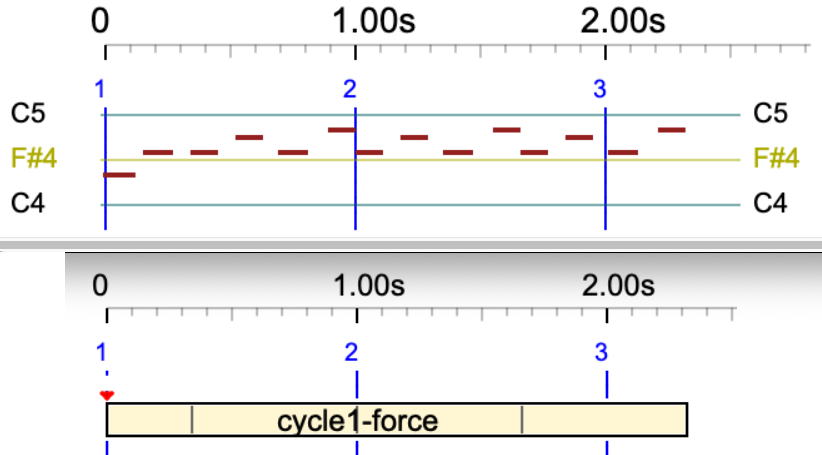
The duration now exceeds 2 beats in order to complete the 'G4, A4, G4, Bb5' repetition.
Cyclic sound objects play identically in both MIDI and Csound. All properties, such as pivot, pre-roll and post-roll, and effects, such as _transpose, _keyxpand and _keymap, are supported.
Below is an instance of cycle1 with a pre-roll of -100 ms and a post-roll of 300 ms. The grey parts are additional time segments that do not contain any event.
cycle1 _
Truncate the end of an object
Play this in MIDI and Csound:
C4 oscar2-trunc
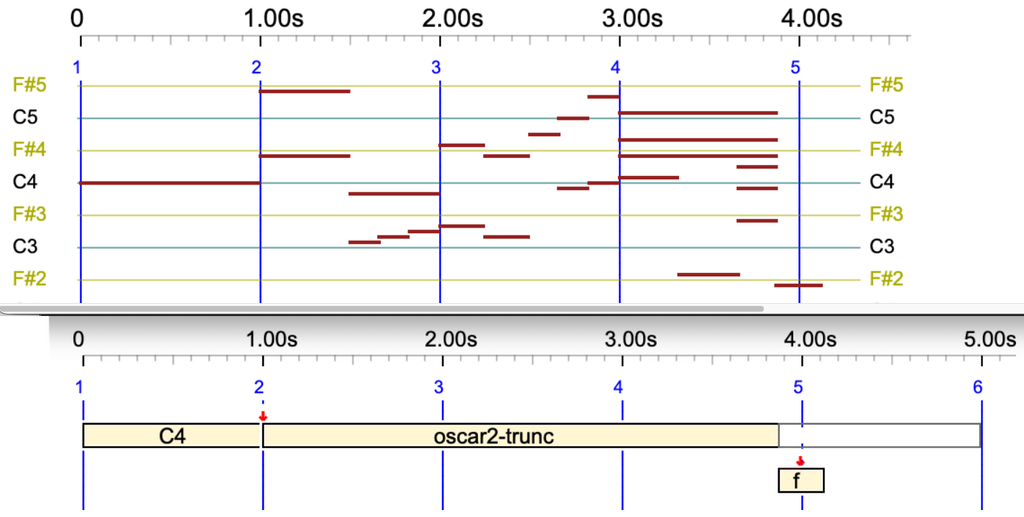
Now let us add an 'f' sound-object which is not relocatable. As per the following score, it should be located with its pivot exactly on the fourth beat:
C4 oscar2-trunc -- f
However, the 'oscar2-trunc' sound-object is set to the 'Never cover end' option. It also has a 'Truncate end' option, set to accepting a truncation up to 50% of the sound's duration. This is an acceptable set of constraints:
A Trace file can be displayed, giving explanations about the time-setting process.
Read below the trace file for setting up 'C4 oscar2-trunc -- f':
The trace indicates that 'oscar2-trunc' was truncated by 1125 ms at its end.
Now, let us try:
C4 oscar2-trunc f
The 'f' sound object needs to start on the second beat, which would cut off more than 50% of the end of 'oscar2-trunc'. There is no solution to this set of constraints. Therefore, the machine breaks the 'Non cover' limitation, yielding the following:

This is also explained in the Trace file:
Since both the 'C4' note and the 'oscar2-trunc' sound-object are relocatable, we can figure out another solution that would not break an constraint:

This was generated by a modified version of the time-setting algorithm. In the correct version, this solution is not acceptable because it creates negative dates.
Truncate the beginning of an object
Let us now try to truncate the beginning of 'oscar2-trunc' by setting it no 'No relocate' and putting a 'crac' sound-object whose duration is slightly longer than 1 beat. The score of 'crac' is '{B3,D4}{C4,E4}'. We play:
crac oscar2-trunc
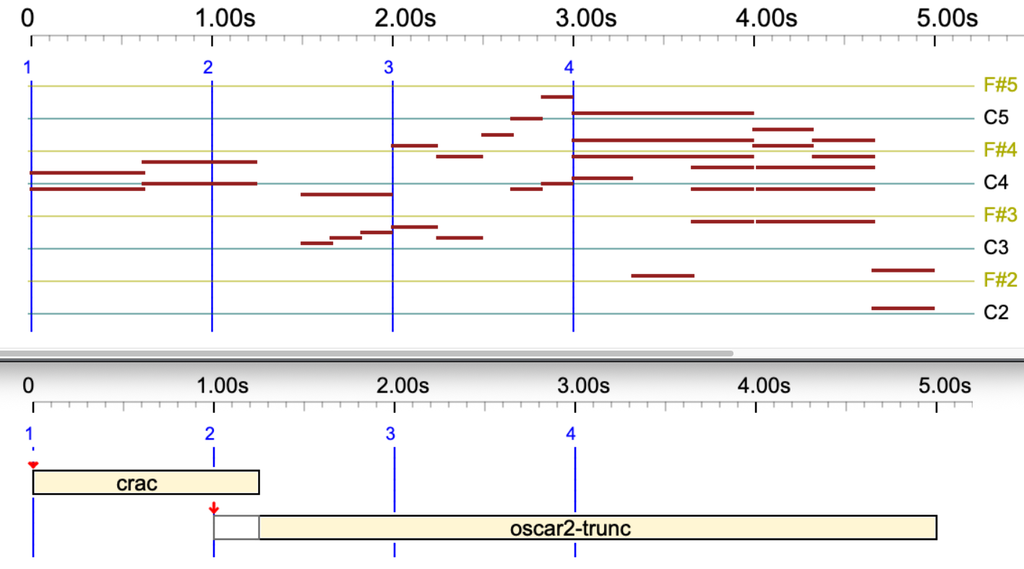
The picture is self-explanatory. The transition between 'crac' and 'oscar2-trunc' is smooth, because 'oscar2-trunc' starts sounding at the date of the first NoteOn(s) following the truncated part.
Try this longer truncation:
crac crac crac crac crac oscar2-trunc
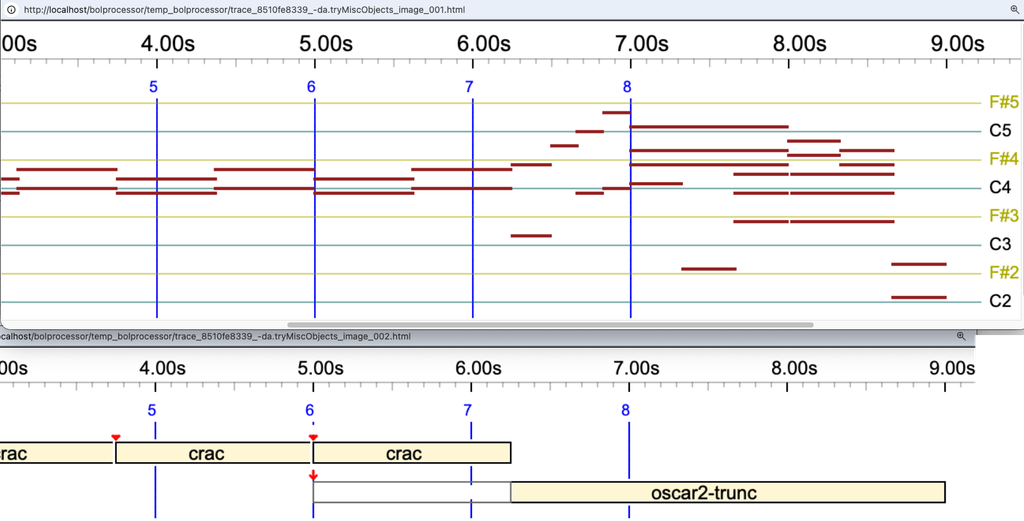
Same result using 'oscar2-trunc-csound' which is a pure Csound object:
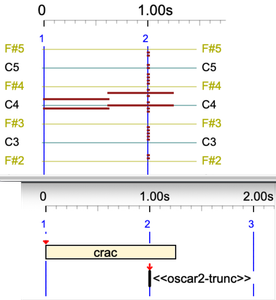
An out-time sound-object is never truncated:
crac << oscar2-trunc >>>
Truncating both ends of a sound-object
Try the following:
crac oscar2-trunc -- f
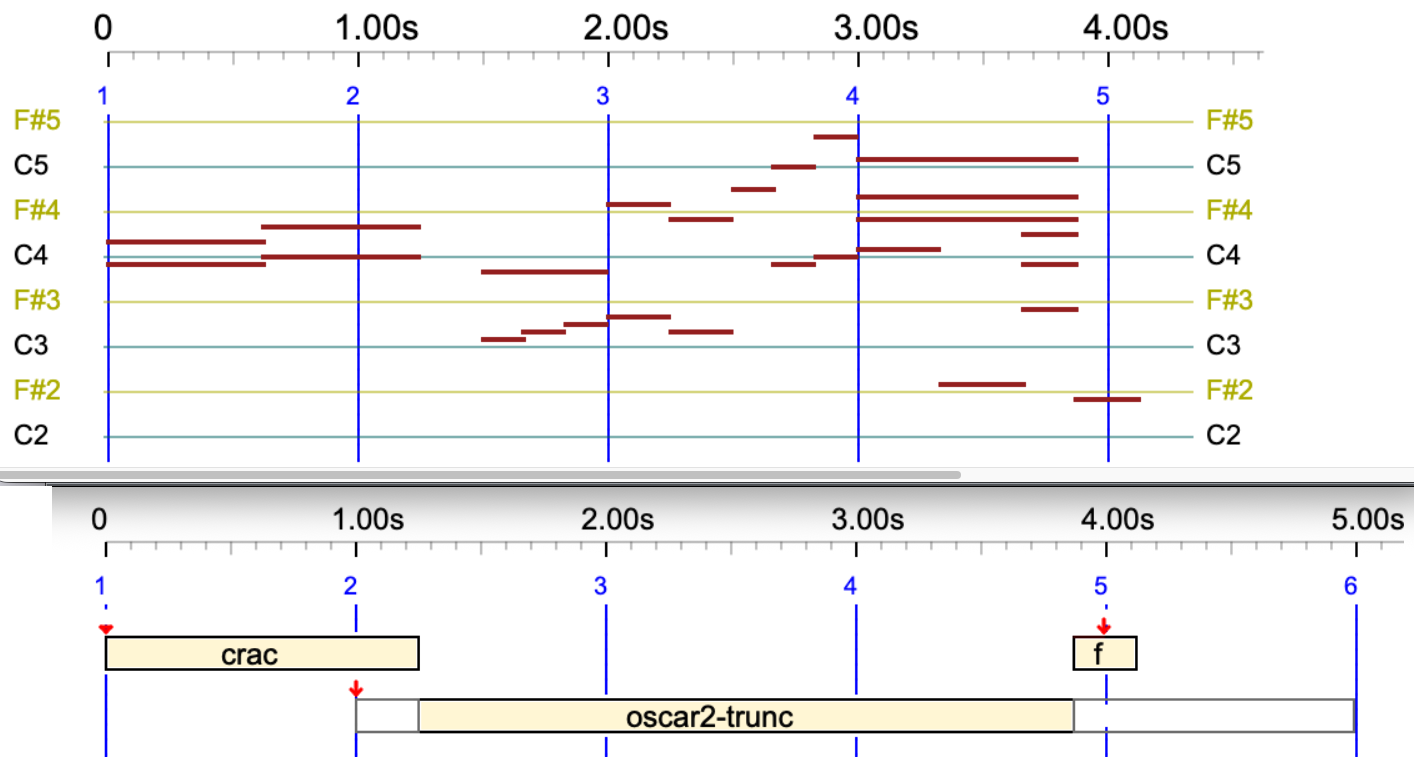
If you are using the Event list, be aware that the start and end times displayed are those after truncation. To locate events correctly, you will need the 'trunc beg' and 'trunc end' values:
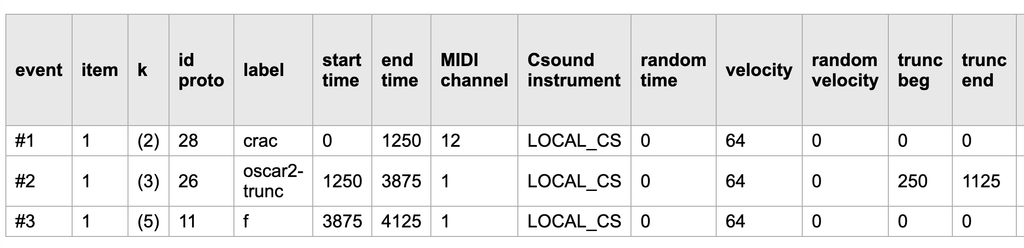
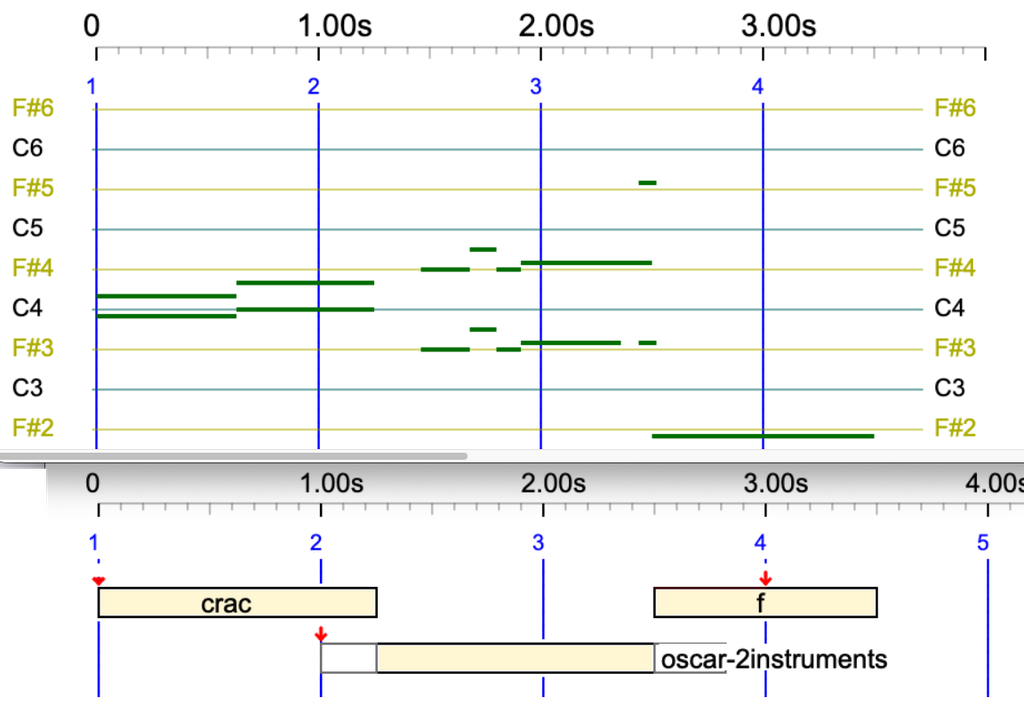
Let us truncate on both sides a pure Csound object playing 2 instruments:
crac oscar-2instruments - _tempo(1/4) f
Break tempo
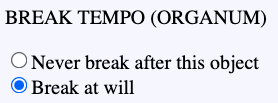
Another solution to avoid issues with timings or sound objects being truncated is to authorise 'oscar2-trunc' to break the tempo. This technique is known as 'organum' in classical music performance. When this option is set on the 'oscar2-trunc' sound-object, we get:

The broken tempo is noticeable by the delayed position of the fifth streak (or beat).
This broken tempo will impose itself on any other sequences of events played on top of it. Play for instance:
{C4 oscar2-trunc f, D4 E4 B3 F3, A4 B4}
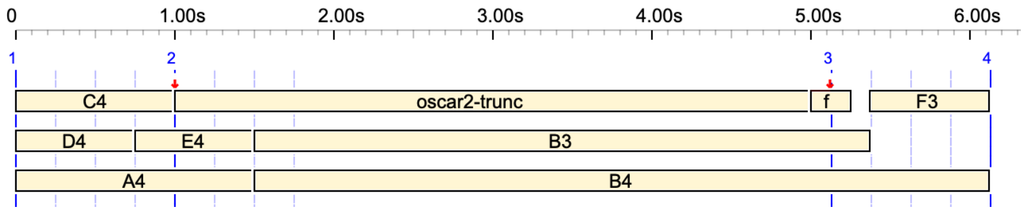
At first glance, it is surprising that the two sequences do not end on the same date. Note that 'F3' appears to be out of the picture. However, this bizarre result can be explained by counting beats. An expansion of the polymetric expression is the following:
_tempo(4) {C4_ _ _ oscar2-trunc_ _ _ f_ _ _ , D4_ _ E4_ _ B3_ _ F3_ _ , A4 _ _ _ _ _ B4_ _ _ _ _ }
The confusing factor is that the physical duration of 'f' is 0.25 s., with its pivot in the middle sitting on the beat labelled '3' (blue line). Notes in the 'D4 E4 B3 F3' sequence occupy 3 beats and their symbolic duration is 3/4 beat, whereas 'A4' and 'B4' occupy 1.5 beat. This is a typical example of the difference between symbolic duration (beats) and physical duration (seconds).
The process is summarized in the trace. The displacement of the third beat is marked as 'DELTA=3125':
Continuity property
A sound-object can be instructed to 'stick' to the preceding and/or the next event in the sequence. These properties are known as 'Continuity at the beginning' and 'Continuity at the end'. The 'glue' sound-event is of this kind. Play:
cycle1-force _ - glue
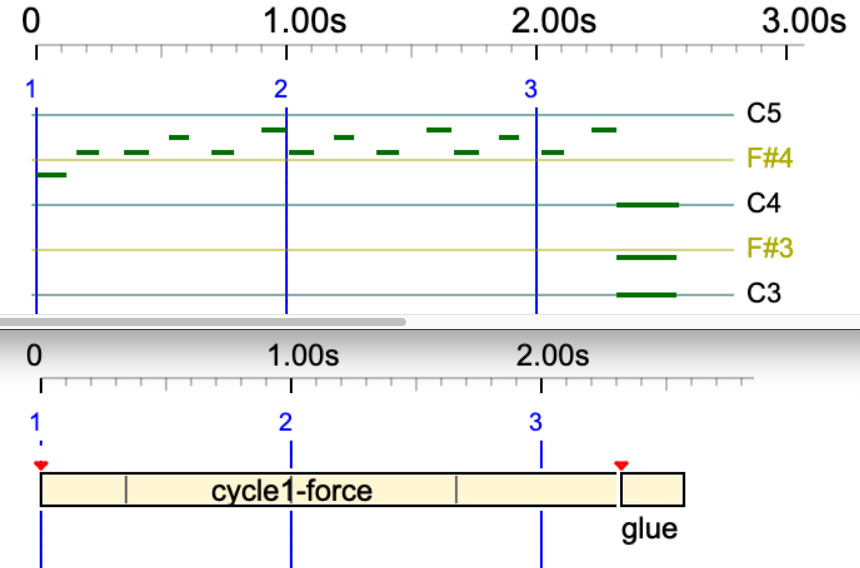
The 'glue' sound object was supposed to be placed on the fourth beat, but it ended up at the end of 'cycle1-force'.
A refinement of this process is the allowance for a maximum gap at the beginning or the end of a sound-object. These properties are known as 'Allow gap'.
Tonal scale
A detailed presentation of this topic is on this page. The tonality can be controlled in both Csound and real-time MIDI productions (read more). The good news is that (micro)tonal adjustements can be applied to both MIDI and Csound sound-objects.
Let's consider an example where the difference is obvious: the Bohlen-Pierce scale, in which the octave is replaced with a tritave (ratio 3/1) and it is divided in 13 intervals. Let us play the following in both MIDI and Csound:
_tempo(0.66) G3 C4 oscar - _scale(Bohlen-Pierce,60) G3 C4 oscar
The '60' in the _scale instruction means that the block key is the middle of a standard keyboard (more details). So, 'C4' is rendered at the same frequency in both the standard equal-tempered scale and the Bohlen-Pierce scale.
The event list of this performance can be downloaded here.
Note that the pianorolls of both parts are identical, because tonal corrections are done after drawing the pictures.
Serial tools
Serial tools such as _retro, _rotate, etc., modifying the order of sound-objects (read documentation) do not modify the order of events inside each sound-object.
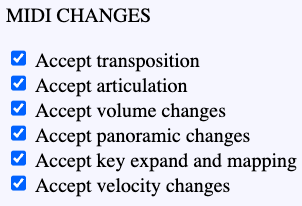
Other serial tools are accepted by 'oscar', as shown by its settings.
The same effects are applied to Csound productions, whether converted from MIDI or using the object's Csound score.
Play this in both MIDI and Csound:
oscar - _transpose(3) oscar
Play in Csound:
oscar-purecsound - _transpose(3) oscar-purecsound
Check this in both MIDI and Csound:
oscar - _keyxpand(F#4,-1) oscar
More complex:
oscar - _keymap(C4,C2,C6,C7) oscar
Various effects
The _pitchbend() command has no effect on sound-objects. This is on the agenda.
Play this superposition of two occurrences of 'oscar' displaced by a few milliseconds, both in MIDI and Csound:
{oscar, 2/10 oscar}