The first version of the Bol Processor (BP1) was an advanced word processor designed to store text representations of musical variations created by Indian drum players. This work required a mapping system that could associate a word with a single key on the computer keyboard.
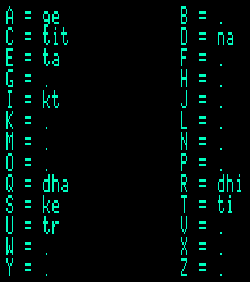
on Bol Processor BP1
Although the keyboard mapping was relatively easy to program in the Apple II's 6502 assembly language, its implementation in BP2 and then BP3 was delayed until version 3.4.4 (May 2026). Thus, after many years, the entire technical environment for the study of drum improvisation has been revived, alongside the restored procedures of item parsing and learning rule weights from examples.
Checking keyboard mapping on BP3
Open "-gr.dhadhatite" (in the latest distribution of the "ctests" folder). On top of the grammar you can read:
-se.dhadhatite
-al.dhadhatite
-wg.dhadhatite
-da.dhadhatite
-kb.dhadhatite
The "-kb.dhadhatite" declaration points to a file containing the keyboard mapping. If this file is present in the "ctests" folder, a button appears below the grammar to open it. If no file with this name is found, you will be offered the option of creating a new one.
The display is self-explanatory:
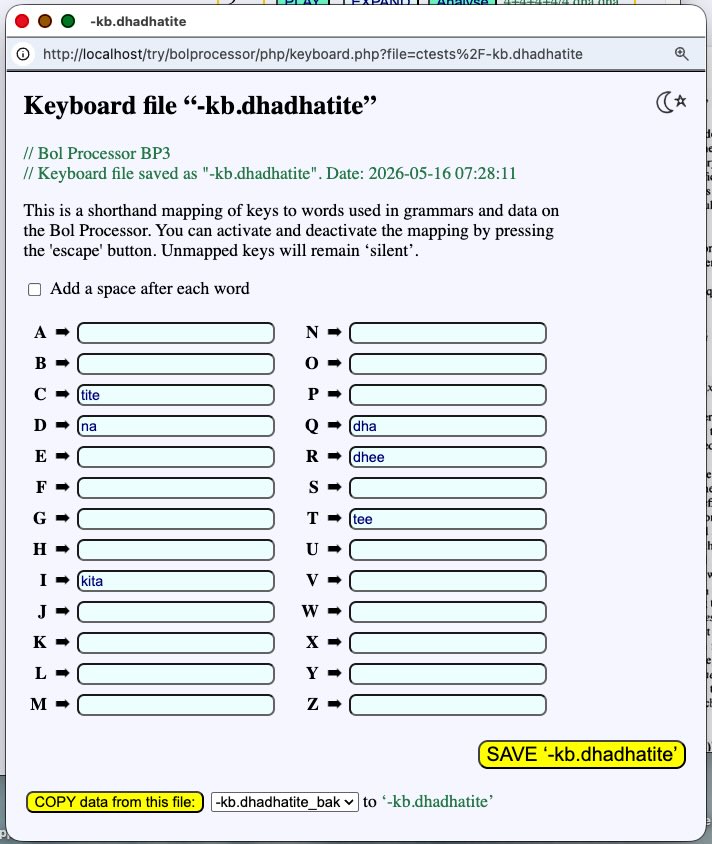
The mapping involves the association of alphabetic keys with any word (or sequence of words). Here we use only the terminal alphabet of the grammar — 'bols' in the language of drum players. But we could map other keys to frequently used variables or expressions in this work environment.
When working with the tabla, Jim Kippen managed to position the words at keyboard locations that facilitated typing at the same speed at which he would play them on the tabla. For this reason, "dha" is located at the far left.
To activate the mapping, click on the desired position in the grammar and then press the 'Escape' key. Now, if you type "qcqqcrd" — or "QcQQCrd", etc. — you will get:
dhatitedhadhatitedheena
This works in MacOS, Windows and Linux environments.
Alphabetic keys that are not mapped, such as 'A' and 'N', will be inactive. Non-alphabetic keys, such as digits and typographic symbols, will function as normal.
If the "Add space after each word" option is checked, and the mapping is saved, typing "qcqqcrd" will produce:
dha tite dha dha tite dhee na
The Bol Processor can segment strings without spaces if they are made of words from the terminal alphabet, here defined in "-al.dhadhatite". However, adding spaces makes it easier to read for untrained humans.
The same keyboard mapping feature can be used on a Data page such as "-da.dhadhatite".
At the bottom of the keyboard form, there is a button labelled "COPY data from this file". This allows you to select a different keyboard file to use for the settings.