Examples cited on this page belong to the -da.trySerialTools project.
Geeks can check the "Trace serial tools" option in the settings if they wish to monitor processes in Zouleb.c.
The serial tool approach makes it possible to carve "shapes" in the time and pitch dimensions of a musical work containing simple notes and/or sound-objects. These tools were first implemented in the late 1990s, following suggestions from the Dutch composer Harm Visser.
Serial tools are applied immediately after the production process for a musical piece, and before the expansion of its polymetric structures. Therefore, they are ignored during the production.
All tools in the current implementation (version 3.5.2 and later) are applied recursively to the fields of polymetric structures.
Tools modifying the order of sound-objects
_retro
_retro C0 C2
_retro {C0 C2}
both produce:
C2 C0
Note the propagation in polymetric structures:
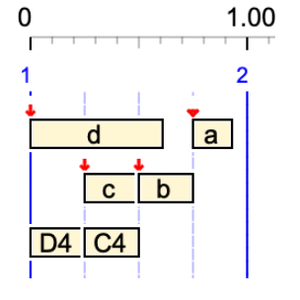
_retro {a b {c d, C4 D4}} 1/4
produces:
1/4 { { d c,D4 C4 } b a }
Here, sound objects a, b, c and d were mixed with the simple notes C4 and D4. Consequently, the timing of the final structure is influenced by the metrical and topological properties of these sound objects.
The cascading effect of _retro can be difficult to figure out. For example,
_retro a b _retro c d _retro A4 B4
will produce:
c d b a B4 A4
whereas
_retro {a b _retro {c d _retro {A4 B4}}}
will produce:
c d B4 A4 b a
_ordseq
This tool restores the order of the following sequence (or polymetric structure) if it has been subject to change by _retro, _rndseq or _rotate. For example,
_retro {A3 B3, C5 D5 _ordseq C4 D4} F4
will produce:
F4 {B3 A3, C4 D4 D5 C5} F4
_rndseq
_rndseq a b c d
will put the sequence in an unpredictable order, for instance:
a d b c
If a positive integer is set as the seed for randomisation in the project settings, the same order will appear each time the production is launched. In our comparative tests, we use seed = 1, which produces the same "random series" in all systems.
Beware that
_rndseq A4 B4 C4 _rndseq A5 B5 C5 D5
is interpreted as:
_rndseq A4 B4 C4 {_rndseq A5 B5 C5 D5}
where the "{_rndseq A5 B5 C5 D5}" expression is a fifth unit, which may yield (depending on the seed):
B4 B5 D5 A5 C5 C4 A4
and not:
_rndseq{A4 B4 C4} _rndseq{A5 B5 C5 D5}
which may yield:
C5 B5 D5 A5 B4 C4 A4
Using curled brackets to mark out sequences is a good idea!
_randomize
This instruction cancels the fixed randomisation setting. In fact, it shuffles the cards and sets the seed to 0. Example of proper use:
_randomize _rndseq a b c d
_rotate
_rotate(x) rotates the following sequence by x units. If x = 2, the rotated sequence will start after the first 2 units, which will be sent to the end. Thus,
_rotate(2) C4 D4 E4 F4
will produce:
E4 F4 C4 D4
and
_rotate(-1) C4 D4 E4 F4
will produce:
F4 C4 D4 E4
This one:
_rotate(-1) {_rotate(2) _rotate(-1) a b c d}
will produce "a b c d" because -1 + 2 -1 = 0.
The _rotate instruction is propagated to all fields of polymetric structures. Thus,
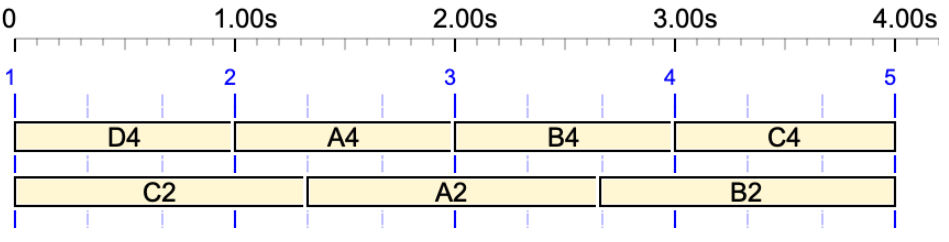
_rotate(-1) {A4 B4 C4 D4, A2 B2 C2}
will produce:
{D4 A4 B4 C4, C2 A2 B2}
Be aware that "units" may be simple notes, sound-objects, polymetric structures or structures that are preceded by another serial tool. For example,
_rotate(2) {A4 B4 _rotate(-1) C4 {D4 E4} F4, A3 B3 C3} F5 G5
produces:
G5 { { E4 D4 } F4 C4 A4 B4, C3 A3 B3 } F5
Explanation: The "C4 {D4 E4} F4" and "D4 E4" sequences rotate by 1 unit because 2 - 1 = 1. The "A3 B3 C3" sequence rotates by 2 units. The "_rotate(-1) C4 {D4 E4} F4" expression is treated as a single unit in the rotation by 2 units of "A4 B4 _rotate(-1) C4 {D4 E4} F4".
Tempo and speed markers are treated as "units" in the rotation. Thus,
_rotate(-1) C4 D4 _tempo(3/2) E4 F4 G4
produces:
G4 C4 D4 _tempo(3/2) E4 F4

Units moved by _rotate, _retro or _rndseq can also be silences or silent sound-objects, for instance:
_rotate(-1) {- b a c d, a b c'} d'
which produces:
d' { d - b a c, c' a b }

Upgrade of the Zouleb() procedure (geeks only)
'Zouleb' is an anagram of 'Boulez', in honour of Pierre Boulez, who championed the composition of serial music.
Until version 3.5.2 was released in August 2026, the Zouleb() procedure in Zouleb.c used a different syntax for tools such as _rotate, which ignored the field separator ','.
If you wish to try the old procedure, check the Ignore field separators option in the SERIAL TOOLS section of the settings. This option is set on the old projects -gr.Visser.Shapes and -gr.Visser.Waves (read page).
For example,
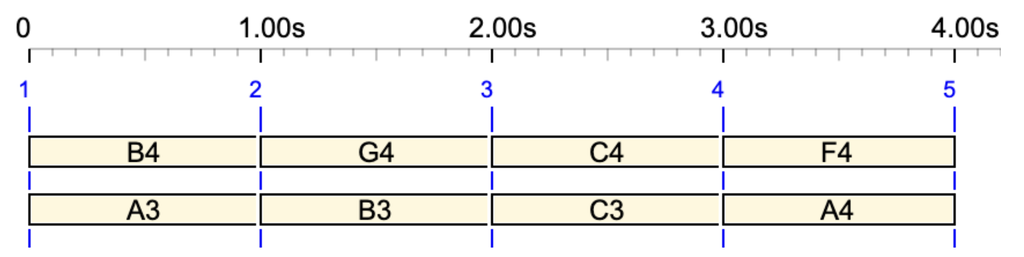
_rotate(1) {A4 B4 _rotate(1) C4 F4 G4, A3 B3 C3}
produces
{B4 G4 C4 F4 A4, B3 C3 A3}
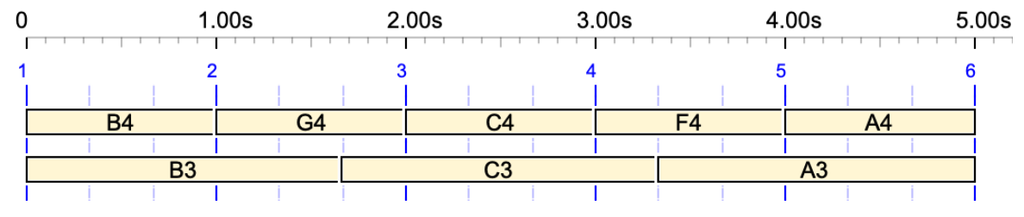
with the current procedure, whereas the old procedure produced:
{B4 G4 C4 F4,A3 B3 C3 A4}
Tools modifying pitches
_transpose
_transpose(n) shifts the following sequence up by n steps (not necessarily semitones). For example,
_transpose(4) C4 D4 E4
produces:
E4 F#4 G#4
Sound-objects can also be transposed if their "Accept transposition" option is set. For example,
c a b - _transpose(6) c a b

This and other pitch-modifying tools deal with steps of the scale. These are semitones only in 12-tone scales. Try for example a 13-tone scale:
-to.tryScales
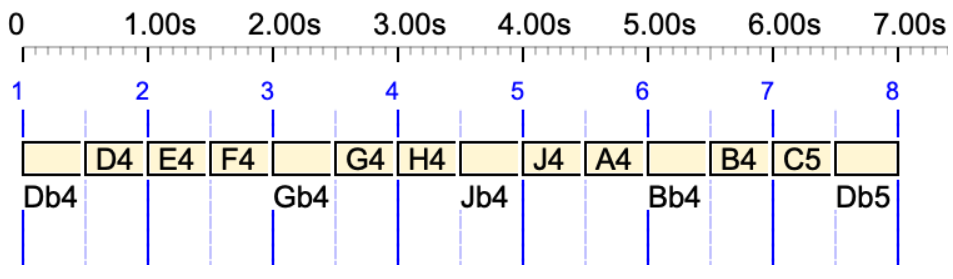
_scale(Bohlen-Pierce,0) _transpose(1) C4 Db4 D4 E4 F4 Gb4 G4 H4 Jb4 J4 A4 Bb4 B4 C5
which produces:
Db4 D4 E4 F4 Gb4 G4 H4 Jb4 J4 A4 Bb4 B4 C5 Db5
_keyxpand
_keyxpand(basenote, ratio) multiplies melodic intervals by ratio (positive or negative) relative to the basenote. For example,
_keyxpand(C4, 2) D4 E4 F4
produces:
E4 G#4 Bb4
The basenote parameter can be an explicit note, as shown above, or a key number ranging from 0 to 127. For instance, if C4 is mapped to the value 60 in the settings, it can be replaced by 60:
_keyxpand(60, 2) D4 E4 F4
_keyxpand is applied recursively to the fields of a polymetric expression. The values of ratio are cumulated multiplicatively if the centre note is the same. For instance,
_keyxpand(C4,-2) B3 C4 { _keyxpand(C4,-1) D4 E4 }
produces:
D4 C4 E4 G#4
i.e. the same as:
_keyxpand(C4,-2) B3 C4 _keyxpand(C4,2) { D4 E4 }
or _keyxpand(C4,-2) B3 C4 _keyxpand(C4,2) D4 E4
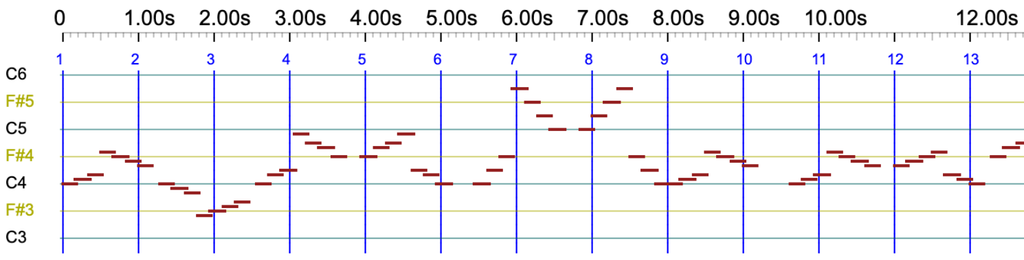
See -gr.tryKeyXpand for a typical example containing notes and sound-objects. The beginning of the piano roll produced by this grammar provides an approximate overview of the process:
The "ratio" parameter can be any floating-point number, positive or negative. For example,
_keyxpand(C4,-1.80) D4 E4
will produce:
G#3 F3
The two-semitone distance between C4 and D4 has been transformed to 2 × -1.8 = -3.6, which has been rounded down to -4, yielding G♯3. Similarly, the four semitones between C4 and E4 have been transformed to 4 × -1.8 = -7.2, which has been rounded up to -7, yielding F3.
Algebra
Let 'k' be the key number of 'basenote'. The following equation is used to change a note whose key number is 'x' to a note whose key number is 'y':
y = x + ratio . (x - k)
Key expand interpolation
👉 This feature is not yet implemented in BP3, but we plan to offer it in consistent with key mapping interpolation (see below).
_keymap
Syntax: _keymap(p1,q1,p2,q2)
In the sequence, this tool modifies pitches in range (p1,p2) according to a linear mapping in which q1 is the image of p1 and q2 the image of p2.
The tool makes changes on "simple notes" and on "sound-objects" in which the property "Accept key changes" has been set to true.
p1, q1, p2, q2 may be written as integers (key numbers) in range 0..127, or simple notes using the current note convention. The _keymap(p1,q1,p2,q2) syntax demands that p2 > p2, or the equivalent notes are in ascending order. For instance, both expressions:
_keymap(C3,E4,C5,C6) C4 B3 A3
and _keymap(48,64,72,84) C4 B3 A3
produce:
D5 C#5 C5
Algebra
Given _keymap(p1,q1,p2,q2) where p1, q1, p2 and q2 are key numbers, the following equation is used to change a note whose key number is 'x' to a note whose key number is 'y':
y = a x + b
with a = (q2 - q1) / (p2 - p1)
and b = q1 - a p1
In the example above, a = 5/6 and b = 24. Thus, C4 (60) is converted to D5 (74), B3 (59) to C#5 (73 after rounding from 73.16), and A3 (57) to C5 (72 after rounding from 71.5).
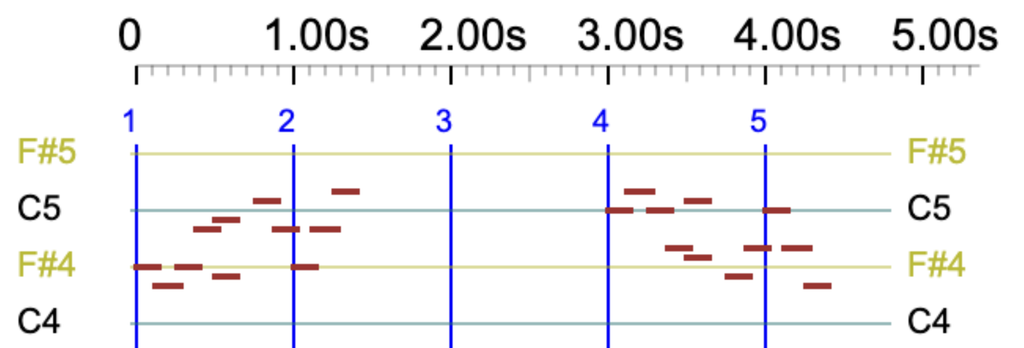
Changes to sound objects can be visualised using the -gr.tryKeyMap grammar by clicking the 'TryThis' button at the bottom of the page. The following sequence is played:
TryThis --> _keymap(52,86,86,52) a -- b
Sound-objects 'a' and 'b' (defined in -so.tryKeyMap) are identical except that "Accept key changes" is checked for 'a' and unchecked for 'b'. Therefore, 'b' is not modified:
Keymap interpolation
Changes can be made continuous using _mapcont and _mapstep instructions, and discrete again with _mapfixed. The parameters p1, q1, p2 and q2 are interpolated between two _keymap instructions.
Instructions _mapcont and _mapstep are equivalent when dealing with simple notes. However, _mapcont also modifies pitches inside the sound-objects whose option "Accept key changes" is checked.
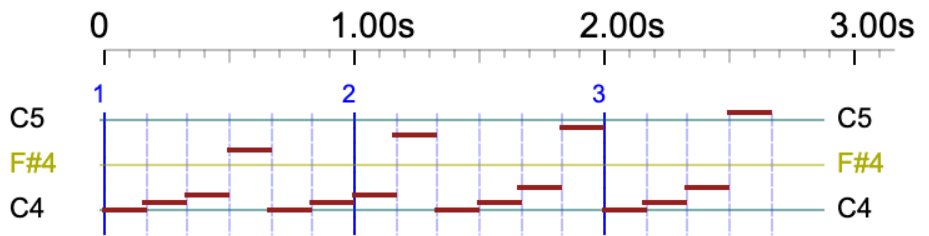
Let's see an example easy to visualise because of the repeated pattern "C4 C#4 D4 G4":
_tempo(6) _mapcont _keymap(C3,C3,C5,C5) C4 C#4 D4 G4 C4 C#4 D4 G4 C4 C#4 D4 G4 C4 C#4 D4 G4 _keymap(C3,C2,C5,C6)
Same process using sound-objects: click the 'TryThis2' button at the bottom of the -gr.tryKeyMap grammar. The following sequence is played:
TryThis2 --> _mapcont _keymap(52,52,86,86) a a a _keymap(52,86,86,52)
Since the 'a' sound-object accepts key changes, it is modified by _keymap with parameters p1, q1, p2 and q2 interpolated between the two values. The interpolation is computed again for each note. This produces:
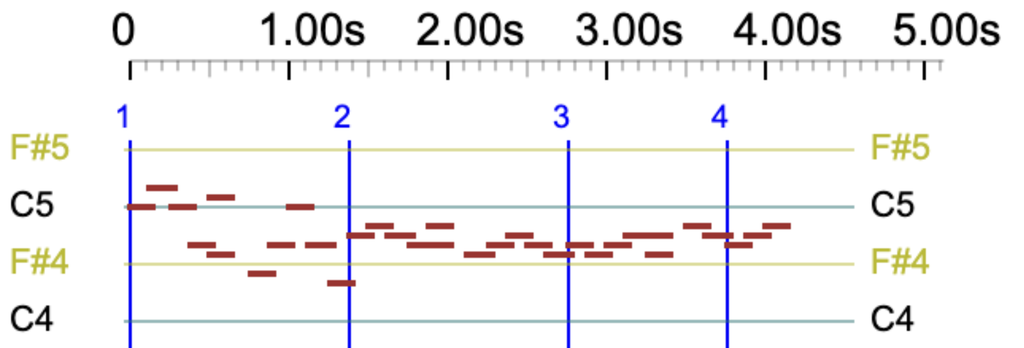
Grammar -gr.tryKeyMap is a more elaborated example containing notes and sound-objects. The beginning of the piano roll produced by this grammar provides an approximate overview of the process:
