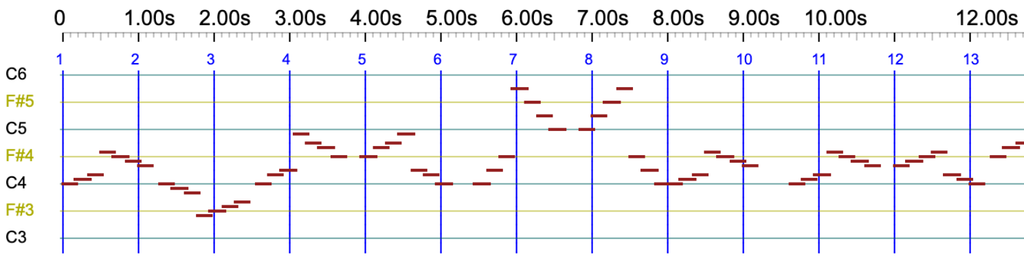
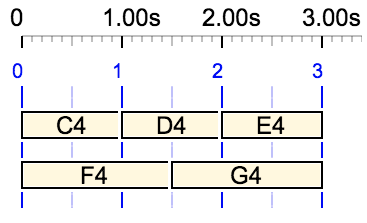
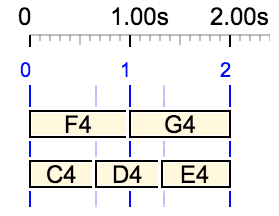
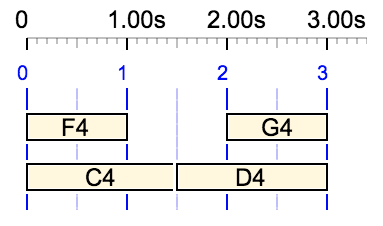
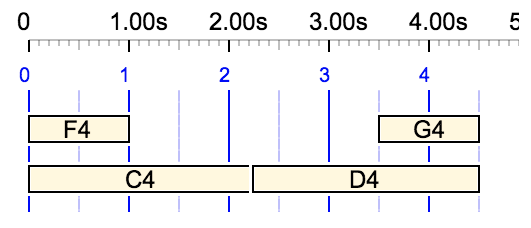
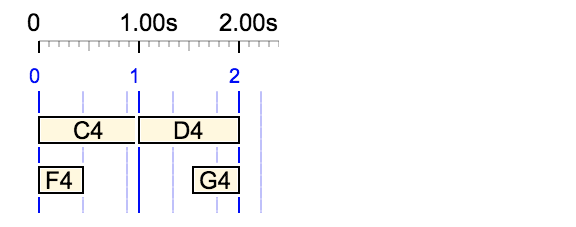
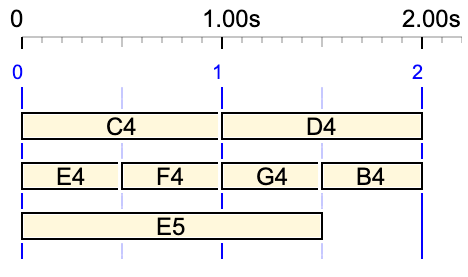
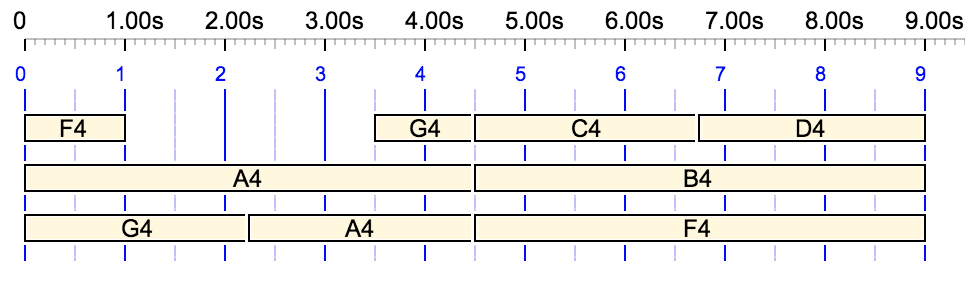
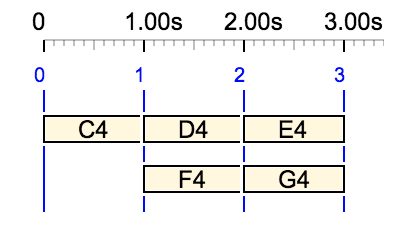
Performance controls such as _volume(), _pan(), _mod() (modulation), _press() (pressure) and _pitchbend() modify the sound of the notes and sound-objects that follow them. In MIDI they produce controller messages, and in Csound they set arguments of the score: see Csound check. Additional Csound parameters, declared in a Csound resource file, are set in the same way with _value(): see Csound objects.
A control applies to what follows it in its own expression. Until recently (version 3.6.0), an expression without controls of its own reverted to the default values: volume 90, panoramic 64 (centre), no modulation, no pressure, no pitchbend. This was impractical for scores made of successive polymetric expressions, such as scores imported from MusicXML, in which each measure is a polymetric expression whose fields are the parts of the score. Setting the stereo position of a string quartet required a _pan() control for each part in every measure.
Now, a fixed value of a control is carried over to the following expressions that do not set it. The Bol Processor decides which expressions receive it according to the part, the instrument or the MIDI channel to which it is attached. This page explains the rules.
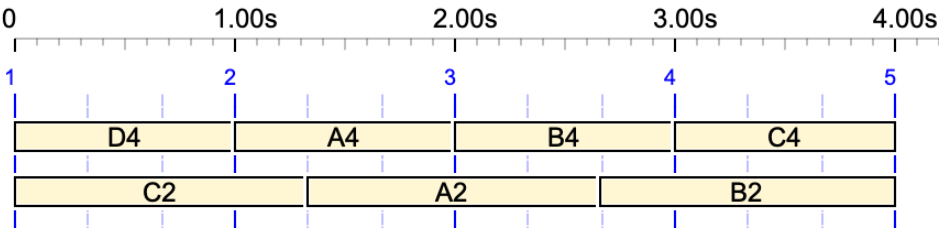
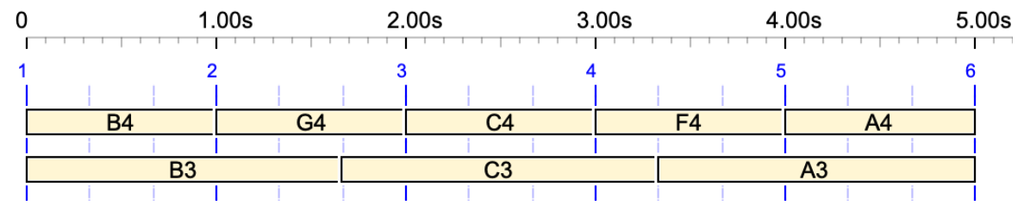
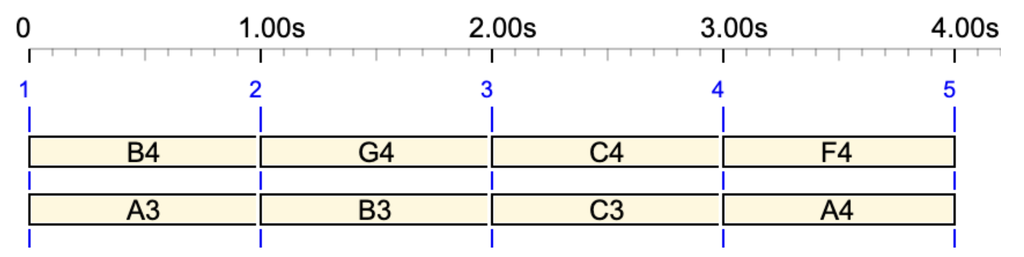
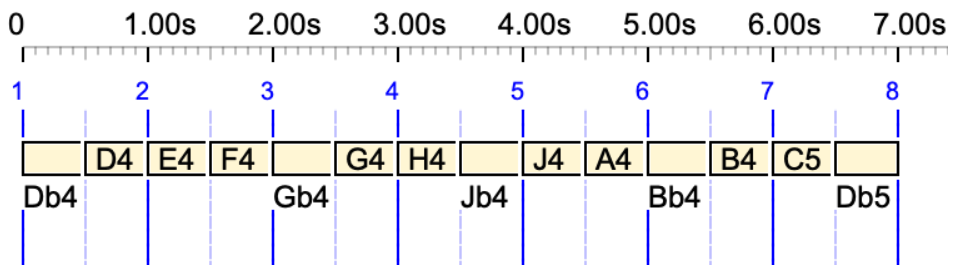
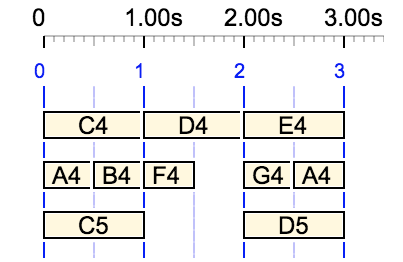
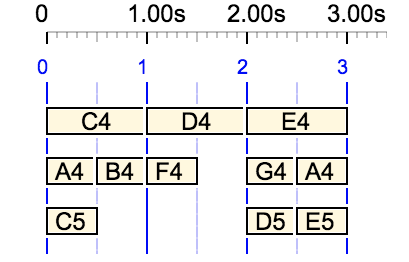
The examples are found in the data project "‑da.checkCarryOver" (folder "ctests"), in which each item states the values it should produce. They are shown here with the Csound scores they produce, using the Csound resource "‑cs.Beethoven-fugue-b-flat-major" designed for a string quartet. In these scores:
arguments 5 and 6 (red) are the start and end volume (default 90);
arguments 15 and 16 (blue) are the start and end panoramic (default 64);
part 1 is played by instrument 1 (violin), part 2 by instrument 4 (second violin); notes without a part are played by instrument 1.
MIDI output follows the same rules, since the values of the controls are the same. In MIDI, a controller message is sent on the channel of a note whenever its value differs from the previous one on this channel.
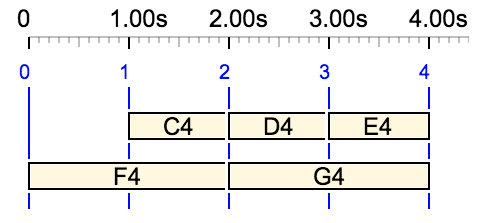
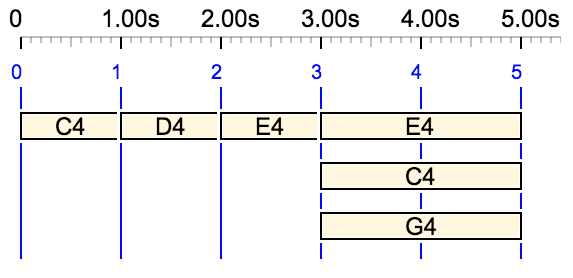
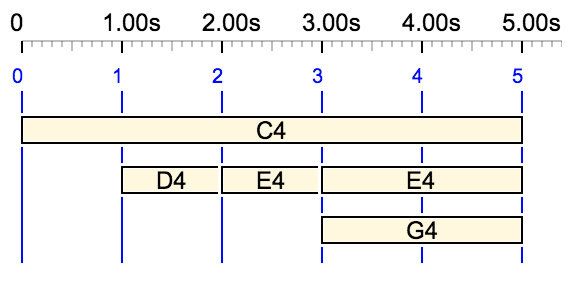
In a sequence, a value set by a control applies to the following notes, even if they are sent to another MIDI channel. Here, all three notes are played at volume 20:
_volume(20) C4 _chan(2) D4 _chan(3) E4
The same is now true when the notes are in separate expressions:
Before this change, D4 and E4 were played at the default volume 90.
To which part, instrument or channel does a value belong?
A value is attached to:
the instrument if _ins() has been specified;
otherwise, the part if _part() has been specified;
otherwise, the MIDI channel if _chan() has been specified;
otherwise, the current instrument: the one guessed by _value() for an additional parameter (see below), or instrument 1.
An item starts with the implicit values _ins(1) _part(1) _chan(1). A note that does not receive the value from its own expression takes the value attached to its instrument, its part or its channel, including implicit ones. In the previous example, the volume 20 was attached to the implicit instrument 1, which is also that of D4 and E4.
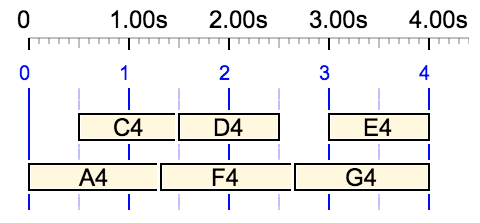
Values attached to parts remain separate, even if the parts are sent to the same MIDI channel:
This is what makes it possible to set the stereo position of each part once and for all, in the first measure of a score. In the third measure, a new value changes the position of part 2:
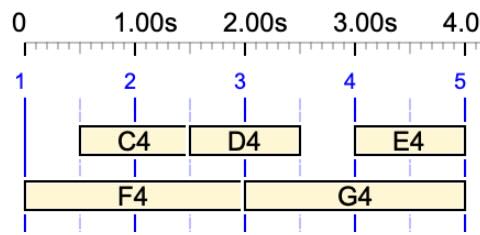
An explicit _chan(1) is not the same as the implicit channel 1. Here, the volume 50 belongs to channel 1, so D4 on channel 2 does not receive it, whereas it would without _chan(1):
A Csound resource file may assign an instrument to a MIDI channel. If _ins() was given outside a polymetric expression, a _chan() inside this expression that selects such a channel overrides it: the following notes are played by the instrument of the channel, and the values set after _chan() belong to the channel. An _ins() given in the same field as _chan(), as in the previous examples, keeps its priority.
In the following example, item #26 from "‑da.tryCsound", the Csound resource "‑cs.tryCsound" assigns instrument 3 (harpsichord) to channel 2. E4 and F4 are played by instrument 3, and F4 receives the volume 50 attached to channel 2. G4 is played again by instrument 1, with the volume 30 attached to it. (The volume is on arguments 5 and 6 of instrument 1, and on arguments 7 and 8 of instrument 3.)
When several values are attached to the instrument, the part and the channel of a note, the most recent one wins. If they were set at the same time, as in the fields of a polymetric expression, the order of priority is: instrument specified by _ins(), part, channel, and finally the implicit instrument.
In the following example, the volumes 80 and 30 are both set at date 0. The volume 80 belongs to the implicit instrument 1, the volume 30 belongs to part 2. Therefore D4, in part 2, gets 30, while F4, which has no part, gets 80:
Only fixed values are carried over. A value belonging to a continuous variation (_volumecont, _pitchcont, _cont(), etc.) or a stepwise variation (_volumestep, etc.) describes a movement within its own expression. It erases the remembered value, and the following expressions get the default value:
This is important for pitchbend: the end of a glissando such as _pitchcont _pitchbend(0) C4 D4 _pitchbend(100) should not detune the notes that follow.
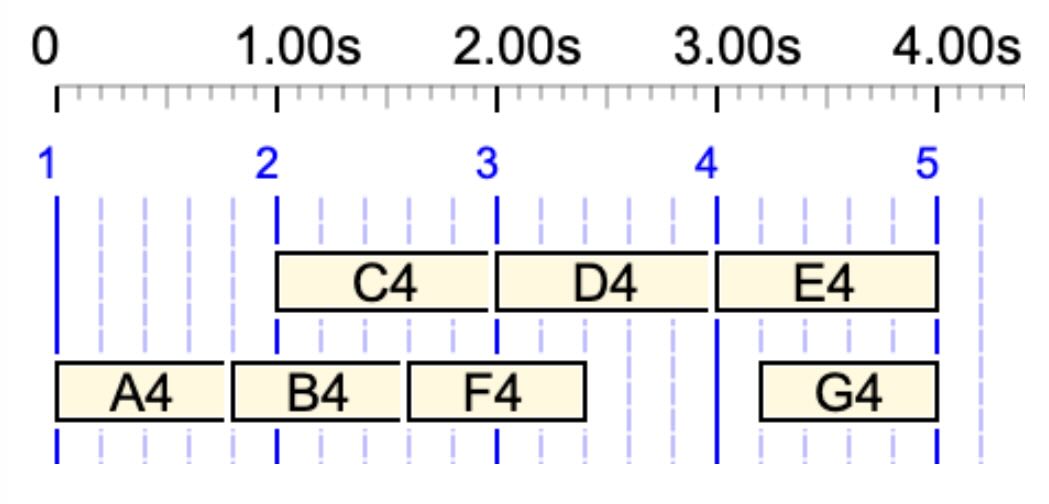
The value erased is the one attached to the part, instrument or channel of the variation. A value attached elsewhere may then apply again. Below, the variation of part 2 erases the value of part 2, so E4 receives the volume 80 attached to the implicit instrument 1:
A value only applies to expressions starting after the date at which it is set. Fields of the same polymetric expression starting at the same time do not share their values, otherwise the result would depend on the order in which the fields are written. Here, D4 gets the default volume and E4 gets 20:
As a consequence, a value written at the very end of an expression does not reach the next one, since its date is the start date of the next expression. Here, D4 is played at volume 90:
Values are carried over to expressions that do not set them. In the following example, E4 does not belong to an expression of its own: it follows C4 in the main sequence, which has already received the default value. So E4 is played at volume 90:
Values are also carried over from one line of a data item to the next, since each line is played as a chunk. This is the case when a long item is played with the "PLAY safe" button, which splits it into chunks to save memory. In the following item, D4 and F4 keep the stereo positions of their parts:
Items produced by a grammar do not share their values: each item starts with the default values.
Additional parameters
The same rules apply to additional Csound parameters set by _value(). Examples are found in the section "Carrying over additional parameters" of "‑da.tryCsoundObjects", using the Csound resource "‑cs.tryCsoundObjects" in which instrument 6 has a parameter "blah" on arguments 15 and 16 (default 231.5).
A _value() instruction guesses the instrument to which its parameter belongs, here _ins(6). This guessed instrument does not count as specified, so the values of the parts below remain separate:
A carried value combines with the values found in the Csound scores of sound-objects, according to the combination mode of the parameter (additive or multiplicative), just like a value set explicitly.
These rules were designed with the score of Beethoven's Grosse Fugue (opus 133) for string quartet, imported from MusicXML: the stereo positions of the four parts are set by _pan() controls in the first measure only. In unusual situations, the result might not be the one you expect. Please let us know!
Beethoven's Fugue in B flat major interpreted by the Bol Processor + Csound, with Sauveur temperament 👉 Listen in stereo!
Sound-objects are a specific type of time-objects handled by the Bol Processor. Whereas time-objects are designed to send timely commands to various devices, including robots, sound-objects produce sounds via MIDI and Csound drivers. A new output format (event lists) makes it possible to connect the Bol Processor to the largest diversity of sound software devices.
🎶 The relocation or truncation of sound-objects, constraints on continuity, and the use of broken tempo (organum), bear similarities to the actions of human musicians during a performance. Virtuose performers need to break the rigidity of the beats in order to fully express the musicality of specific events.
All examples discussed here can be found in the Data project '-da.tryMiscObjects'. The time-setting of sound-objects uses an algorithm that has been documented in detail in previous publications.
In the Bol Processor, time-objects that produce (musical) sounds are of two types:
Simple notes are expressed in English, Italian-French or Indian conventional notation as a note name followed by an octave number. For example, C4 in English notation designates the note C in the fourth octave, which is usually the #60 key in the middle of a piano keyboard. C4 is equivalent to do3 in Italian-French notation and sa4 in Indian notation.
Sound-objects, which will be discussed here, are 'packages' of instructions (in MIDI or/and Csound formats) able to describe a set of instructions that may be likened to a 'musical gesture'.
The first version of the Bol Processor (BP1), released in 1980, dealt exclusively with sound objects representing the 'gestures' of Indian drummers and dancers. Within the current technical limitations, it produced and analysed musical items in text format, which the mussicologist could read or play on a drum. Read for example Analysis of tabla compositions.
Later, when the MIDI and Csound formats became available on small computers, handling simple notes and sound objects was introduced to expand the scope.
Editing sound-objects on BP3
Throughout this tutorial, we will become familiar with three types of sound object from a technological perspective:
MIDI objects produced by MIDI code
Csound objects produced by converting MIDI code to a Csound score
Pure Csound objects defined in Csound scores
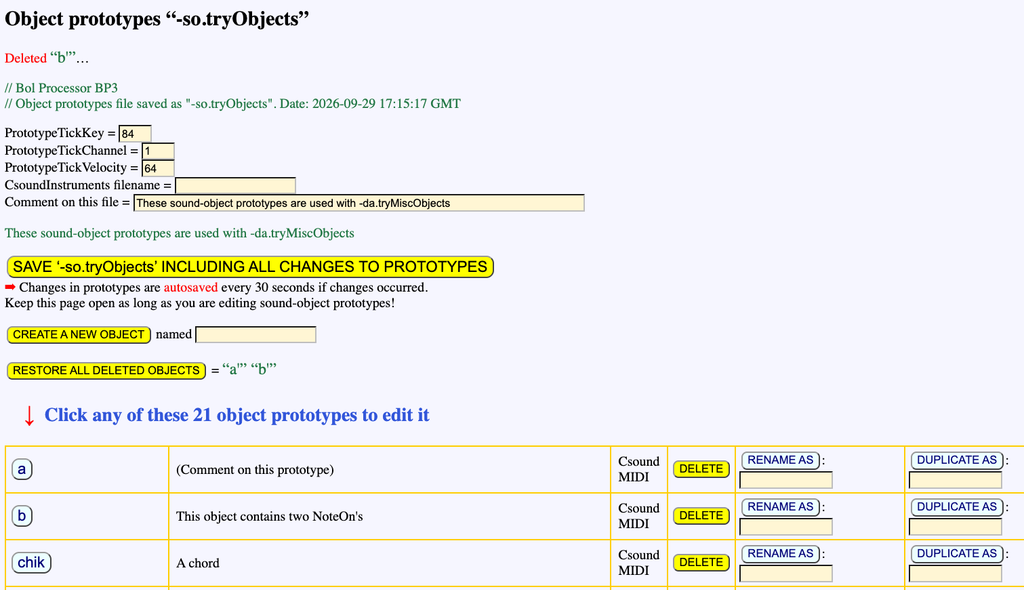
Open the '-da.tryMiscObjects' project, which is distributed in the 'ctests' folder. A line of buttons at the bottom of the edit window gives access to the connected files. For example, since '-so.tryObjects' is written at the top of the project, a button with the same name is visible. Clicking this button displays the full set of sound objects used by this project:
👉 This tab must never be closed if sound objects are to be modified or created. A javascript scheduler checks for modifications to the sound objects every 30 seconds, and automatically saves the updated '-so.tryObjects' file. A message on top of the '-so.tryObjects' page confirms it:
If you are in a hurry, you can of course click the SAVE '-so.tryObjects' button.
Every sound-object is of the MIDI or Csound type, or both.
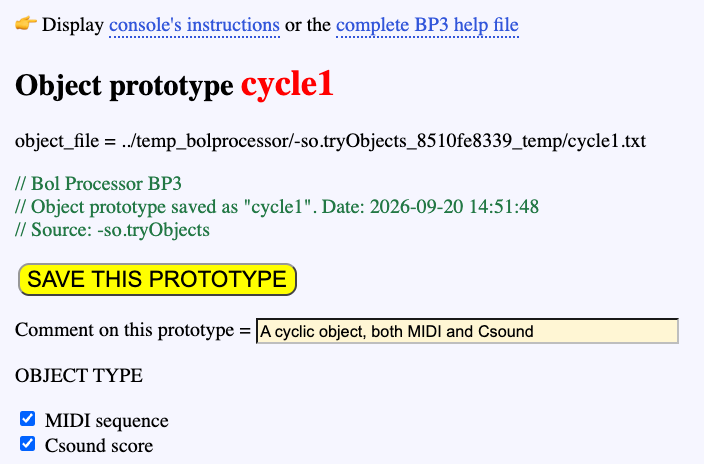
Click any name of sound-object, e.g. 'cycle1', to open the sound-object editor in a new tab:
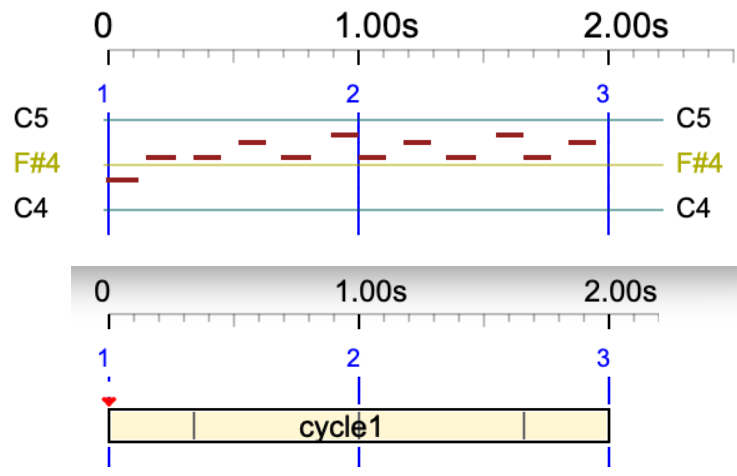
This sound-object contains both MIDI and Csound code, producing identical sequences of events, as the Csound score at the bottom of the page was automatically generated from the MIDI content.
You can modify the Csound score, save it, then save the prototype and wait for less than 30 seconds for it to be updated in the '-so.tryObjects' file.
The advantage of using Csound scores for sound-objects is that they can represent much more complex instructions than MIDI messages, as they can control any number of parameters (arguments) in a Csound instrument. The instrument number 'x' or label can be set using the _ins(x) command in the Bol Processor score. Alternatively, it can be made specific to this sound object by entering the instrument number in the 'Force to instrument' field.
The MIDI sequence can be played by clicking the PLAY button, and it can be exported as a MIDI file. Conversely, a new MIDI sequence can be uploaded to the sound-object. This sequence, for example, was created using the MIDI file output format in the Bol Processor.
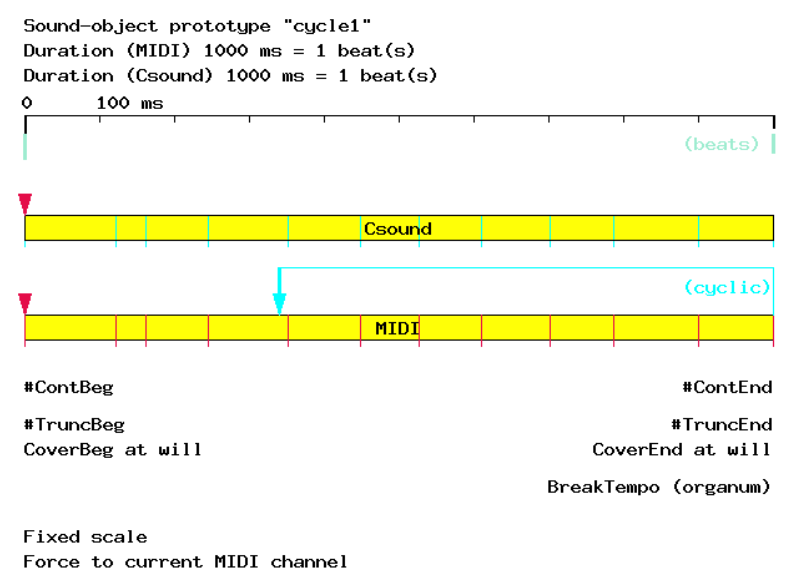
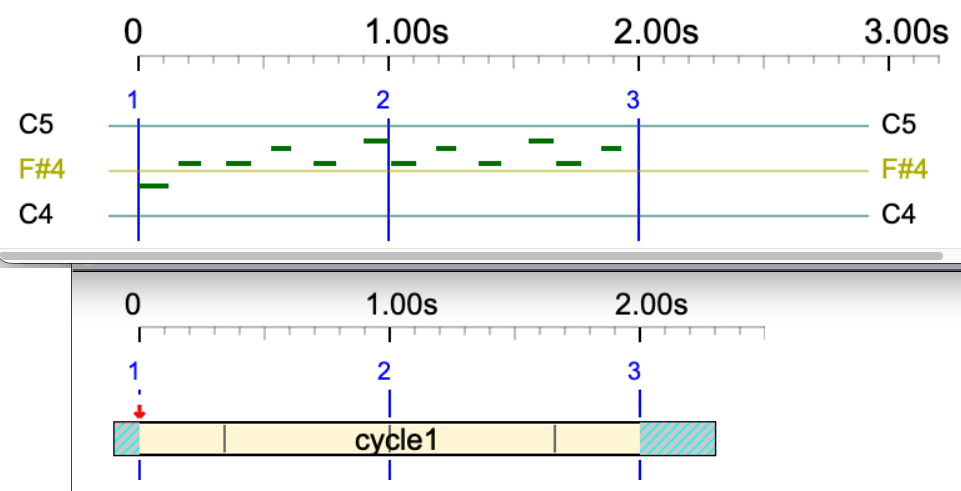
An image of the sound-object is available at the bottom of its page:
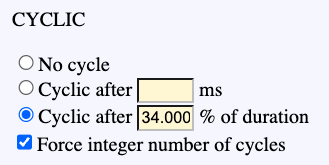
This image highlights a property of 'cycle1': as its name suggests, it is cyclic. This means that, if an extension is required but the 'Never rescale' option at the top of the page prevents this, it will fill the time interval with self-replications of its MIDI or Csound sequence. Replications are set to start at 34 % of its duration. This parameter can also be specified in milliseconds. Beware that if you enter a negative value or a value larger than the sound-object's duration, it will be set to 0. The same restrictions apply to parameters such as CONTINUITY, COVER, and TRUNCATE.
Creating a new sound-object
Let us create a sound-object labelled 'oscar' using a phrase of Oscar Peterson in the imported MusicXML score '-da.Watch_What_Happens_by_Oscar_Peterson'.
First click the EXPLODE button to split measures. Find one that you feel eligible as a sound-object. We selected measure #6:
To export this fragment as a MIDI file, first set the Fade-out time to zero in the settings, otherwise it will end with 2 seconds of silence. Then select the MIDI file output format and click 'PLAY' near the 6th item. Click 'download' to get a file named 'Watch_What_Happens_by_Oscar_Peterson.mid' which contains only the chosen measure.
Then go back to the '-so.tryObjects' page and create an object called 'oscar'. Add 'oscar' to the '-al.tryObjects' alphabet which can be accessed via the link near the bottom of the '-da.tryMiscObjects' page. As 'oscar' belongs to the terminal alphabet, it should start with a lowercase character. However, you can bypass this rule by typing it between single quotation marks.
Open the 'oscar' tab and click the choose file button near 'Create or replace MIDI codes loading a MIDI file'. This will allow you to upload the MIDI file. Then click 'SAVE THIS PROTOTYPE'.
The duration of this sound-object is now set to 1820 ms, which is 1.82 beats because its time reference Tref is set to 1000 ms (by default). All default properties are fit for this demo, we'll change a few of them later.
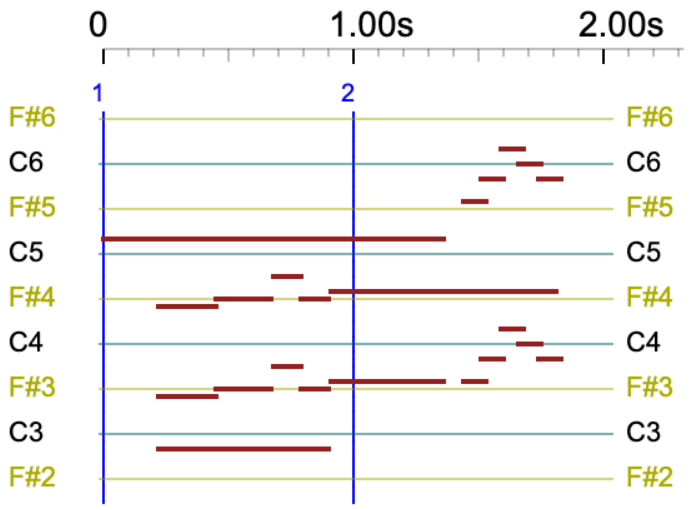
Don't forget to wait for at least 30 seconds so that the new object is saved along with the '-so.tryObjects' file. The return to '-da.tryMiscObjects', type 'oscar' in the edit field and play it in real-time MIDI or MIDI file. You will get the following pianoroll and sound:
Now, you can also create the equivalent Csound score of this object by clicking the 'CREATE Csound CODE from MIDI codes' button. Wait a few seconds for the processing to complete. You will get:
Click the 'SAVE THIS CODE' button, then 'SAVE THIS PROTOTYPE'.
The Csound code is only used when the output format is Csound. Real-time MIDI and MIDI files use the MIDI codes of sound-objects. For this reason, if a sound-object contains only Csound code, it won't produce any sound in MIDI.
Csound
An introduction to using Csound with the Bol Processor is found on the Csound checkup page.
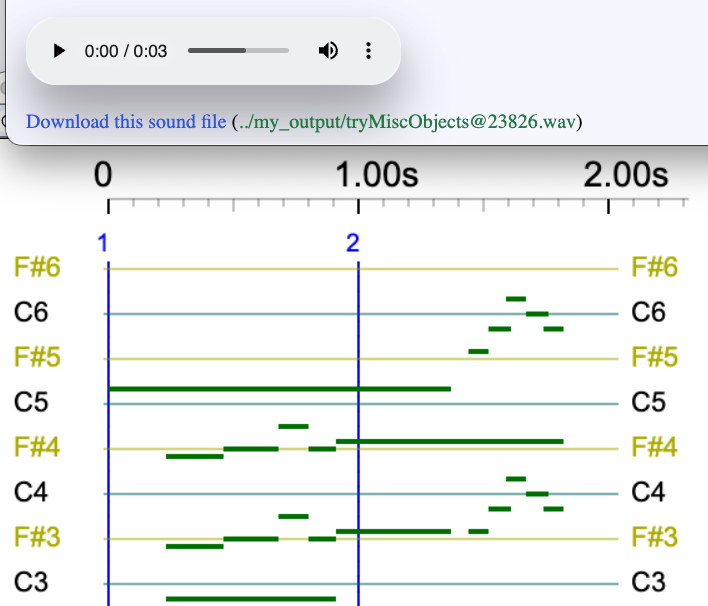
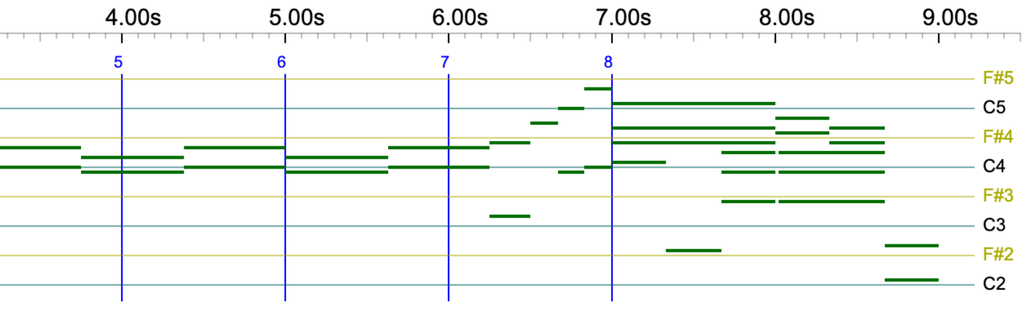
Select the Csound score output format and play 'oscar'. You get the following:
No MIDI output, as the Bol Processor produced a Csound score output which the Csound console converted to a sound file. The notes are drawn in green on the pianoroll instead of brown, indicating that Csound is being used instead of MIDI.
The MIDI code stored in 'oscar' was not used. Instead, the Csound score was used.
If the sound-object contains MIDI code and no Csound score, using it with the Csound output option will convert MIDI to Csound for this particular task.
What happens if a sound-object contains Csound score and no MIDI code? Try it by duplicating 'oscar' to 'oscar-purecsound' and click the 'SUPPRESS all MIDI codes' button on the 'oscar-purecsound' page. Don't forget to add 'oscar-purecsound' to the '-al.tryObjects' alphabet!
Now, playing 'oscar-purecsound' will produce the same output as 'oscar' with the 'Csound score output' option selected. However, you will not hear any sound if you play 'oscar-purecsound' with the real-time MIDI or MIDI file output option selected.
The Bol Processor can convert streams of MIDI codes into Csound scores. However, it cannot perform the reverse conversion for a simple reason: Csound uses events that are too complex for straightforward conversion to MIDI.
On this page, we use the minimum set of arguments in Csound scores (10) which makes them eligible for a sound rendering by the instruments described in the Csound resource '-cs.tryTunings'. A more sophisticated use is explained on the Csound objects page. A practical example using 13 arguments is proposed on the Sarasvati Vina grammar project.
MIDI channels and Csound instruments
Looking back at the Bol Processor score used to create 'oscar' reveals that it was calling both MIDI channels 1 and 2:
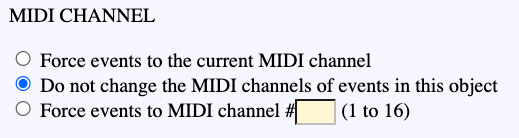
This probably went unnoticed when the sound object was played on a MIDI device set to mix all 16 channels by default. However, MIDI channels can be used to redirect MIDI event streams to different devices. The _part() instruction also does this on the Bol Processor. Anyway, we need options for dealing with channels contained in a sound-object's MIDI code:
The 'Do not change…' option is declared as follows in 'tryObjects.json' (created when the output option is Event list):
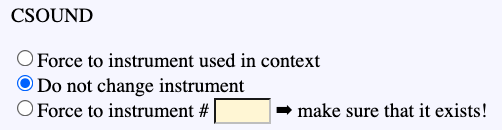
The same process applies to Csound instruments. These can be specified using the _inst() command in the Bol Processor score, but instruments can also be set in each sound object:
Here, for instance, instruments specified in the Csound score will be used. This is declared as follows in 'tryObjects.json':
A Csound sound-object can also use several instruments specified on eaach line of its Csound score. Duplicate 'oscar-purecsound' to 'oscar-2instruments', select the 'Do not change instrument', then modify the Csound score as follows:
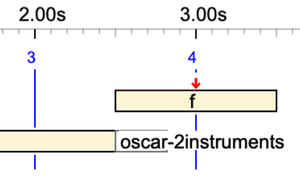
Notes F#4, F#3 A4 and D5 will be played with instrument #3, and other notes with instrument #1. Save this score, save the 'oscar-2instruments', click SAVE on the -'so.tryObjects' page, add 'oscar-2instruments' to the '-al.tryObjects' alphabet, and play:
oscar-2instruments
Isn't it beautiful? 😀
In this demo, we used instruments #1, #2 and #3 from the Csound instrument file named '-cs.tryTunings' because they each have 10 arguments that match the 10 parameters contained in the Csound scores. More complex instruments use more parameters.
This is still a small part of the sophistication of Csound, as Csound scores can handle an infinity of instruments with their specific parameters (example). You only need to design them…
Event list
Sound-objects are listed in event lists along with the parameters required for their instantiation. Indeed, the exported JSON file, e.g. 'tryObjects.json', is also used to this effect.
For example, the performance of
_ins(3) C4 - oscar-2instruments
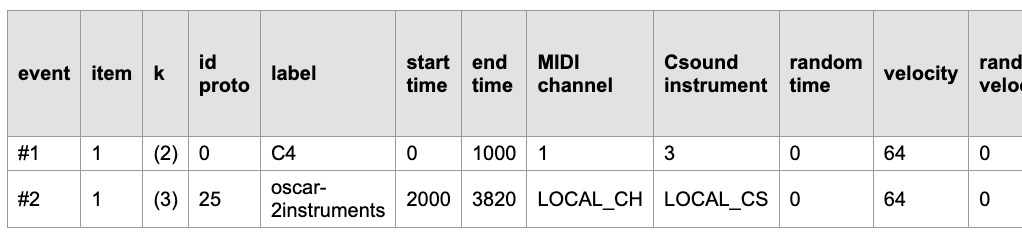
produces an event list starting like this:
Here, the Csound instrument column displays instrument 3 for the 'C4' note. However, it states that 'oscar-2instruments' should use its own internal instrument assignments. These will be find in the Csound score stored in 'tryObjects.json'.
Duration of a sound-object
Type and play:
oscar - _tempo(1/3) oscar
The first instance of 'oscar' will play at the same speed as the captured fragment. The second instance will play at a third of the speed. This is possible because the property 'OK rescale' is selected. If you don't want to change the speed, regardless of the tempo of the performance, select 'Never rescale'.
When 'OK rescale' is selected, you can still prohibit the expansion or contraction of the duration, owing to the 'Expand' and 'Compress' options. Try to play the preceding example after unchecking 'Expand' or 'Compress', ot selecting 'Never rescale'.
A finer control of durations is possible. Select 'Dilation ratio range from' and set acceptable variations in range 0.5 to 2. Then play:
oscar - _tempo(4) oscar ---- _tempo(1/3) oscar
Speeds 4 and 1/3 won't be accepted and will be limited to 2 and 1/2:
Cover property
Now try this:
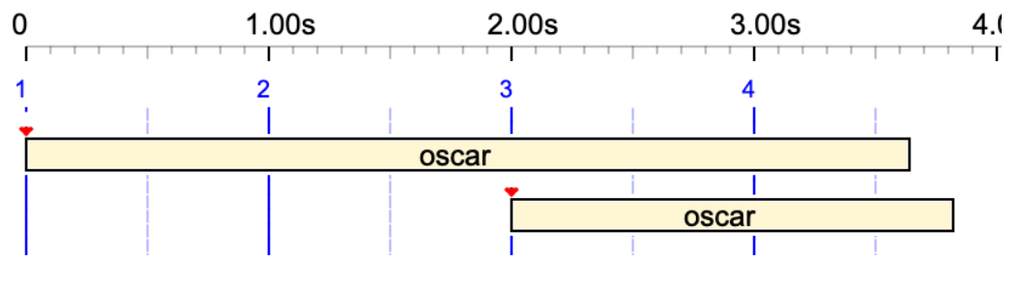
_tempo(0.5) oscar _tempo(1) oscar
Oops!
The two occurrences overlap because the second one starts on the second beat (2.00 seconds). The small red triangle at the start of the object indicates its pivot, which we will discuss later. Its shape indicates that the object is relocatable. So, how can we make the second occurrence play after the first has finished?
The solution is to set the 'COVER END' property to 'Never cover':
The same can be achieved by setting the 'COVER BEGINNING' property to 'Never cover'.
Tied sound-objects
The concatenation sign '&' used to tie notes together in articulations (read tied notes) also applies to all kinds of sound-objects. For example:
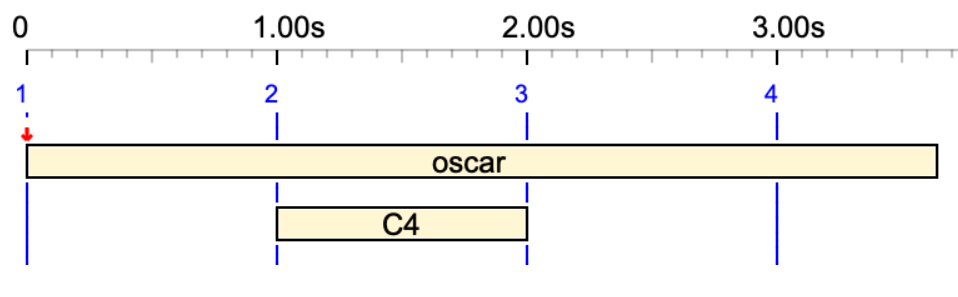
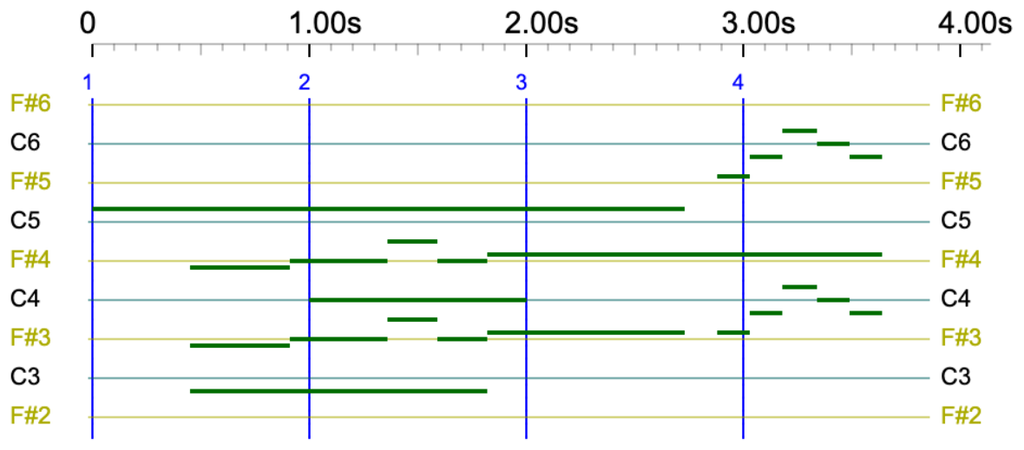
oscar& C4 &oscar
The symbolic duration of 'oscar' is extended to 2 beats, plus one beat in the middle to accommodate 'C4'. Given that the physical duration of its prototype is 1820 ms, its total duration is 3640 ms.
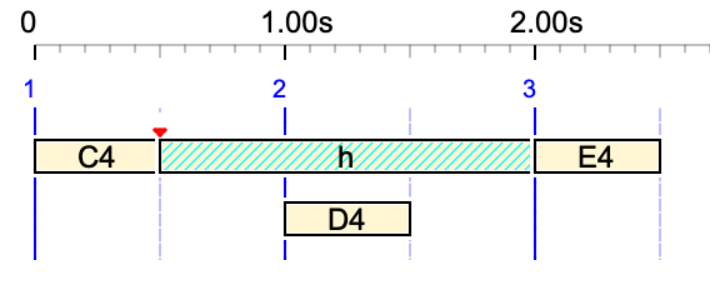
Below, the silent (undeclared) sound-object 'h' is used in a tie:
_tempo(2) C4 h& D4 &h E4
Pre-roll and post-roll
Note that the second occurrence in the preceding example moved exactly to the end of the first. Perhaps we need to set a safe silence of, say, 300 ms after each occurrence of 'oscar'. This can be achieved by setting the post-roll to 300 ms. Post-roll is the additional time given to a time object to finish its effect:
A similar effect can be achieved by setting a negative pre-roll, which introduces a silence at the beginning of the object. Two buttons at the bottom of the 'oscar' page make it easier to understand the concept of 'pre-roll' and 'post-roll' in terms of silences:
The pre-roll and post-roll of a sound-object can be positive or negative and are intended to frame a time interval outside the limits set by the object's first and last events. A positive post-roll means that there are 'things happening' at a given delay after the last event. A positive pre-roll indicates that 'things will happen' after a given delay following the first event. If the object has a 'Non-cover' property, the new limits will be used to calculate its location.
These delays are expressed in physical time (milliseconds), as it would make no sense for them to differ if the sound-object were played at a different speed.
Smooth time, smooth sound-object
Play the following on striated time (the default setting on '-da.trMiscObjects'):
oscar - _tempo(4/3) oscar - _tempo(2) oscar
The open the settings, uncheck the 'Striated time' option, save the settings, and play the same in smooth time.
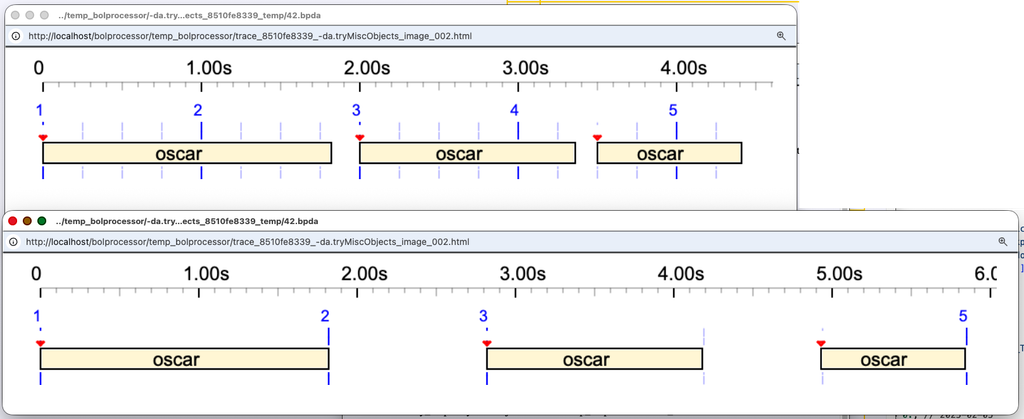
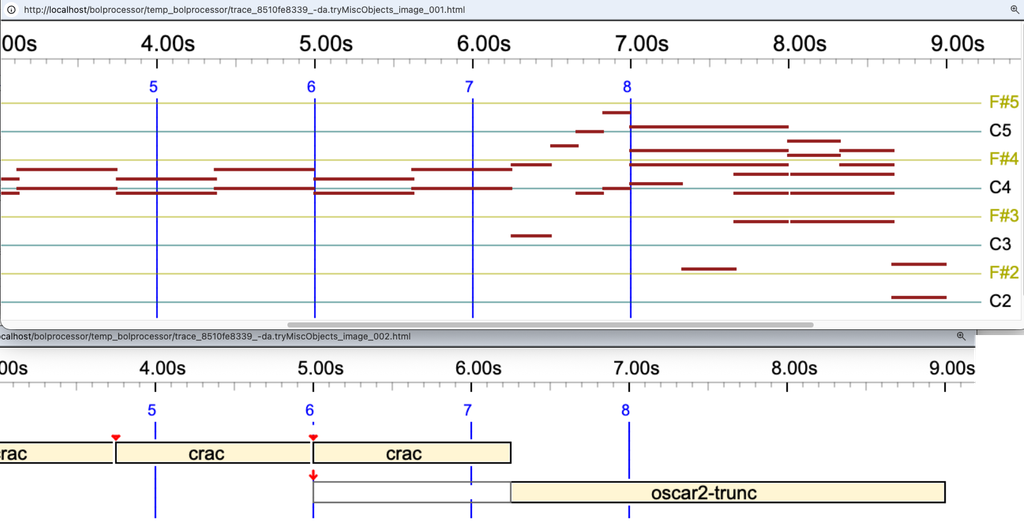
The two results are shown below:
In striated time (top image), the pivot of each sound-object is set on a time streak (blue vertical line), and the time streaks are arranged according to the rhythmic structure.
In smooth time (bottom image), sound-objects and silences are located on the sole basis of their durations. For example, the first silence lasts for 1 second (the default setting), whereas the second silence, at tempo 4/3, lasts for 0.75 seconds.
A typical example of using smooth time is the arrangement of time patterns (empty time-objects) as shown in '-gr.tryTimePatterns' (read more):
A smooth time-object is one whose Tref parameter is set to 0 ms. By default, this value is 1000 ms. This will be explained and demonstrated in future…
Silent sound-object
A silent sound-object is one in which both the MIDI and Csound contents are empty. It may be called a time-object since it does not deal with sound in its raw form. Since it does not deal with sound in its raw form, it may be called a time-object. However, once it is displayed in an event list, it may be used by other devices to produce any sequence of events.
Silent sound-objects can be created in three ways:
A left-over variable
A terminal symbol unrelated to a sound-object description
A sound-object declared with empty MIDI and Csound contents
Check the three types in this example:
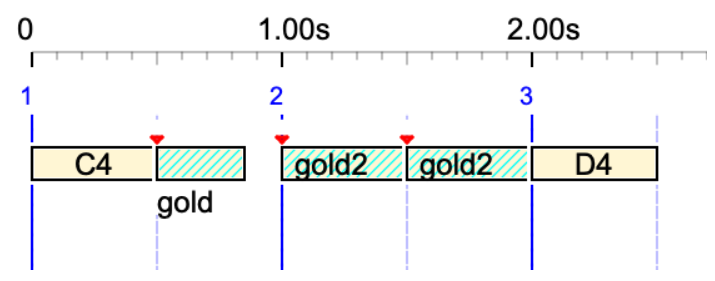
Thisvariable C4 gold gold h D4
Here, 'Thisvariable' is a left-over variable and 'h' is a terminal symbol not declared in '-so.tryObjects'. Both are played with a one-beat duration. However, 'gold' is declared in '-so.tryObjects' with a 'Tref' duration of 700 ms that cannot be rescaled, plus the 'force continuity in the beginning' property and 'relocate' properties.
The 'gold' silent sound-object can be given the same metrical and topological properties as other sound objects, creating a wide variety of situations.
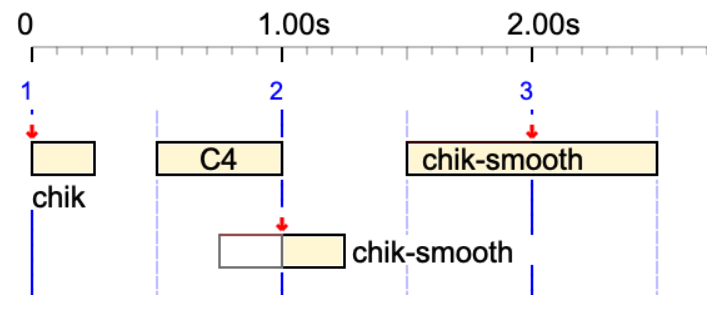
The 'chik-smooth' silent sound-object has a 'Tref' duration of 0 ms. We call it a smooth sound-object. It 'adapts' to the current rhythmic structure by occupying 1 beat. Let us place the 'chik-smooth' pivot in the middle, allow it to be truncated and prevent its beginning from being covered. Now we play:
The duration of 'chik-smooth' is one beat, that is 0.5 s when the tempo is 2 and 1 s when the tempo is 1.
The 'gold2' silent sound-object has a 'Tref' duration of 0 ms. We call it a smooth silent sound-object. Let us play:
_tempo(2) C4 gold gold2 gold2 D4
Here, the 'gold2' sound-object has a duration of one beat, or 0.5 seconds. The 'gold' sound-object, instead, is played at half its nominal duration, or 350 ms.
Out-time sound-object
Play:
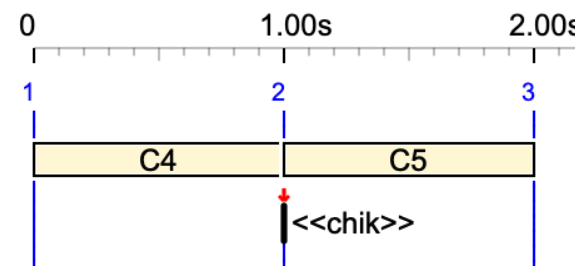
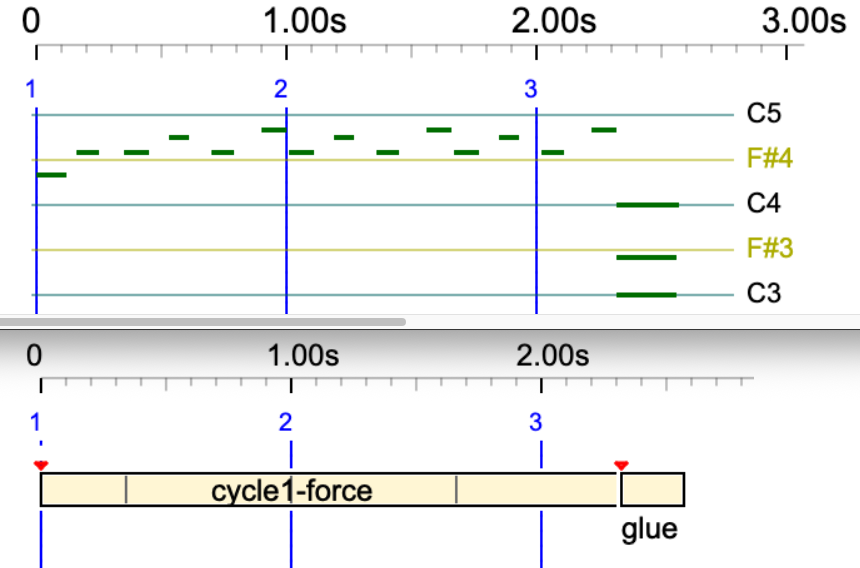
C4 << chik >> C5
The 'chik' sound-object, normally lasting 250 ms, is played with duration zero if written between <<>>:
This is visible in the Csound score of this performance. Notes in 'chik' are {C3, F3, C4} :
By default, the pivot is located at the beginning of its sound-object. However, it can be set at various locations: beginning (pre-roll excluded), end (post-roll excluded), middle (pre-roll and post-roll excluded), first NoteOn, last NoteOff, middle of the NoteOn/NoteOff sequence. It can also be set to start at a given distance from the beginning, either as a percentage of the total duration (excluding pre-roll and post-roll) or as a fixed number of milliseconds.
This level of sophistication is necessary given that sound-objects — or, more generally, time-objects — are intended to drive all kinds of devices, including robots.
Try for instance:
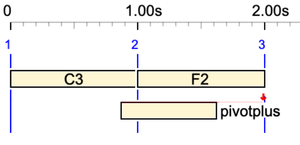
C3 F2 pivotplus
The 'pivotplus' sound-object has its pivot located at 150 % duration from its beginning. The pivot is displayed as a full red arrow, meaning that the object cannot be relocated: the time-setting algorithm will place it on a time streak according to the rhythmic structure wherever possible.
Now try:
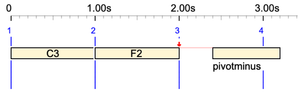
C3 F2 pivotminus
The 'pivotminus' sound-object has its pivot located at -50 % duration from its beginning.
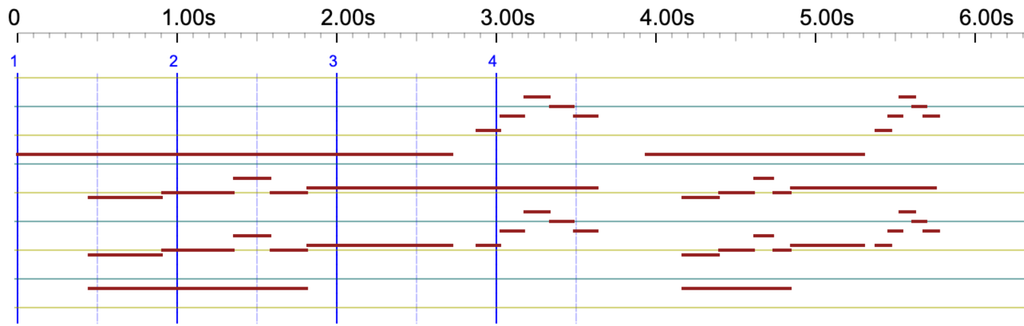
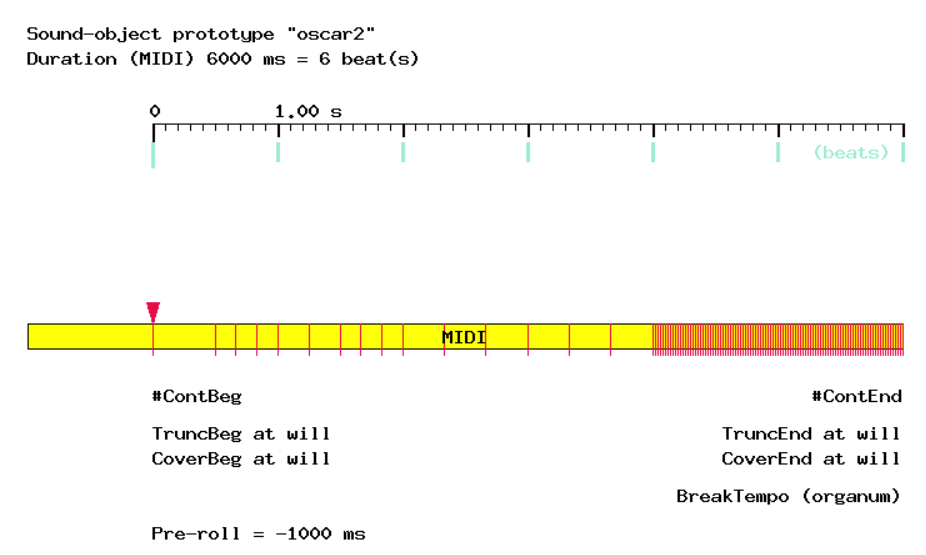
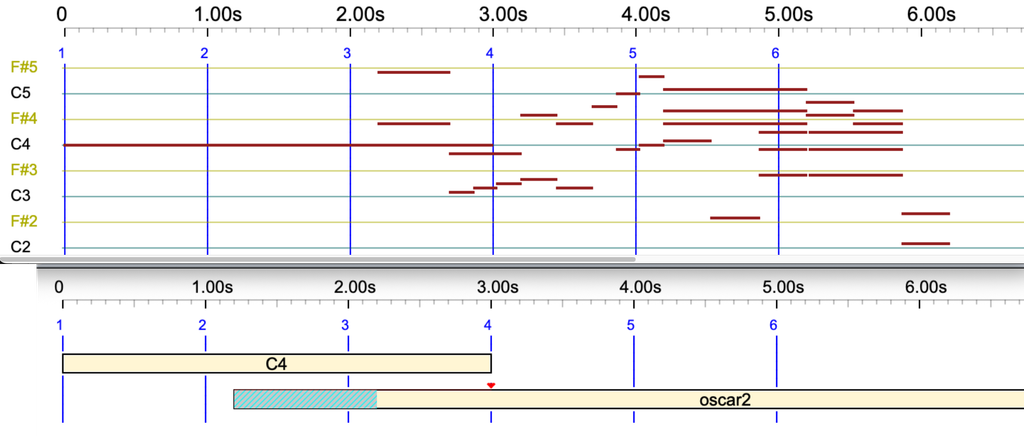
Now, let's take another look at the eighteenth measure of 'Watch_What_Happens_by_Oscar_Peterson.mid' by Oscar Peterson, which has been used to create the 'oscar2' sound-object:
Note that it contains notes in MIDI channels 1 and 2. The image looks like this:
The numerous red lines from 4 to 6 seconds represent a series of MIDI messages that gradually decrease the volume. These can be deleted by a single click of the 'SUPPRESS volume control' button.
A pre-roll of -1000 ms has been added to introduce silence at the beginning of the object. However, the actual start of the object is at time 0, as indicated by its pivot (the red triangle).
The terminal symbol 'oscar2' has been added to the '-al.tryObjects' alphabet. If this had not been done, the machine would read "oscar2" as "oscar 2" and play 'oscar' followed by a two-beat silence!
The pivot is used to position 'oscar2' correctly in time. We will play for instance:
C4 _ _ oscar2
Let us set the position of the pivot at 800 ms of the beginning. This sets the first NoteOn (the first event of this object) to start 800 ms before the pivot location on the third beat:
👉 Be warned that the volume decreases at the end of this example. Your sound device may remain silent after the first playback. To avoid this, check the 'Reset controllers' option in the settings.
Cyclic sound-object
Let's take another look at the 'cycle1' sound object, which loops from 34% of its starting point. Play:
cycle1 _
We are calling 'cycle1' on 2 beats, but its option 'Never rescale' is checked. It will reach the expected duration by repeating its sequence of events, starting from 34% of its duration, as instructed:
The notes in this sound object are 'E4, G4, G4, A4, G4, Bb5'. The first two notes, 'E4 G4', are in the 34% area and are not repeated. The repetition therefore starts at 1.00 s with 'G4 A4 G4 Bb5'. However, to keep the total duration at 2.00 s, the second repetition is incomplete.
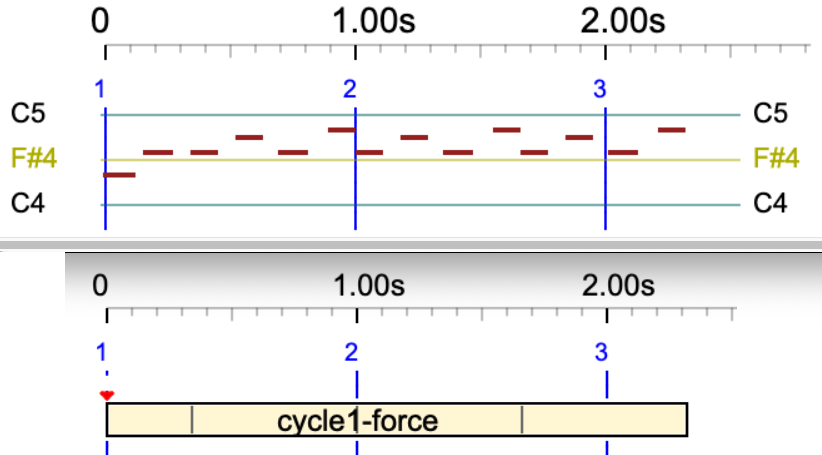
Let us create a copy of 'cycle1', called 'cycle1-force', which should extend itself with an integer number of repetitions.
(Don't forget to add it to the '-al.tryObjects' alphabet!)
Now play:
cycle1-force _
The duration now exceeds 2 beats in order to complete the 'G4, A4, G4, Bb5' repetition.
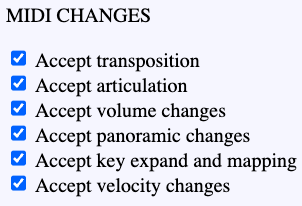
Cyclic sound objects play identically in both MIDI and Csound. All properties, such as pivot, pre-roll and post-roll, and effects, such as _transpose, _keyxpand and _keymap, are supported.
Below is an instance of cycle1 with a pre-roll of -100 ms and a post-roll of 300 ms. The grey parts are additional time segments that do not contain any event.
cycle1 _
Truncate the end of an object
Play this in MIDI and Csound:
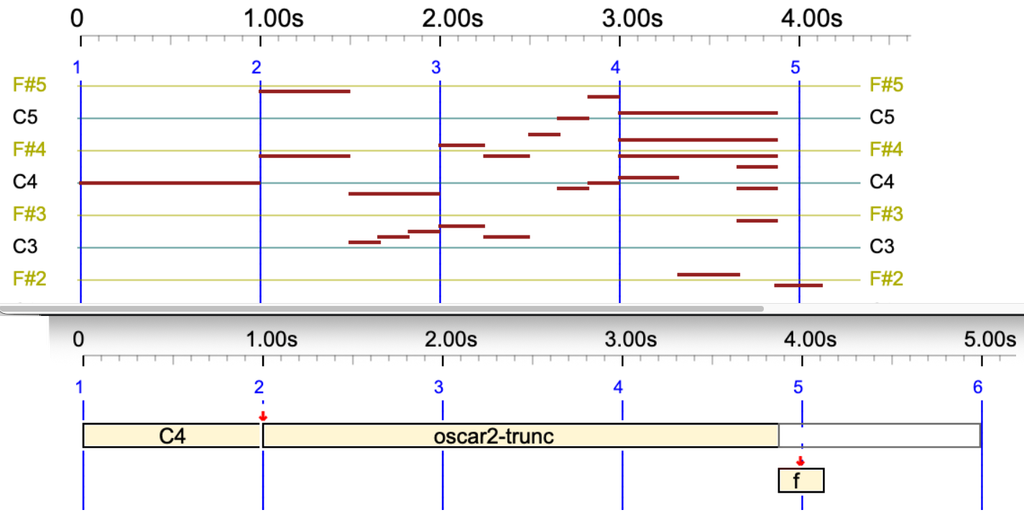
C4 oscar2-trunc
Now let us add an 'f' sound-object which is not relocatable. As per the following score, it should be located with its pivot exactly on the fourth beat:
C4 oscar2-trunc -- f
However, the 'oscar2-trunc' sound-object is set to the 'Never cover end' option. It also has a 'Truncate end' option, set to accepting a truncation up to 50% of the sound's duration. This is an acceptable set of constraints:
A Trace file can be displayed, giving explanations about the time-setting process.
Read below the trace file for setting up 'C4 oscar2-trunc -- f':
Placing objects… Col#5 side 1 Ts=5000 t1=3875 t2=4125 "f" should spend 1125 milliseconds, but no solution. < Col 3 NewTs=5000 ts1= 2000 ts2=2000 Tsm=5000 "-" This object is not the one concerned.<< Col#2 nseq = 0 side = 2 ts = 1000 t1 = 1000 t2 = 5000 "oscar2-trunc" We must save 1125 milliseconds solution 1 ---------- SEQUENCE 1 --------------------- #1 "C4" [0,1000] TruncBeg=0 TruncEnd=0 alpha=1.000000 delta=0 DELTA=0 #2 "oscar2-trunc" [1000,3875] TruncBeg=0 TruncEnd=1125 alpha=1.000000 delta=0 DELTA=0 #3 "-" [2000,2000] TruncBeg=0 TruncEnd=0 alpha=2.000000 delta=0 DELTA=0 #5 "f" [3875,4125] TruncBeg=0 TruncEnd=0 alpha=1.000000 delta=0 DELTA=0 ---------- (time resolution = 1 ms) ------------
The trace indicates that 'oscar2-trunc' was truncated by 1125 ms at its end.
Now, let us try:
C4 oscar2-trunc f
The 'f' sound object needs to start on the second beat, which would cut off more than 50% of the end of 'oscar2-trunc'. There is no solution to this set of constraints. Therefore, the machine breaks the 'Non cover' limitation, yielding the following:
This is also explained in the Trace file:
Placing objects… Col#3 side 1 Ts=5000 t1=1875 t2=2125 "f" should spend 3125 milliseconds, but no solution. < Col#2 nseq = 0 side = 2 ts = 1000 t1 = 1000 t2 = 5000 "oscar2-trunc" We must save 3125 milliseconds ➡ We must release time constraint(s)! • Releasing overlapping
Since both the 'C4' note and the 'oscar2-trunc' sound-object are relocatable, we can figure out another solution that would not break an constraint:
This was generated by a modified version of the time-setting algorithm. In the correct version, this solution is not acceptable because it creates negative dates.
Truncate the beginning of an object
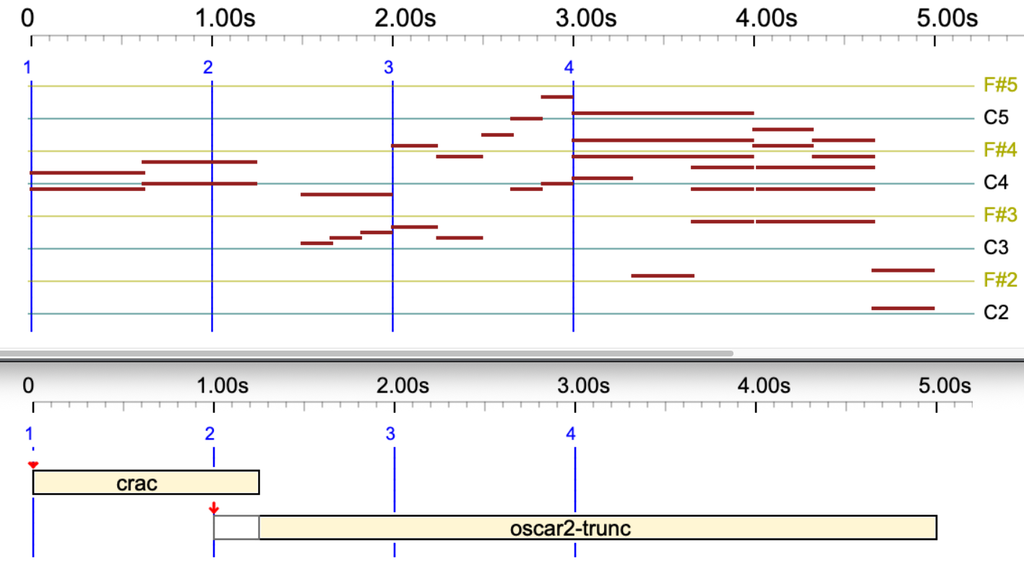
Let us now try to truncate the beginning of 'oscar2-trunc' by setting it no 'No relocate' and putting a 'crac' sound-object whose duration is slightly longer than 1 beat. The score of 'crac' is '{B3,D4}{C4,E4}'. We play:
crac oscar2-trunc
The picture is self-explanatory. The transition between 'crac' and 'oscar2-trunc' is smooth, because 'oscar2-trunc' starts sounding at the date of the first NoteOn(s) following the truncated part.
Try this longer truncation:
crac crac crac crac crac oscar2-trunc
Same result using 'oscar2-trunc-csound' which is a pure Csound object:
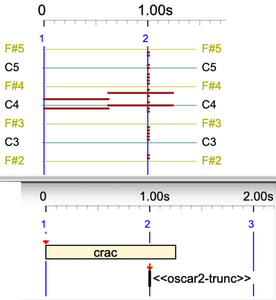
An out-time sound-object is never truncated:
crac << oscar2-trunc >>>
Truncating both ends of a sound-object
Try the following:
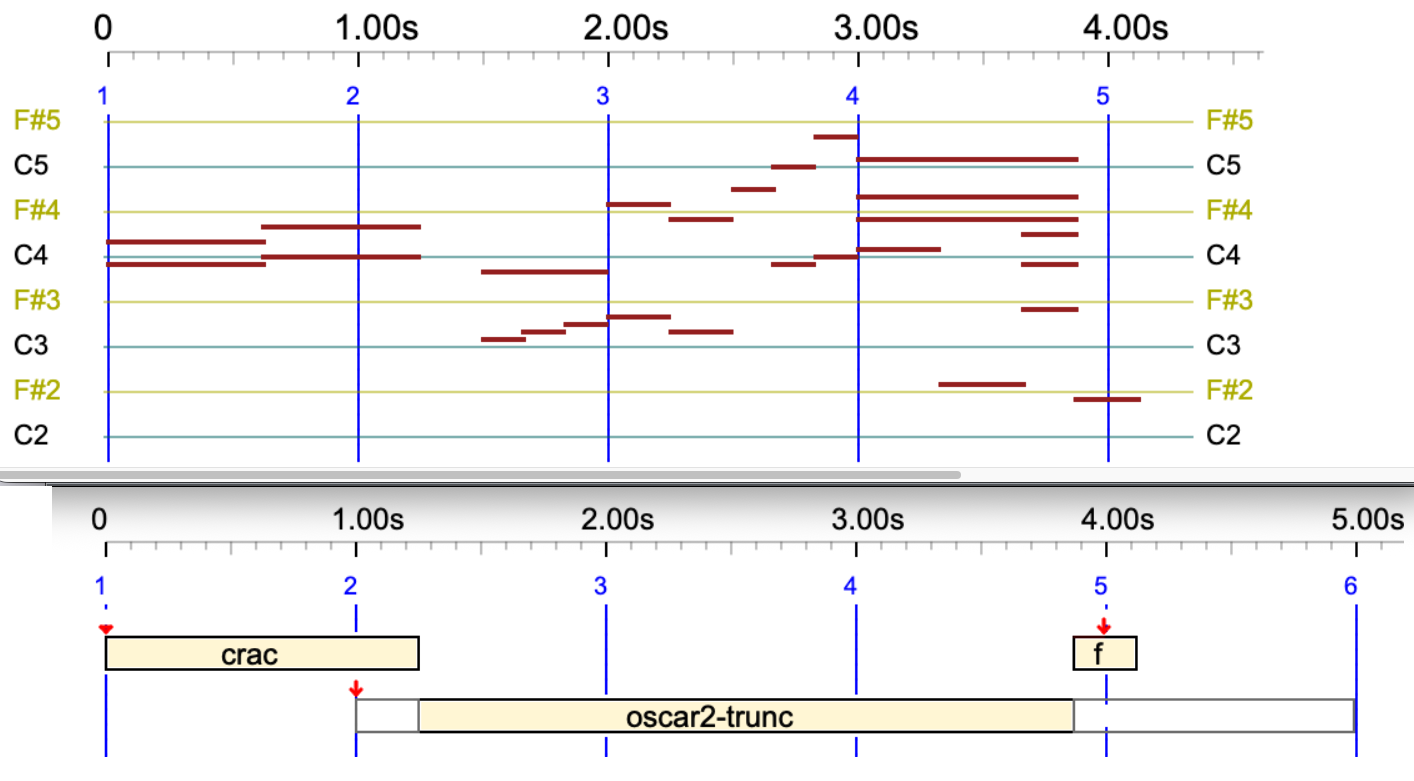
crac oscar2-trunc -- f
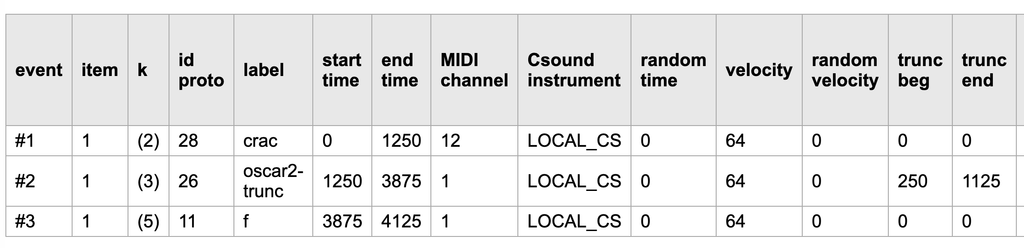
If you are using the Event list, be aware that the start and end times displayed are those after truncation. To locate events correctly, you will need the 'trunc beg' and 'trunc end' values:
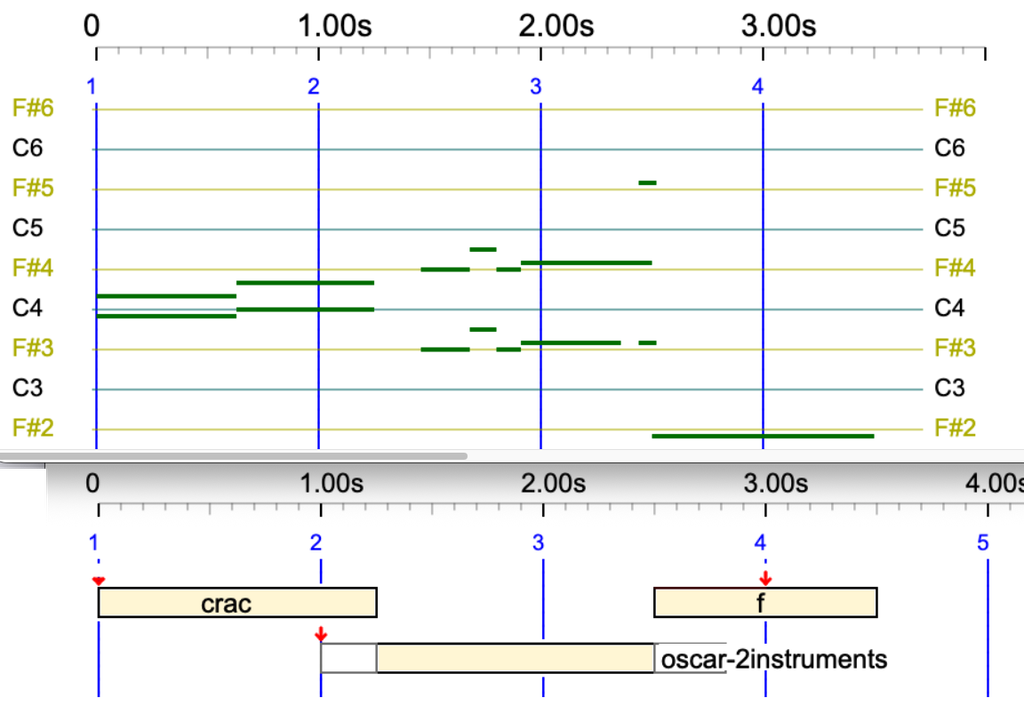
Let us truncate on both sides a pure Csound object playing 2 instruments:
crac oscar-2instruments - _tempo(1/4) f
Break tempo
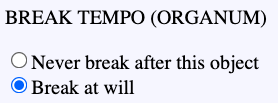
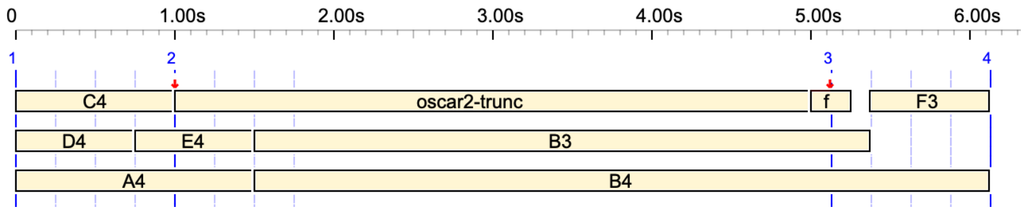
Another solution to avoid issues with timings or sound objects being truncated is to authorise 'oscar2-trunc' to break the tempo. This technique is known as 'organum' in classical music performance. When this option is set on the 'oscar2-trunc' sound-object, we get:
The broken tempo is noticeable by the delayed position of the fifth streak (or beat).
This broken tempo will impose itself on any other sequences of events played on top of it. Play for instance:
{C4 oscar2-trunc f, D4 E4 B3 F3, A4 B4}
At first glance, it is surprising that the two sequences do not end on the same date. Note that 'F3' appears to be out of the picture. However, this bizarre result can be explained by counting beats. An expansion of the polymetric expression is the following:
The confusing factor is that the physical duration of 'f' is 0.25 s., with its pivot in the middle sitting on the beat labelled '3' (blue line). Notes in the 'D4 E4 B3 F3' sequence occupy 3 beats and their symbolic duration is 3/4 beat, whereas 'A4' and 'B4' occupy 1.5 beat. This is a typical example of the difference between symbolic duration (beats) and physical duration (seconds).
The process is summarized in the trace. The displacement of the third beat is marked as 'DELTA=3125':
A sound-object can be instructed to 'stick' to the preceding and/or the next event in the sequence. These properties are known as 'Continuity at the beginning' and 'Continuity at the end'. The 'glue' sound-event is of this kind. Play:
cycle1-force _ - glue
The 'glue' sound object was supposed to be placed on the fourth beat, but it ended up at the end of 'cycle1-force'.
A refinement of this process is the allowance for a maximum gap at the beginning or the end of a sound-object. These properties are known as 'Allow gap'.
Tonal scale
A detailed presentation of this topic is on this page. The tonality can be controlled in both Csound and real-time MIDI productions (read more). The good news is that (micro)tonal adjustements can be applied to both MIDI and Csound sound-objects.
Let's consider an example where the difference is obvious: the Bohlen-Pierce scale, in which the octave is replaced with a tritave (ratio 3/1) and it is divided in 13 intervals. Let us play the following in both MIDI and Csound:
_tempo(0.66) G3 C4 oscar - _scale(Bohlen-Pierce,60) G3 C4 oscar
The '60' in the _scale instruction means that the block key is the middle of a standard keyboard (more details). So, 'C4' is rendered at the same frequency in both the standard equal-tempered scale and the Bohlen-Pierce scale.
The event list of this performance can be downloaded here.
Note that the pianorolls of both parts are identical, because tonal corrections are done after drawing the pictures.
Serial tools
Serial tools such as _retro, _rotate, etc., modifying the order of sound-objects (read documentation) do not modify the order of events inside each sound-object.
Other serial tools are accepted by 'oscar', as shown by its settings.
The same effects are applied to Csound productions, whether converted from MIDI or using the object's Csound score.
Play this in both MIDI and Csound:
oscar - _transpose(3) oscar
Play in Csound:
oscar-purecsound - _transpose(3) oscar-purecsound
Check this in both MIDI and Csound:
oscar - _keyxpand(F#4,-1) oscar
More complex:
oscar - _keymap(C4,C2,C6,C7) oscar
Various effects
The _pitchbend() command has no effect on sound-objects. This is on the agenda.
Play this superposition of two occurrences of 'oscar' displaced by a few milliseconds, both in MIDI and Csound:
{oscar, 2/10 oscar}
Modify MIDI codes in a sound-object prototype
Bottom of the page of a sound-object prototype and its graphic display
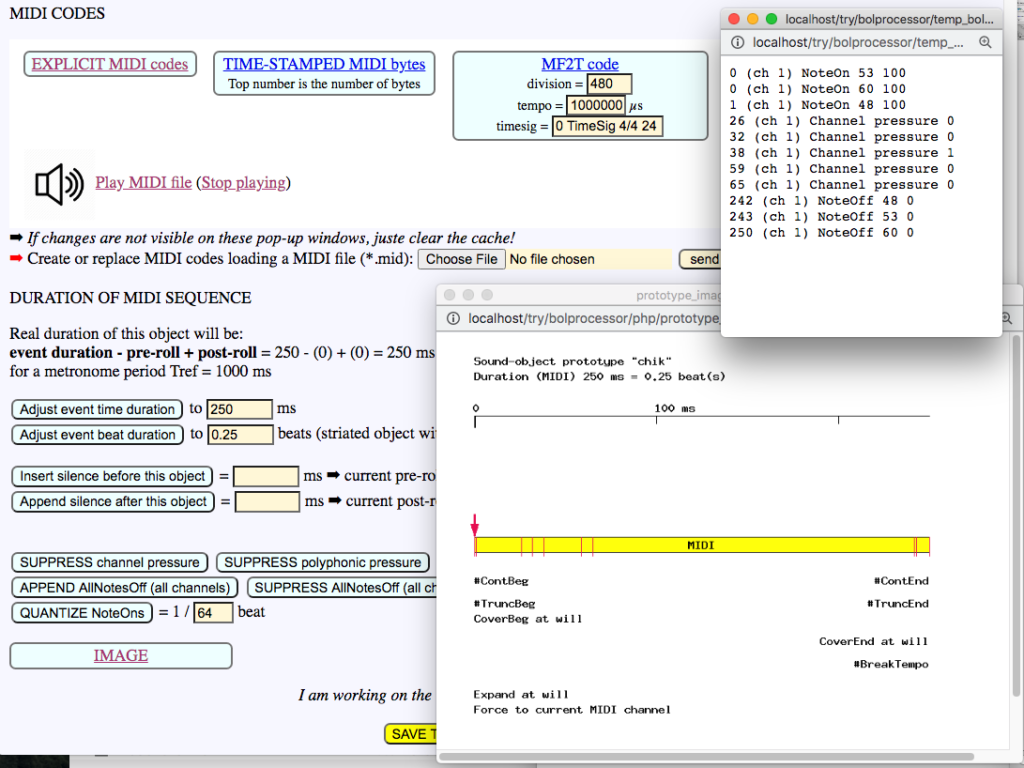
At the bottom of each sound-object prototype page, the EXPLICIT MIDI codes and TIME-STAMPED MIDI bytes links display the lists of MIDI instructions and time-stamped bytes that will be sent to the MIDI driver. (The first number is actually the number of bytes.)
👉 Don't forget that the “-so” file is saved in the background every 30 seconds (autosave) while you are modifying sound-object prototypes… To return to the original version, close the “-so” tag and restore the “-so” file from its copy!
The IMAGE link displays an image of the sound-object prototype along with indications of its topological and metrical properties, similar to the BP2.9.8 interface.
The Play MIDI file link produces a sound output based on MIDI events contained in the sound-object prototype. Here, the "chik" sound-object prototype plays a 250 ms chord on a stringed instrument. The interface uses the MIDI player to do this.
Note that there are five "Channel pressure" MIDI instructions in this sound-object. These may have been picked up by playing on a pressure-sensitive keyboard and their relevance is low since channel pressure can be controlled at a higher level by performance parameters. It is therefore advisable to click on SUPPRESS channel pressure and check the effect on EXPLICIT MIDI codes and TIME-STAMPED MIDI bytes. If the change is not immediately visible (this depends on the browser), simply reload the pop-up window. Other "continuous" parameters such as "volume control" can be suppressed in a similar way.
APPEND AllNotesOff (all channels) can be a useful option to ensure that this object turns off all pending notes on the sound machine. It sends an instruction to each of the 16 channels.
The MIDI content of this object can be changed by loading a MIDI file. Click Choose File to select a MIDI file — for example, "test.mid" in the "ctests" folder — and then send to upload it. It is not finalised immediately: you can examine the EXPLICIT MIDI codes and TIME-STAMPED MIDI bytes of this file before saving it to the sound-object prototype. The example "test.mid" contains no less than 432 bytes because of the "Channel pressure" and "Parameter ctrl 7" messages, which control pressure and volume. You can accept the import by clicking SAVE or cancel it by clicking CANCEL. There is currently no "undo" function in case the MIDI sequence has been replaced or deleted by mistake.
An important feature is QUANTIZE NoteOns. We are dealing with "striated sound-objects", which means that they are designed to be played at a certain tempo. The tempo at which the MIDI content of this object was captured is generally not the same as the tempo at which it will be played, as the latter depends on performance parameters. The reference tempo is given by Tref which in this case is 1000 ms for a metronome with 60 beats/mn. The MIDI content uploaded by "test.mid" has a duration of 3500 ms, i.e. 3.5 beats. This duration can be set either in milliseconds or in beats. Regardless of the duration, it is often convenient to locate NoteOn and NoteOff events to a precise fraction of a beat. An Quantizing to 1/64th of a beat is often a good choice. For simplicity's sake, we will set it to 1/50th of a beat, or 20 ms. Before clicking on QUANTIZE NoteOns, check the EXPLICIT MIDI codes. You will notice that there is a NoteOn of key 62 at 804 ms and a NoteOff of key 60 at 825 ms. Set the quantization to 1/50th of a beat and click QUANTIZE NoteOns. Now the timings of these events have been changed to 800 ms and 820 ms respectively, which are multiples of 20 closest to the original timings.
Examples cited on this page belong to the -da.trySerialTools project.
Geeks can check the "Trace serial tools" option in the settings if they wish to monitor processes in Zouleb.c.
The serial tool approach makes it possible to carve "shapes" in the time and pitch dimensions of a musical work containing simple notes and/or sound-objects. These tools were first implemented in the late 1990s, following suggestions from the Dutch composer Harm Visser.
Serial tools are applied immediately after the production process for a musical piece, and before the expansion of its polymetric structures. Therefore, they are ignored during the production.
All tools in the current implementation (version 3.5.2 and later) are applied recursively to the fields of polymetric structures.
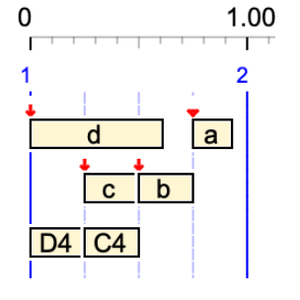
Here, sound objects a, b, c and d were mixed with the simple notes C4 and D4. Consequently, the timing of the final structure is influenced by the metrical and topological properties of these sound objects.
The cascading effect of _retro can be difficult to figure out. For example,
_retro a b _retro c d _retro A4 B4
will produce:
c d b a B4 A4
whereas
_retro {a b _retro {c d _retro {A4 B4}}}
will produce:
c d B4 A4 b a
_ordseq
This tool restores the order of the following sequence (or polymetric structure) if it has been subject to change by _retro, _rndseq or _rotate. For example,
_retro {A3 B3, C5 D5 _ordseq C4 D4} F4
will produce:
F4 {B3 A3, C4 D4 D5 C5} F4
_rndseq
_rndseq a b c d
will put the sequence in an unpredictable order, for instance:
a d b c
If a positive integer is set as the seed for randomisation in the project settings, the same order will appear each time the production is launched. In our comparative tests, we use seed = 1, which produces the same "random series" in all systems.
Beware that
_rndseq A4 B4 C4 _rndseq A5 B5 C5 D5
is interpreted as:
_rndseq A4 B4 C4 {_rndseq A5 B5 C5 D5}
where the "{_rndseq A5 B5 C5 D5}" expression is a fifth unit, which may yield (depending on the seed):
B4 B5 D5 A5 C5 C4 A4
and not:
_rndseq{A4 B4 C4} _rndseq{A5 B5 C5 D5}
which may yield:
C5 B5 D5 A5 B4 C4 A4
Using curled brackets to mark out sequences is a good idea!
_randomize
This instruction cancels the fixed randomisation setting. In fact, it shuffles the cards and sets the seed to 0. Example of proper use:
_randomize _rndseq a b c d
_rotate
_rotate(x) rotates the following sequence by x units. If x = 2, the rotated sequence will start after the first 2 units, which will be sent to the end. Thus,
_rotate(2) C4 D4 E4 F4
will produce:
E4 F4 C4 D4
and
_rotate(-1) C4 D4 E4 F4
will produce:
F4 C4 D4 E4
This one:
_rotate(-1) {_rotate(2) _rotate(-1) a b c d}
will produce "a b c d" because -1 + 2 -1 = 0.
The _rotate instruction is propagated to all fields of polymetric structures. Thus,
_rotate(-1) {A4 B4 C4 D4, A2 B2 C2}
will produce:
{D4 A4 B4 C4, C2 A2 B2}
Be aware that "units" may be simple notes, sound-objects, polymetric structures or structures that are preceded by another serial tool. For example,
Explanation: The "C4 {D4 E4} F4" and "D4 E4" sequences rotate by 1 unit because 2 - 1 = 1. The "A3 B3 C3" sequence rotates by 2 units. The "_rotate(-1) C4 {D4 E4} F4" expression is treated as a single unit in the rotation by 2 units of "A4 B4 _rotate(-1) C4 {D4 E4} F4".
Tempo and speed markers are treated as "units" in the rotation. Thus,
_rotate(-1) C4 D4 _tempo(3/2) E4 F4 G4
produces:
G4 C4 D4 _tempo(3/2) E4 F4
Units moved by _rotate, _retro or _rndseq can also be silences or silent sound-objects, for instance:
_rotate(-1) {- b a c d, a b c'} d'
which produces:
d' { d - b a c, c' a b }
Upgrade of the Zouleb() procedure (geeks only)
'Zouleb' is an anagram of 'Boulez', in honour of Pierre Boulez, who championed the composition of serial music.
Until version 3.5.2 was released in August 2026, the Zouleb() procedure in Zouleb.c used a different syntax for tools such as _rotate, which ignored the field separator ','.
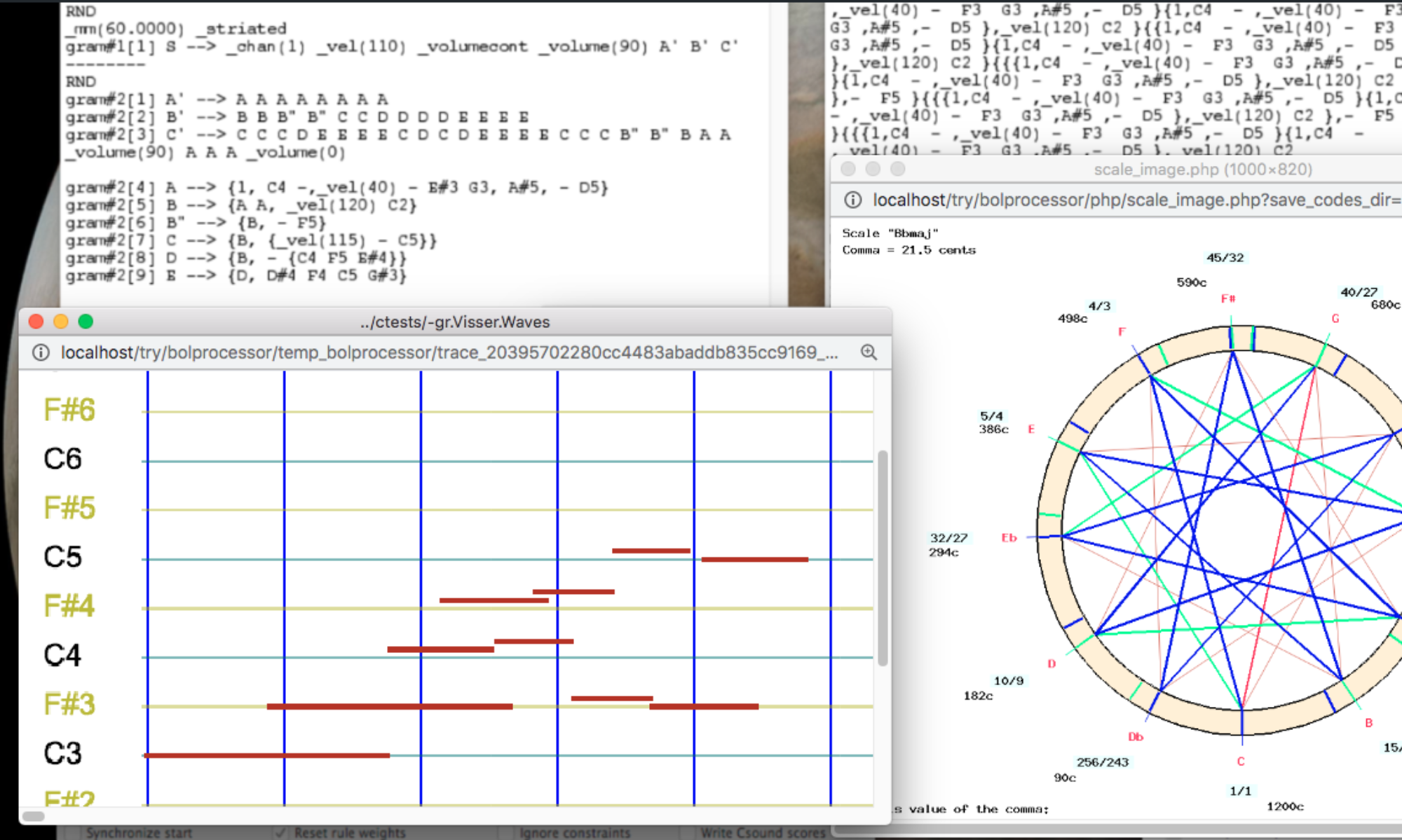
If you wish to try the old procedure, check the Ignore field separators option in the SERIAL TOOLS section of the settings. This option is set on the old projects -gr.Visser.Shapes and -gr.Visser.Waves (read page).
For example,
_rotate(1) {A4 B4 _rotate(1) C4 F4 G4, A3 B3 C3}
produces
{B4 G4 C4 F4 A4, B3 C3 A3}
with the current procedure, whereas the old procedure produced:
{B4 G4 C4 F4,A3 B3 C3 A4}
Tools modifying pitches
_transpose
_transpose(n) shifts the following sequence up by nsteps (not necessarily semitones). For example,
_transpose(4) C4 D4 E4
produces:
E4 F#4 G#4
Sound-objects can also be transposed if their "Accept transposition" option is set. For example,
c a b - _transpose(6) c a b
This and other pitch-modifying tools deal with steps of the scale. These are semitones only in 12-tone scales. Try for example a 13-tone scale:
_keyxpand(basenote, ratio) multiplies melodic intervals by ratio (positive or negative) relative to the basenote. For example,
_keyxpand(C4, 2) D4 E4 F4
produces:
E4 G#4 Bb4
The basenote parameter can be an explicit note, as shown above, or a key number ranging from 0 to 127. For instance, if C4 is mapped to the value 60 in the settings, it can be replaced by 60:
_keyxpand(60, 2) D4 E4 F4
_keyxpand is applied recursively to the fields of a polymetric expression. The values of ratio are cumulated multiplicatively if the centre note is the same. For instance,
See -gr.tryKeyXpand for a typical example containing notes and sound-objects. The beginning of the piano roll produced by this grammar provides an approximate overview of the process:
The "ratio" parameter can be any floating-point number, positive or negative. For example,
_keyxpand(C4,-1.80) D4 E4
will produce:
G#3 F3
The two-semitone distance between C4 and D4 has been transformed to 2 × -1.8 = -3.6, which has been rounded down to -4, yielding G♯3. Similarly, the four semitones between C4 and E4 have been transformed to 4 × -1.8 = -7.2, which has been rounded up to -7, yielding F3.
Algebra
Let 'k' be the key number of 'basenote'. The following equation is used to change a note whose key number is 'x' to a note whose key number is 'y':
y = x + ratio . (x - k)
Key expand interpolation
👉 This feature is not yet implemented in BP3, but we plan to offer it in consistent with key mapping interpolation (see below).
_keymap
Syntax: _keymap(p1,q1,p2,q2)
In the sequence, this tool modifies pitches in range (p1,p2) according to a linear mapping in which q1 is the image of p1 and q2 the image of p2.
The tool makes changes on "simple notes" and on "sound-objects" in which the property "Accept key changes" has been set to true.
p1, q1, p2, q2 may be written as integers (key numbers) in range 0..127, or simple notes using the current note convention. The _keymap(p1,q1,p2,q2) syntax demands that p2 > p2, or the equivalent notes are in ascending order. For instance, both expressions:
_keymap(C3,E4,C5,C6) C4 B3 A3 and _keymap(48,64,72,84) C4 B3 A3
produce:
D5 C#5 C5
Algebra
Given _keymap(p1,q1,p2,q2) where p1, q1, p2 and q2 are key numbers, the following equation is used to change a note whose key number is 'x' to a note whose key number is 'y':
y = a x + b with a = (q2 - q1) / (p2 - p1) and b = q1 - a p1
In the example above, a = 5/6 and b = 24. Thus, C4 (60) is converted to D5 (74), B3 (59) to C#5 (73 after rounding from 73.16), and A3 (57) to C5 (72 after rounding from 71.5).
Changes to sound objects can be visualised using the -gr.tryKeyMap grammar by clicking the 'TryThis' button at the bottom of the page. The following sequence is played:
TryThis --> _keymap(52,86,86,52) a -- b
Sound-objects 'a' and 'b' (defined in -so.tryKeyMap) are identical except that "Accept key changes" is checked for 'a' and unchecked for 'b'. Therefore, 'b' is not modified:
Keymap interpolation
Changes can be made continuous using _mapcont and _mapstep instructions, and discrete again with _mapfixed. The parameters p1, q1, p2 and q2 are interpolated between two _keymap instructions.
Instructions _mapcont and _mapstep are equivalent when dealing with simple notes. However, _mapcont also modifies pitches inside the sound-objects whose option "Accept key changes" is checked.
Let's see an example easy to visualise because of the repeated pattern "C4 C#4 D4 G4":
Same process using sound-objects: click the 'TryThis2' button at the bottom of the -gr.tryKeyMap grammar. The following sequence is played:
TryThis2 --> _mapcont _keymap(52,52,86,86) a a a _keymap(52,86,86,52)
Since the 'a' sound-object accepts key changes, it is modified by _keymap with parameters p1, q1, p2 and q2 interpolated between the two values. The interpolation is computed again for each note. This produces:
Grammar -gr.tryKeyMap is a more elaborated example containing notes and sound-objects. The beginning of the piano roll produced by this grammar provides an approximate overview of the process:
In the current version of the Bol Processor, sound-objects contain either a stream of MIDI codes or a few lines of Csound score, or both. Each terminal is either interpreted as either a simple note (a NoteOn/NoteOff sequence) or linked to a sound-object, provided that one with the same name exists in a related sound object description file (e.g. '-so.abc').
When an item is played in real time using MIDI, a MIDI file or Csound, any terminal not listed in the associated sound object description file is ignored. The same applies to variables that were not rewritten or erased at the end of the production process.
In earlier versions of BP3 (before 3.15), these unused symbols were erased before constructing the phase table containing the list of sound events. At present, they are treated as silent sound objects. While these objects carry neither MIDI nor Csound instructions, they have the same metric characteristics as a simple note: a duration of one unit, a pivot at the beginning for its location, and relocatability.
These silent sound-objects are of little or no utility in the MacOS, Windows and Linux implementations of BP3. They are intended for environments using the WebAssembly (WASM) architecture. The idea is to use the Bol Processor's sophisticated time-setting features to send the structure to external devices and create sounds of great design. Read this page for more information.
Additionally, a silent sound-object can be created and declared in a sound object description file, with the same metrical and topological properties as other sound-objects. These properties can be used to create specific configurations. Read Sound-objects for more information.
Examples of data creating silent sound-objects can be found in the '-da.trySilentSoundObjects' project. The resulting graphs are shown below.
The terminal alphabet of this data project includes 'a', 'y', 'z', but only 'a' is found in '-so.abc'. The note convention is English.
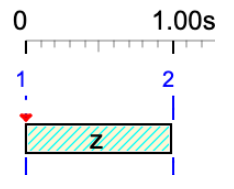
z
'z' is treated as a silent sound-object and displayed as a hatched rectangle. Its duration is 1 unit.
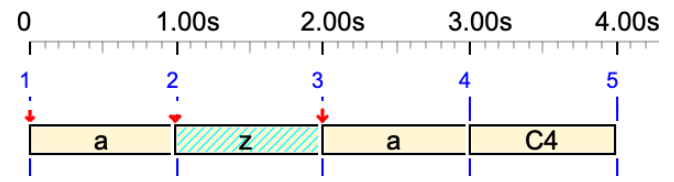
a z a C4
In this sequence, the silent sound-object 'z' occupies 1 unit but it does not produce any sound.
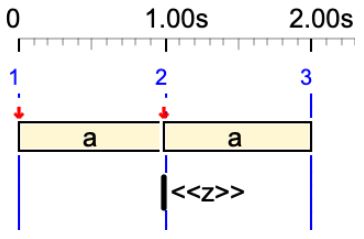
a <<z>> a
Here, 'z' is an out-time silent sound-object (no duration). No sound and no duration.
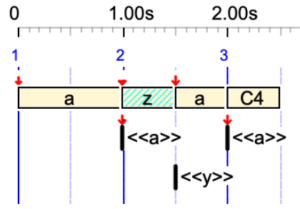
a <<a>> _tempo(2) z <<y>> a <<a>> C4
'z' has 1/2 beat duration, due to the tempo. 'y' is an out-time silent sound-object.
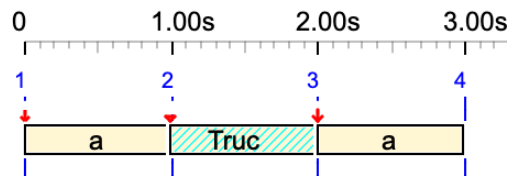
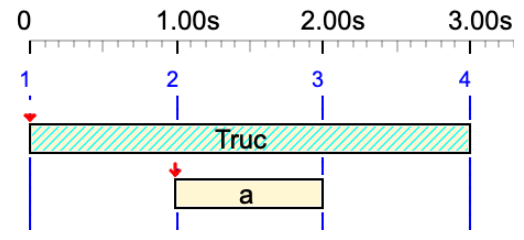
a Truc a
Variable 'Truc' is converted to a silent sound-object. Its duration is 1 unit.
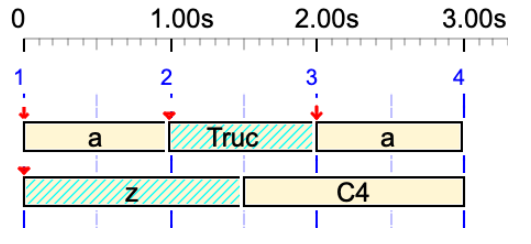
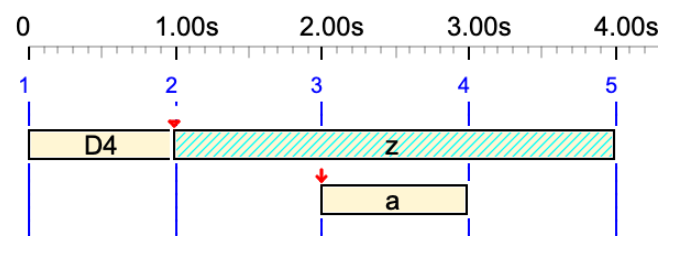
{a Truc a, z C4}
In this polymetric expression, 'z' is resized to have the same symbolic duration as C4.
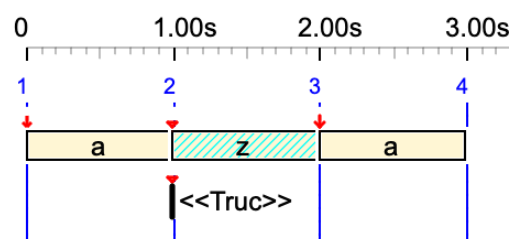
a <<Truc>> z a
Variable 'Truc' is converted to an out-time silent sound-object.
D4 z& a &z
Silent sound-object 'z' is tied to itself. 👉 Read the Tied notes page.
Truc& a &Truc
Variable 'Truc' is converted to a silent sound-object and tied to itself.
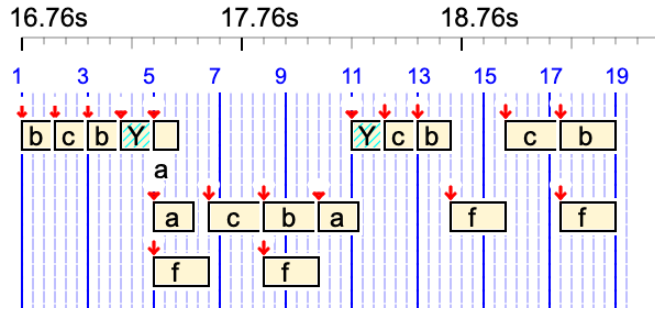
The conversion of variables to silent sound-objects may have an impact on grammars using substitution rules in which an erase rule cannot be used at each substitution. Check for instance '-gr.koto3':
Variable 'Y' hasn't been erased and it occupies a one-unit time segment without producing any sound.
Flags can be used in grammars to activate/deactivate rules according to simple numerical and logical evaluations.
Let us look at the ‘-gr.tryFlags’ grammar:
-al.abc
// First create string of ‘a’
gram#1[1] S --> X /Num_total = 20/
gram#1[2] /Num_total - 1/ X --> a X
--------
// Create flags counting 'a' and 'b'
gram#2[1] X --> lambda /Num_a = 20/ /Num_b = 0/
--------
// Now replace 'a' with 'b' until they are in equal numbers
gram#3[1] /Num_a > Num_b/ a --> b /Num_b + 1/ /Num_a - 1/
This grammar produces a string of 20 terminal symbols (Num_total) containing an equal number of (randomly positioned) 'a' and 'b'. For example:
b b a a a b a a b a b a b b b a b b a a
In a grammar rule, flags are enclosed in '/'. The first occurrence of a flag usually sets its initial value (an integer number), for example /Num_total = 20/.
Additive/subtractive operations (on integers) can then be performed to increase or decrease the values of the flags, e.g. /Num_b + 1/ or /Num_a - 1/.
Flags that appear before the left argument of a rule are evaluated and used to control the rule. For example,
/myflag/ X --> Y
will only be a candidate rule if 'myflag' is strictly positive. This evaluation can also be a check of the values of two flags. For example, rule:
/flag1 > flag2/ /flag3 = flag2/ /flag4 = 50/ X --> Y
will only remain a candidate as long as the three conditions are met.
This technique can be combined with other control techniques, such as (positive/negative, proximate/remote, left/right) contexts, rule weights etc. An example of the use of flags can be found in "-gr.trial.mohanam", combined with rule weights and pattern contexts. Read the page Computing ‘ideas’.
➡ Note that the operators '≤', '≥' and '≠' are not yet accepted in the current version of BP3 as it does not handle multi-byte Unicode characters.
Polymetric expressions are the basic representation model for the timing of musical data in the Bol Processor. Its versatility makes it ideal for use in computer music environments across many cultures. The word is a mixture of polyphony and polyrhythm, the former evoking superimposed streams of musical events, and the latter a metric adjustment of their durations.
This page illustrates the syntax of simple expressions and their interpretation by the polymetric expansion algorithm described in Two algorithms for the instantiation of structures of musical objects (Bel 1992). This process can be extremely complex, since an entire musical work — e.g. Beethoven's Fugue in B flat major — is treated by the Bol Processor as a single polymetric structure: see example.
In this tutorial, simple notes ("C4", "D4" etc.) are used following the "English" convention. All time-setting processes could be illustrated using sound-objects (including silent sound-objects) or simple notes in other conventions: "Italian/Spanish/French" or "Indian".
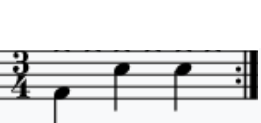
For example, if the time signature is 3/4, we will have 3 quarter notes (crotchets) in a bar (see picture). A half note (minim) lasts twice as long as a quarter note in the same context. Other relative durations are expressed in the same way.
To get the physical duration of a note we need an additional piece of information: the metronome value, for example "mm = 100", which means 100 beats (quarter notes) per minute.
A metronome value (60 bpm by default ) is declared in the settings file of a Grammar or Data page. With this setting, note "E4" on a Bol Processor score represents an "E" of the 4th octave played in 1 beat with a physical duration of 1 second.
This convention extends to arbitrarily named sound-objects whose default durations are set by the streams of MIDI events or sequences of Csound instructions from which they are composed. The mapping of symbolic to physical time for the performance of sound-object structures (with their metric and topological properties) is a sophisticated process performed by a time-setting algorithm. A practical example is discussed on the page Interactive improvisation with sound-objects.
Polymetric expression
Typical forms of polymetric expressions are:
field 1, field2 or {field 1, field2} indicates that field1 and field2 should be superimposed and the total symbolic duration should be adjusted to that of field1;
field1 • field2 or {field1 • field2} indicates that field1 and field2 should be consecutive and the symbolic duration of each field should be adjusted to that of field1;
{expression} is equivalent to expression.
Curly braces '{' and '}' are used to create multi-level expressions.
➡ Periods written as bullets '•' in the Data and Grammar windows are converted to plain periods before being sent to the console, as the console rejects some Unicode characters.
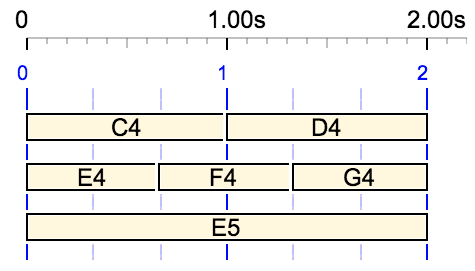
For example, {C4 D4, E4 F4 G4, E5} produces the following time structure with a metronome set to 60 beats per minute:
Item {C4 D4, E4 F4 G4, E5} on a sound-object graph The duration is 2 beats, as set by the first field "C4 D4"
The use of the first field to set the total duration is highlighted by the following examples where the fields appear in a reverse order:
{C4 D4 E4, F4 G4} Duration of 3 beats
{F4 G4, C4 D4 E4} Duration of 2 beats
Rests (silences) can be notated with "-" for single unit rests, or with integer numbers and ratios. The following shows a single unit rest and a more complex rest of 2.5 beats:
{F4 - G4, C4 D4} Duration of 3 beats
{F4 2 1/2 G4, C4 D4} Duration of 4.5 beats
Fields in reverse order: {C4 D4, F4 2 1/2 G4} Duration of 2 beats
Polymetric structures can be multi-level, for example:
The same time-setting rules apply to sequences where commas are replaced by periods. This is the period notation. For example:
Sequence F4 2 1/2 G4 • C4 D4 or {F4 2 1/2 G4 • C4 D4} Duration is set by that of the first field "F4 2 1/2 G4" = 4.5 beats applied to the second field
Superpositions and sequences can be combined (even in multi-level expressions), such as:
{F4 2 1/2 G4 • C4 D4, A4 B4, G4 A4 • F4} Duration of 9 beats = twice that of "F4 2 1/2 G4"
Undetermined rests
Undetermined rests are a powerful feature of polymetric expressions, saving humans from the inconvenience of complicated time computations. This is an important step towards minimising the amount of numerical/symbolic information needed to create a precise temporal structures in music.
The polymetric expansion algorithm calculates (symbolic) durations that produce the least complex expression.
Undetermined rests are notated as "…" or "_rest" in Data or Grammars.
👉 Since the Bol Processor console does not recognise the "…" Unicode symbol, the PHP interface rewrites it as"_rest".
The examples below are based on superimposed structures, in which fields are separated by commas. The same expansion algorithm applies to sequential structures, where fields are separated by periods. All examples can be checked on the "-da.tryRests" page.
The same process is applied to structures containing sound-objects and/or simple notes. Here, we use simple notes for the sake of clarity.
Let us start with a trivial example. In {C4 D4 E4, … F4 G4}, the undetermined rest "…" is replaced by a single unit rest:
{C4 D4 E4, … F4 G4} = {C4 D4 E4, _rest F4 G4}
Thus, the expression {C4 D4 E4, … F4 G4} is equivalent to {C4 D4 E4, - F4 G4} or {C4 D4 E4, 1 F4 G4}.
A similar sequential structure {C4 D4 E4 • … F4 G4} yields the following solution:
C4 D4 E4 • … F4 G4 = C4 D4 E4 • _rest F4 G4
This solution gives the simplest polymetric expression. The same simple case is that of {… C4 D4 E4, F4 G4}:
{… C4 D4 E4, F4 G4} = {_rest C4 D4 E4, F4 G4}
If a field of the polymetric expression contains several undetermined rests, these are assigned equal durations — in such a way that the complexity of the structure remains minimal.
Thus, this structure is equivalent to {1/2 C4 D4 1/2 E4, A4 F4 G4}.
An undetermined rest cannot be assigned duration 0, even when this would result in a simpler expression. For example, in {… C4 D4 … E4, F4 G4} duration 0 would result in a "three in two" polyrhythm, whereas duration 1/2 results in "five in two":
{… C4 D4 … E4, F4 G4}
👉 The rejection of null durations has been implemented in December 2025 (version 3.3.6).
Each field of a polymetric expression can contain undetermined rests. Consider for example {… C4 D4 E4, A4 B4 F4 … G4}. Once again, assigning a duration of zero to each undetermined would result in the simplest structure, since "four in three" (LCM = 12) is a better trade-off than "five in four" (LCM = 20). However, but this null duration is not accepted:
{… C4 D4 E4, A4 B4 F4 … G4}
A more complex structure is assigned to {C4 D4 E4, A4 B4 F4 … G4 A4, C5 … D5} with rests of 1 unit in the second and third fields. The LCM of 3 and 6 is 6, which is the lowest value possible for this structure.
{C4 D4 E4, A4 B4 F4 … G4 A4, C5 … D5}
A similar case is {C4 D4 E4, A4 B4 F4 … G4 A4, C5 … D5 E5}:
{C4 D4 E4, A4 B4 F4 … G4 A4, C5 … D5 E5}
Here, the first rest has been assigned 1 unit and the second one 3 units. This gives the LCM of 3 and 6 = 6.
Replacing commas with periods gives the same structure in a sequential form:
"C4 D4 E4 • A4 B4 F4 … G4 A4 • C5 … D5 E5" = {C4 D4 E4 • A4 B4 F4 _rest G4 A4 • C5 _rest D5 E5} Duration of the first field "C4 D4 E4" is applied to the 2nd and 3d ones which results in a final count of 3 x 3 = 9 beats
Remember that the first field of a polymetric structure is the one that sets up its tempo (and global duration). Thus, replacing {C4 D4 E4, A4 B4 F4 … G4 A4, C5 … D5 E5} with {C5 … D5 E5, C4 D4 E4, A4 B4 F4 … G4 A4} sets the duration to 6 beats instead of 3, even though relative durations are unchanged:
A polymetric expression is minimised by replacing quantified rests with undetermined rests wherever possible, without losing accuracy. An algorithm has been implemented (version 3.3.6 of December 2025) to minimise the samples used for training an AI to translate a MIDI stream into its equivalent polymetric expression (read the AI recognition of polymetric notation page).
The process is shown in detail on project "-da.tryMinimise". Click the MINIMIZE button to minimize all structures on this page, and Undo MINIMISE to delete the minimised version. Items can be played and displayed to verify that they are identical to their minimised versions.
Sound-objects or simple notes can be concatenated ("tied"). Consider, for example:
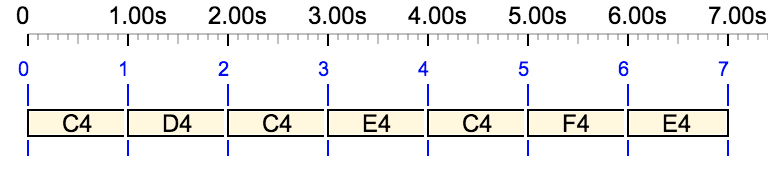
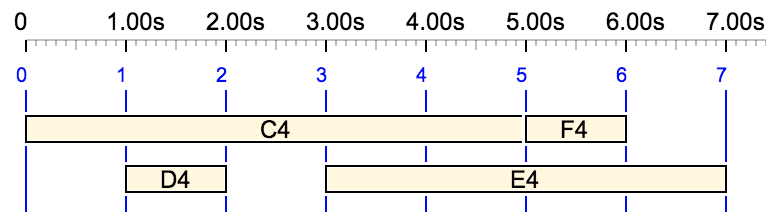
"C4 D4 C4 E4 C4 F4 E4"
and its variation with ties notated "&":
"C4& D4 &C4& E4&&C4 F4 &E4"
The time interval of a tied note/sound-object may cross the limits of (tree-shaped) polymetric structures. For example:
{C4 D4}{E4{2,E4,C4,G4}}
{C4& D4}{E4 {2,E4,&C4,G4}}
The challenge of dealing with tied events is discussed on the Tied notes page.
Real music is “polymetric”
The rules and heuristics associated with polymetric expressions make sense when dealing with real musical items. In particular, they made it possible to import MusicXML scores and interpret them as Bol Processor data — read the Importing MusicXML scores page.
This clear representation of complex structures also benefits other musical cultures. In India, for instance, great musicians have long explored the potential of non-integer numbers of beats (matra) in a measure (tala). Read for instance Birth of Saptarishi and Peeyush Talas and listen to the performance.
An Indian conception of time can be seen most clearly in the venerable Bol Processor system for algorithmic music, created by computer scientist Bernard Bel from work on notating tabla rhythms and developed over forty years. Drawing from Indian classical music, it includes an expressive approach to time setting that seems unique to the algorithmic music field, in which sound events are organized in terms of interrelationships before being mapped to physical time. Although not a live coding system itself, it has been heavily influential on the design of the TidalCycles system, particularly its embedded “mininotation” language for describing rhythm in the Bol Processor and more generally its representation of music based not on the duration of events (as in staff notation) but on the duration of cycles.
Alan Blackwell, Emma Cocker, Geoff Cox, Thor Magnusson, Alex McLean, Live Coding: A User's Manual, MIT 2022, page 195.
This page is intended for developers of the Bol Processor BP3 (read installation). It is not a formal description of the algorithms carried by the console's C code, but rather an illustration of their management of musical processes, which may be useful for checking or extending algorithms.
The title of this page should be "Tied sound objects" because sound objects can be tied in the same way as simple notes. However, it is more straightforward to demonstrate the process using simple notes.
All examples are included in the "ctests" folder of the distribution. A set of correct and incorrect examples is found in the "-da.checkTies" project.
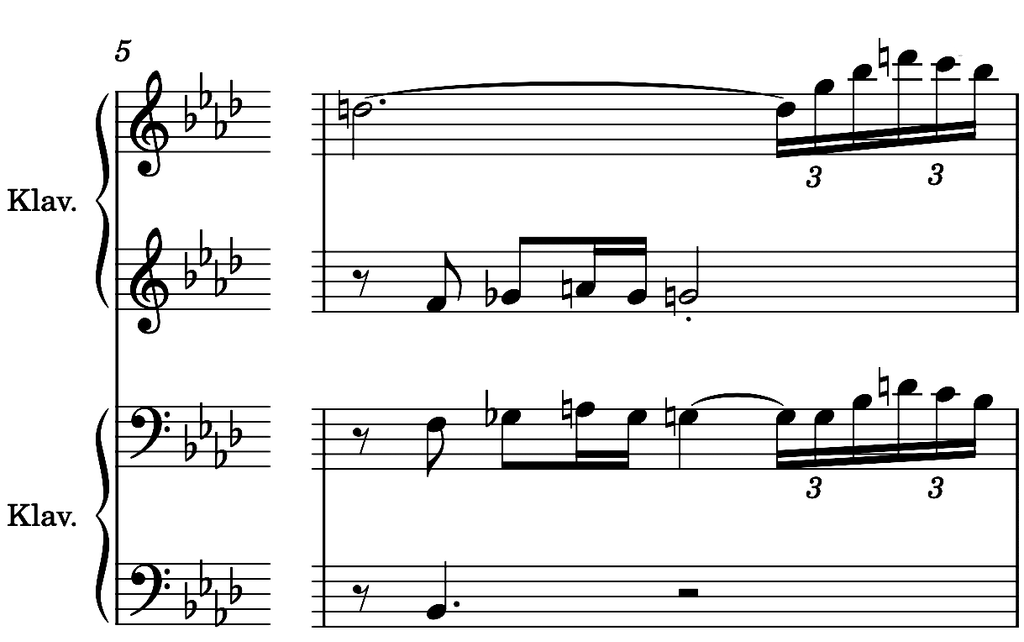
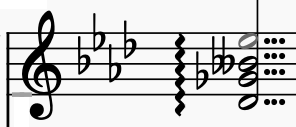
Consider measures #18 to #22 of Liszt's 14th Hungarian Rhapsody imported from a MusicXML file — see Importing MusicXML scores. The printed score of measures #19 to #21 is as follows:
Measures #19 to #21 of Liszt's 14th Hungarian Rhapsody Source: ManWithNoName in the MuseScore community
Tied notes are visible on this score. Slurs connecting notes at different pitches are ignored by the Bol Processor. These could be interpreted using the _legato(x) performance control, but setting an appropriate value for 'x' would require a careful analysis of the context. Ties link the same pitch, such as "Ab1" (A flat in octave 1) at the bottom of the score lines. There are 3 occurrences of tied "Ab1" in this section, the first one starting at the end of measure #18 and the third one ending at measure #21.
In Bol Processor notation (also called polymetric notation), this fragment results in a sequence of polymetric structures. For the sake of clarity, each measure has been placed on its own paragraph:
The 3 occurrences of tied "Ab1" and "B1" are shown in colour. "Ab1&" is the beginning of a tie and "&Ab1" is the end (of the same colour). Longer ties would occasionally require sequences such as "Ab1&" + "&Ab1&"+ "&Ab1".
These ties merge the (symbolic) time intervals of the beginning and ending occurrence. For example, the score "C4& &C4" could be replaced by "C4 _ " or equivalently "{2, C4}". The merging of time intervals is done in the FillPhaseDiagram() procedure of file "FillPhaseDiagram.c".
While parsing the compact polymetric structure to build the phase table — see Complex ratios in polymetric expressions — the algorithm calls GetSymbolicDuration() (in "SetObjectFeatures.c") to calculate the symbolic duration of a sound-object or simple note. By default, this is easy to calculate. The ignoreconcat flag is set to true if the sound-object or note is not followed by a '&'. The duration is set by prodtempo = Prod / tempo.
If ignoreconcat is false, GetSymbolicDuration() looks for the next acceptable occurrence of the note or sound object preceded by a '&'. Acceptability implies the following conditions:
The note or sound-object should be on the same MIDI channel or the same Csound instrument;
The date of the next occurrence should be later than the on-set date.
The conditions are readily apparent in the example. For example, "A1b&" cannot be paired with "&A1b" because the latter occurs at an earlier date. The next valid occurrence is "&A1b". The same applies to pairs shown in other colours. Each colour indicates a matching pair.
Once the duration has been set, the algorithm calls PutZeros() to fill as many columns as necessary to set the total duration of the pair of tied notes — as detailed in the page on Complex ratios in polymetric expressions.
In addition, when "&A1b" is parsed later, it should be ignored because the duration of the note has already been set by calling GetSymbolicDuration() and PutZeros() at the time of parsing "A1b&". Skipping these procedures is ensured by the foundendconcatenation flag.
Graphic display
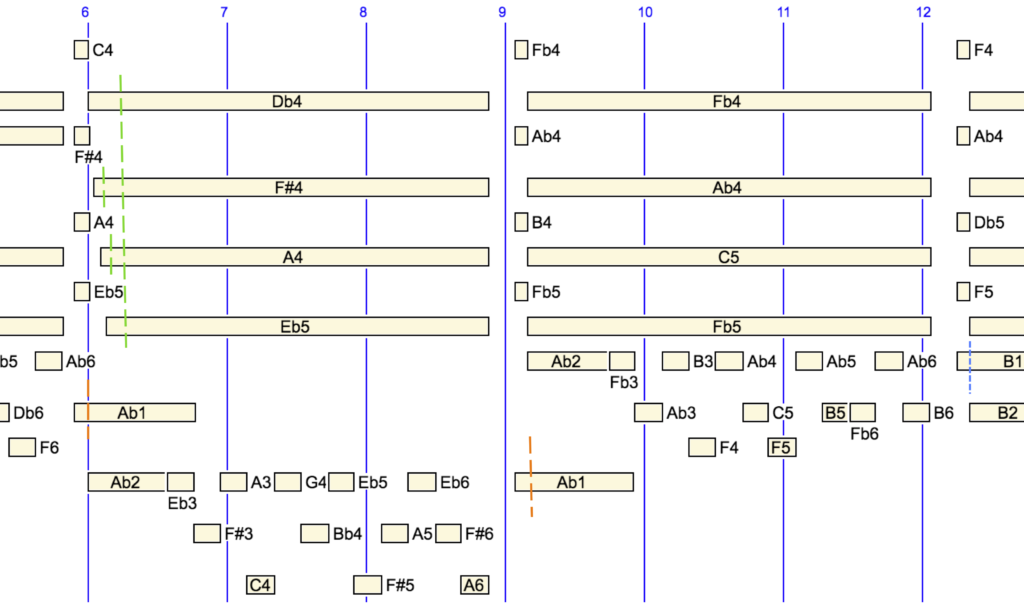
The following is a sound-object graph of measures #20 to #21 on which the bounderies of intervals in tied notes are marked with dashed lines. The bounds of "Ab1& … &AB1" (red colour) are self-explanatory when compared with the musical score shown above: each occurrence is an instance of "{1/8, Ab1&} &Ab1".
Symbolic durations can be checked against physical time: since the tempo is 13/10, the first part has a physical duration of 1/8 x 10 / 13 = 0.09 seconds and the second part 10/13 = 0.77 seconds.
Measures #20-21 of Liszt's 14th Hungarian Rhapsody on a sound-object graph
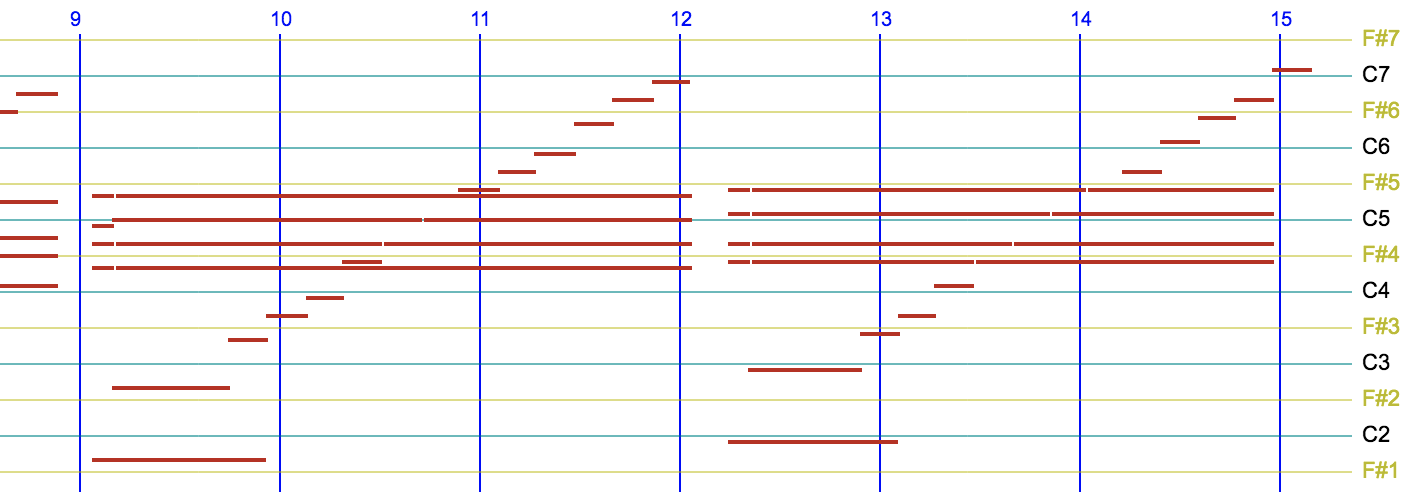
At the end of measure #21 the beginning of the note "B1&" is linked to its occurrence "&B1" in measure #22. The boundary is marked by a dashed blue line. The piano roll of measures #21-22 shows this connection of "B1":
Measures #21-22 of Liszt's 14th Hungarian Rhapsody on a piano roll
Liszt's 14th Hungarian Rhapsody interpreted by the Bol Processor on a Pianoteq physical-model synthesiser Source: ManWithNoName in the MuseScore community
Arpeggios
Arpeggio on chord "{Db, Gb, Bbb, Eb}" "Bbb" is interpreted as "A".
The green dashed lines belong to the polymetric expression {1/4,Db4& Gb4& A4& Eb5&}{7/2,&Db4,&Gb4,&A4,&Eb5}, the interpretation of an arpeggio on the chord at the beginning of measure #20. This interpretation is constructed when importing MusicXML files — see the PHP code in the file "_musicxml.php".
A short sequence "Db4 Gb4 A4 Eb5" (duration 1/4 beat) is played before the chord "{Db4, Gb4, A4, Eb5}" whose duration is set to 7/2 beats. Each note in the sequence is tied to its occurrence in the chord.
A clear illustration of the use of tied notes and undetermined rests is a short musical phrase borrowed from a tutorial by Charles Ames, a pioneering designer of composition algorithms. The phrase is supplied as a musical score but its interpretation requires a careful analysis of the musical structure, resulting in the following Bol Processor score:
To make things clear we need to look at the score in common music notation, divide it into blocks associated with variables, and finally write a grammar "-gr.Ames" to build the structure. Below are details of the analysis process and the resulting graphs of sound-objects and piano roll:
In this grammar, an undetermined rest has been written as "…". In its current version, the Bol Processor console no longer recognises the Unicode symbol for ellipsis "…". Therefore, it is automatically converted it to "_rest" by the PHP interface.
Undetermined rests are a powerful feature of polymetric expressions used to avoid tedious calculations. The polymetric expansion algorithm computes (symbolic) durations that produce the least complex expression. Read more in the Polymetric Structures tutorial.
Tied notes are exactly the ones indicated by links on the musical score. The sound rendering is:
Rendering of "-gr.Ames" with metronome mm = 60
Error tracing
The construction of suitable time intervals for tied notes depends on the matching of pairs — e.g. "A4&" followed by "&A4" — in the Bol Processor score. Some pairs may remain incomplete for one reason or another:
The musical item has been split into chunks, using the PLAY safe (instead of PLAY) option to speed up computation, and the two parts belong to separate chunks;
An error in the imported MusicXML score;
An error in the algorithm — increasingly rare.
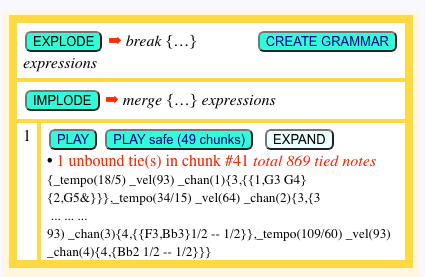
Unbound tie(s) signaled in a chunk
Case (1) is limited by the method for chunking items: each chunk is designed to contain the same number of start and end ties. However, this is not guaranteed because the chunks are limited in size.
Failure to balance ties is indicated below the PLAY safe button (see image).
Errors are shown in colour on the track being played.. These may not cause any noticeable changes in performance. However, we recommend that you report any incorrect data to the designers.
Below is an example of an error in a MusicXML score of Beethoven's Fugue in B flat major. A tie starts at note "Db5" (MIDI key #73) at the beginning of measure #573 (part 2), but it ends nowhere:
Measures #573 to 575 (part 2) of Beethoven's Fugue in B flat major, with a never-ending tie starting at "Db5"
Read the MusicXML score fragment to check for this inconsistency. There are other inconsistencies in this score, such as a slur starting on note 'C4' of measure #646 (part 3) that does not end. This makes it difficult to interpret the slurs as legato.
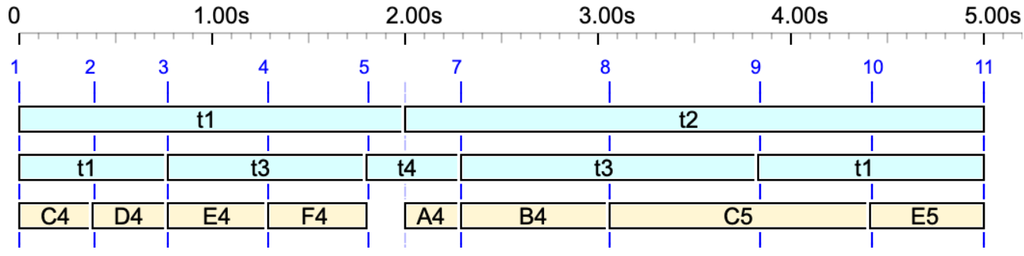
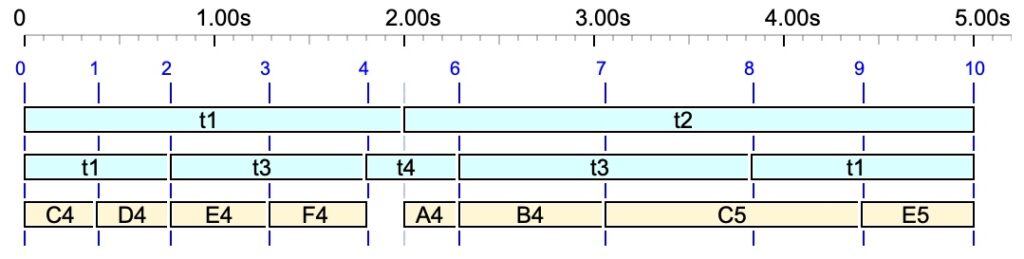
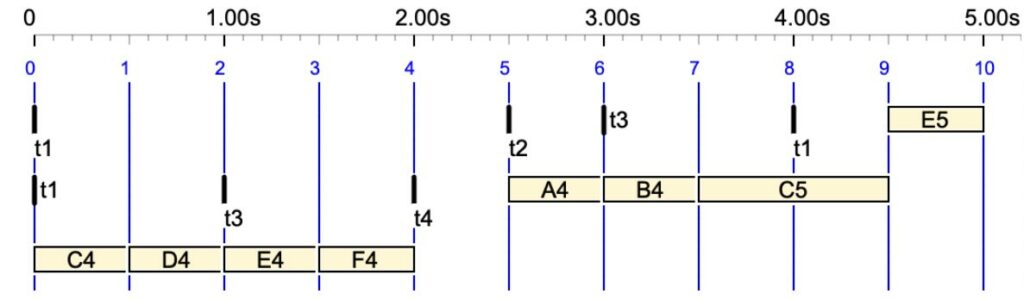
The following is a simple grammar illustrating the use of time patterns in smooth time. Whereas striated time is filled with (regular or irregular) pulses, smooth time does not involve counting.
In this grammar, "t1", "t2" etc. are the time patterns arranged in such a way that they define a structure of (irregular) "beats" on which notes "C4", "D4" etc. will be located.
A sequence of simple notes ‘C4’, ‘D4’,…, arranged against a lattice of time-objects ‘t1’, ‘t2’,…, resulting in an irregular "beat" structure in smooth time.
Time flexibility in Bol Processor is not the effect of arbitrary numerical functions. This flexibility stems from a time structure — Xenakis’ (1963) structure temporelle — that is deeply interwoven with the syntactic description of music.
If striated time is selected, the same structure will be displayed as shown below:
The same sequence of notes in striated time. In this case, time-objects ‘t1’, ‘t2’, etc., have null durations.
Some time patterns were used in Andréine Bel's choreographic work: Shapes in Rhythm.