The polyrhythmic piece "765432" composed by Andréine Bel for her CRONOS dance production (1994) illustrates the use of undetermined rests. Six dancers were on stage: Suresh Shetty, Smriti Mishra, Olivier Rivoirard, Vijayshree Chaudhary, Arindam Dasgupta and Andréine Bel.
In this grammar, "SUB1" indicates a substitution that only needs to be performed once. Using it to replace "SUB" saves computation time.
Glyphs "…" are undetermined rests, i.e. silences whose duration is a priori unknown and will be precisely calculated by the polymetric expansion algorithm.
The whole structure is based on regular arithmetic divisions. For example, Suresh moves at "speed 7", Smriti at "speed 6" and Olivier at "speed 5".
"CR47" and "C46" are patches from the Roland D-50 synthesiser.
ORD GRAM#10[1] Canon --> Twist Walk Stretch Bend Jump Turn GRAM#10[2] Twist --> Sm Tik Tik Tik Tik Tik Su Tik Tik Tik Tik Ol Tik Tik Tik Ar Tik Tik Vi Tik An GRAM#10[3] Walk --> Sm Su Tik Ol Tik Tik Ar Tik Tik Tik Vi Tik Tik Tik Tik An Tik Tik Tik Tik Tik GRAM#10[4] Stretch --> Twist GRAM#10[5] Bend --> Walk GRAM#10[6] Jump --> Twist GRAM#10[7] Turn --> Walk
SUB1 GRAM#11[1] SuCycle7 --> Su Tik Tik Tik Tik Tik Tik GRAM#11[2] SuCycle6 --> Su Tik Tik Tik Tik Tik GRAM#11[3] SuCycle5 --> Su Tik Tik Tik Tik GRAM#11[4] SuCycle4 --> Su Tik Tik Tik GRAM#11[5] SuCycle3 --> Su Tik Tik GRAM#11[6] SuCycle2 --> Su Tik GRAM#11[7] SuCycle1 --> Su GRAM#11[8] SmCycle6 --> Sm - - - - - GRAM#11[9] SmCycle5 --> Sm - - - - GRAM#11[10] SmCycle4 --> Sm - - - GRAM#11[11] SmCycle3 --> Sm - - GRAM#11[12] SmCycle2 --> Sm - GRAM#11[13] SmCycle1 --> Sm GRAM#11[14] OlCycle5 --> Ol - - - - GRAM#11[15] OlCycle4 --> Ol - - - GRAM#11[16] OlCycle3 --> Ol - - GRAM#11[17] OlCycle2 --> Ol - GRAM#11[18] OlCycle1 --> Ol GRAM#11[19] ViCycle4 --> Vi - - - GRAM#11[20] ViCycle3 --> Vi - - GRAM#11[21] ViCycle2 --> Vi - GRAM#11[22] ViCycle1 --> Vi GRAM#11[23] ArCycle3 --> Ar - - GRAM#11[24] ArCycle2 --> Ar - GRAM#11[25] ArCycle1 --> Ar GRAM#11[26] AnCycle2 --> An - GRAM#11[27] AnCycle1 --> An
SUB1 GRAM#12[1] Su --> {1,do4-} GRAM#12[2] Sm --> {1,mi4-} GRAM#12[3] Ol --> {1,sol4-} GRAM#12[4] Vi --> {1,do5-} GRAM#12[5] Ar --> {1,mi5-} GRAM#12[6] An --> {1,sol5-} GRAM#12[7] Tik --> {1,do7-}
The following output was recorded on a Roland D-50 synthesiser.
This performance was part of the choreographic work CRONOS performed at the National Centre for the Performing Arts (Mumbai, India) and the Shri Ram Center (Delhi) in October 1994. An excerpt is shown from 4mn 50s to 5mn 10s:
The following is a simple grammar illustrating the use of time patterns in smooth time. Whereas striated time is filled with (regular or irregular) pulses, smooth time does not involve counting.
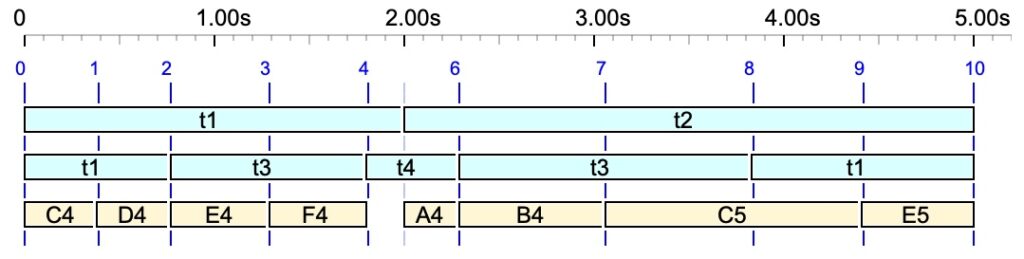
In this grammar, "t1", "t2" etc. are the time patterns arranged in such a way that they define a structure of (irregular) "beats" on which notes "C4", "D4" etc. will be located.
A sequence of simple notes ‘C4’, ‘D4’,…, arranged against a lattice of time-objects ‘t1’, ‘t2’,…, resulting in an irregular "beat" structure in smooth time.
Time flexibility in Bol Processor is not the effect of arbitrary numerical functions. This flexibility stems from a time structure — Xenakis’ (1963) structure temporelle — that is deeply interwoven with the syntactic description of music.
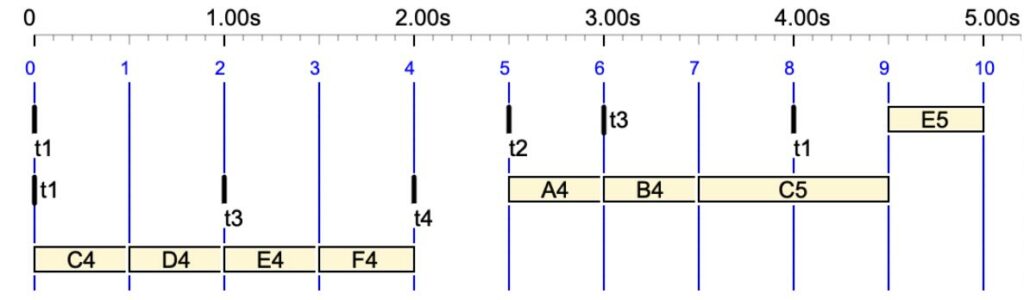
If striated time is selected, the same structure will be displayed as shown below:
The same sequence of notes in striated time. In this case, time-objects ‘t1’, ‘t2’, etc., have null durations.
Some time patterns were used in Andréine Bel's choreographic work: Shapes in Rhythm.
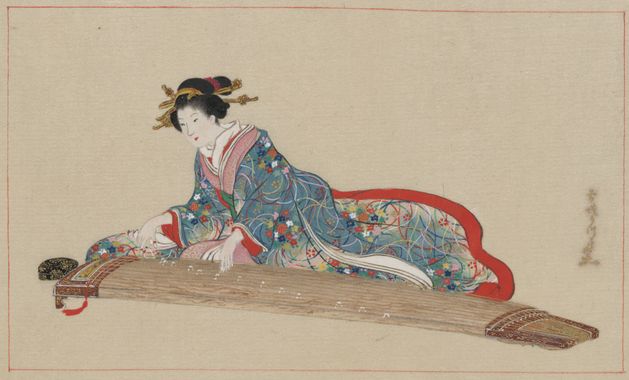
Lady playing koto. Public domain, source: Wikimedia
This grammar (namely “-gr.koto3") is an improvisation model running on the Bol Processor BP2 connected to a Roland D-50 synthesiser. The choice of synthesiser was crucial for a good reproduction of the sound imitating a Japanese koto.
The underlying model (SUB grammar) is a one-dimensional cellular automaton using substitution rules: at each step of the computation, a set of randomly selected rules is applied to the work string. Conversely, in a RND grammar, a new rule would be selected each time the previous one was applied. For more details, see a presentation of "-gr.koto3" on the Bol Processor ‘BP3’ and its PHP interface page.
In subgrammar #2 we see a competition between constructive rules, such as gram#2[8] and gram#2[11] which increase the length of the work string, and destructive rules, such as gram#2[10] and gram#2[15] which decrease its length.
The weight of gram#2[12], initially set to 100, decreases by 10 each time it is applied, until the rule is invalidated.
SUB
gram#1[1] <100> S --> _vel(127) _volume(40) X X X X Y X X X X Y X X X X
gram#1[2] <K9> X --> a  [Weight is controlled by K9, see Interaction]
gram#1[3] X  --> b
-----
SUB
gram#2[1] Y --> Y
gram#2[2] #? ?1 --> #? ?1  [Keep leftmost symbol]
gram#2[3] ?1 #? --> ?1 #?  [Keep rightmost symbol]
gram#2[4] } --> }
gram#2[5] , --> ,
gram#2[6] <5> a --> a
gram#2[7] <30> a b a --> a a
gram#2[8] <100> #({) a b a --> {5,a c b,f f f - f}
gram#2[9] <5> b --> b
gram#2[10] <30> #({) b a b #(}) --> b b
gram#2[11] <100> #({) b a b --> {3,b a b c b a,f a f}
gram#2[12] <100-10> #({) #a b #(}) --> #a c b
gram#2[13] c c c -->  c a c
gram#2[14] c a c --> b a b
gram#2[15] <50> ?1 ?1 ?2 ?3 ?4 ?4 --> ?2 ?3
gram#2[16] <K9> ?1 ?1 ?1 --> ?1
gram#2[17] <K9> ?1 ?1 --> ?1
-----
SUB
gram#3[1] <40> Y --> <<f>>
gram#3[2] <50> Y --> <<chik>>
gram#3[3] <1-1> ? #? --> ? Silence _script(MIDI send Continue) #?
gram#3[4] <50> Silence --> - - - - -
gram#3[5] <15> Silence --> - - - -
gram#3[6] <8> Silence --> - - -
gram#3[7] <8> Silence --> - -
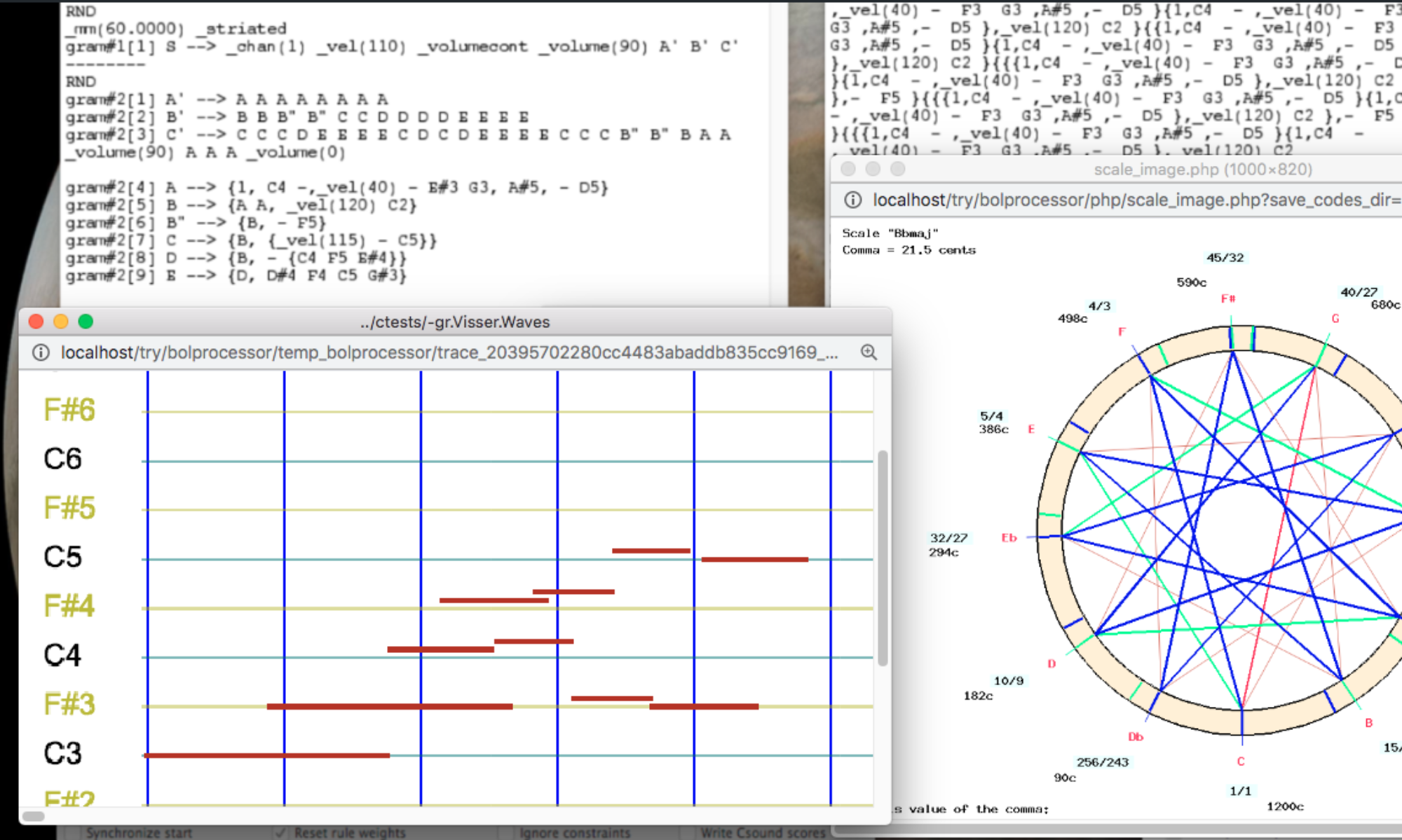
Rules in subgrammar #2 are applied until none of them can be a candidate. Then the rules in subgrammar #3 are applied, producing the out-time sound-objects <<f>> (a bass note) and <<chick>> (a chord).
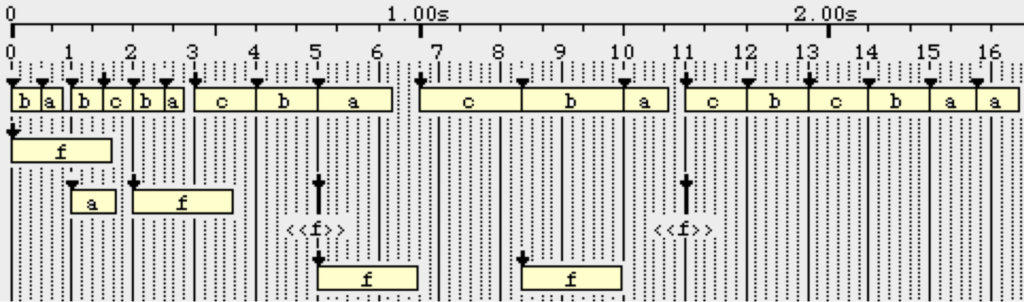
The sound objects "a", "b", "c", "f", "chick" are defined in a sound-object prototype file called "-so.koto3". Some of them have specific properties that force a relocation to satisfy topological constraints. For example, "a" must maintain continuity with the preceding object (as shown in the image), which may cause it to be moved into the past.
The time-setting algorithm takes into account all the constraints to create a piece that may not fit exactly into the metronomic beat pattern. Below is an example of the final piece created using this grammar (played 3 times):
A piece generated by "-gr.koto3" played on a Roland D-50 synthesiser
In this grammar, parameter K9 is set to follow the position of a controller (e.g. the pitchbend or a pedal on the D-50), assigning a value from 0 to 100. This value is the weight of the rules gram#1[2], gram#2[16] and gram#2[17]. The higher the weight, the more "a" and the less "b" in the string; in addition, the final string becomes smaller due to the higher weight of the destructive rules gram#2[16] and gram#2[17].
During the improvisation, the work string is played at each step of its transformation. The end of the transformation is indicated by the <<f>> and <<chick>> sound-objects.
Below is an example of improvisation played in real time MIDI:
An improvization of "-gr.koto3" produced by BP2.9.8 and played on a Roland D-50 synthesiser
The following video illustrates the grammar at work on BP2.9.8 — unfortunately with a GeneralMIDI "koto" sound:
Let us take a look to the ideas and historical background of BP2. At the end of the fifties the linguistic scientist Noam Chomsky wrote his famous book 'Syntactic Structures'. It was an attempt to generalize the structure of language in a system of rewrite-rules, so called 'grammars':
Sentence --> NP + VP NP --> T + N VP --> Verb + NP T --> The N --> man, ball.. Verb -> hit, took…
When we computerize such a grammar and we give the command 'derive' we should see that Sentence became NP + VP, NP became T + N, VP became Verb + NP etc. At the end we see that N became 'man' and Verb became 'hit'. No further derivation is possible. The words 'man', 'hit' are therefore called 'terminal symbols'.
After derivation of Sentence we should read: the man hit… (or whatever). Such a Chomsky 'grammar' can be seen as a set of rules to generate well-formed English sentences.
You can read a rule as 'X --> Y'. It gives the 'instruction' to rewrite X as Y (X becomes Y). Maybe you can imagine already that such a grammar-system can also apply to musical syntax.
Let us therefore compare the Chomsky-example with this BP2-example:
S(entence) --> X Y X --> Motif1 Y --> Motif2 Motif1 --> C3 Motif2 --> D3
After derivation we should hear the terminal symbols C3 D3.
The main difference between the 'Chomsky-grammar' and a BP2-grammar is that a BP2-grammar is exclusive. It is a formalisation of one particular piece of music. Chomsky-grammars try to generalize language as a whole.
At the other hand you can in BP2 'formalize' the sonata-form:
S --> Sonata Sonata --> Theme1 Theme2 Development Coda Theme1 --> Notes1 Theme2 --> Notes2 Development VariateNotes1 VariateNotes2 Coda --> HalfTheme1 HalfTheme2
When we derive the Sonata, we shall hear nothing, because there are no terminal symbols i.c. 'real notes', like C3, D2, etc. So let's finish the Sonata:
Note that we use for VariateNotes1 and VariateNotes2 the tools _transpose(2) and _retro.
_transpose(x) transposes up or down at a given interval: _transpose(2) (two semitone up), _transpose(6) (six semitones up) _transpose(-7) (seven semitones down). You can also use values like _transpose(0.2).
The _retro tool stands of course for 'retrograde'. It turns the symbols backwards. You can read commands like _transpose and _retro as 'transformers'.
Well, let's listen to this Sonata! Select S and 'Play selection':
When you write a variable like Theme1 or VariateNotes2 or Sonata (yes, these are variables until you give them a 'content'), start the variable with a capital and don't use empty spaces between symbols. So Not 'sonata', but 'Sonata'. Not 'n1', but 'N1', not 'my piece', but 'Mypiece'.
You can listen to every stage or level of your piece at every moment. So, instead selecting S, you can select Notes1 or Development, or G3… In other words, you can listen to every compositorial detail! Try to make your own Sonata now!
Note that the example-Sonata is also a description of the actual piece. That is to say that the first half is the description, the second half is the 'realisation' of the description. This approach means that a description can also have a 'subdescription', while the subdescription can have… indeed, a subsubdecription. So BP2 is the perfect tool for hierarchical descriptions of musical structures.
Select candidate rules in a generative grammar randomly and apply them to the workstring until there is no more candidate rule.
Problem
To stop the process it is necessary to scan the entire grammar and make sure that there is no more candidate rule. Each time the workstring has changed, the "candidate / non candidate" status of each rule in the grammar may vary. Since scanning "N" rules in the grammar is time consuming, it is preferable to do it only after "maxtry" unsuccessful attempts to find a candidate. The problem investigated here is to find a minimum "maxtry" making it almost sure that there is no more candidate.
Related problem
Sometimes a selected rule must be applied repeatedly until it is no more candidate. If the position of derivation in the workstring is random then the problem amounts to selecting one amongst "candidate" or "non candidate" positions in a set whose cardinal "N" is the length of the workstring.
To summarize…
The two examples above may be abstracted to the repeated random selection of an item in a set containing N items. The algorithm of a general procedure is given below. The problem is to evaluate "maxtry" so that in the worst case the probability of heuristic [2] being true is greater than a given probability "p".
ScanSet()
    Return number of candidate items;

FoundItem()
    Select an item randomly;
    Return "yes" if item is candidate, "no" otherwise;

Procedure()
    Start:
    nb_candidates = ScanSet();
    if (nb_candidates = 0) exit;
    if (nb_candidates = 1)
        Use candidate item found;
        Go to Start;
        [Heuristic 1: if there was a unique
        candidate item then next time there
        should be less than two.]
    Evaluate maxtry;
    Again:
    Repeat with try = 1 to maxtry
        if (FoundItem()) then
            Use candidate item found;
            Goto Again;
            [Heuristic 2: if try < maxtry
            there may still be candidate items.]
    Go to Start;
Solution
Let "k" be the number of candidate items. The probability to find a candidate item after (maxtry-1) unsuccessful attempts is:
1 - (1 - k/N)^maxtry
If k = 1 then the Scan() procedure will find the unique candidate item. Therefeore the worst case is k = 2 and the condition is:
1 - (1 - 2/N)^maxtry > p
yielding:
maxtry > Log(1 - p) / Log(1 - 2/N)
i.e., if 2/N is much smaller than 1,
maxtry > - N/2 Log(1 - p)
In Bol Processor, we imposed p = 0.64 so that maxtry > N/2.
Indeed, this method is only valid if items have equal weights.
The complete set of preludes and fugues by J.S. Bach known as The Well-tempered Clavier, books II and II, interpreted with presumably "optimal" tuning schemes …
In Computer Music Journal 22,2 (1998) page 63, Dutch composer Visser commented:
I think that the development of more and more visual stuff curtails the possibility of "thinking in your chair." Sometimes I develop grammars, not at the computer, but sitting with a pencil and paper. With programs [other than BP2] this is not possible: you must sit in front of the computer. The difference lies in the type of attention that each software environment demands on the part of the composer, and indeed reflects on the way s/he thinks about music.
The following is a presentation and discussion of some examples written on the Bol Processor by Harm Visser in 1998. All examples shown on this page are available in the sample set bp3-ctests-main.zip shared on GitHub. Follow the instructions on the Bol Processor ‘BP3’ and its PHP interface page to install BP3 and learn its basic operation. Download and install Csound from its distribution page.
In the same way as it deals with superimposed sequences, the polymetric expansion algorithm computes equal symbolic durations between beat separators notated ‘•’ — namely, the period notation. A note sequence in period notation and the context-free grammar from which it is derived are shown below. In this example, the beats contain an increasing number of notes, resulting in an accelerating movement.
S --> _vel(60) A B _vel(65) C D _vel(70) E F _vel(75) G _vel(77) H _vel(80) I _vel(85) J _vel(87) K _vel(90) L A --> E2 • B --> D2 A C --> B2 B D --> G2 C E --> F#2 D F --> A#2 E G --> C2 F H --> G#2 G I --> A2 H J --> D#2 I K --> C#2 J L --> F2 K
The "_vel" operator is a velocity control that produces a gradually increasing volume of the piece. This grammar produces the following "score":
and the following piano-roll representation with the sound example on a Pianoteq synthesiser:
Serial tools
The following grammar produces a 10-minute piece of music with only 12 rules and 3 notes (C3, D4, F#3). It is an illustration of Visser's motto: "composing with a pencil and paper".
The rhythmic complexity is the result of the use of polymetric expressions: the superimposition of sequences listed between curly brackets {} and the resizing of "beats" thanks to the period marker '•'.
The length and complexity of the piece is achieved by using mutually recursive rules. For example, rule gram#2[2] produces "Mel1" which is rewritten by rule gram#2[1].
Three "serial tools" are used:
_transpose(n) shifts the following sequence up by n semitones
_rotate(x) rotates the following sequence by x units
_keyxpand(basenote, ratio) multiplies melodic intervals by ratio relative to the basenote. For example, _keyxpand(C4, 2) would replace the sequence D4 E4 F4 with E4 G#4 Bb4. This tool is applied recursively to the fields of a polymetric expression.
➡ This grammar and the next ones were designed with an old version of _rotate(). For a correct rendering, check the "Ignore field separators" option in the SERIAL TOOLS section of the settings. (Read more here)
Note that all the subgrammars are headed with "ORD", which means that the rules are applied in order rather than randomly. Thus, this grammar produces a unique piece of music, as is the case with all examples composed by Harm Visser. The only stochastic element in this piece is the velocity, which can vary between 60 and 100 due to the performance controls _vel(80) _rndvel(20).
The sound output was played on a Pianoteq synthesiser:
Trills
The following grammar produces trills that take advantage of tempo variations and continuous velocity variations:
ORD gram#1[1] S --> _script(Wait for space) _staccato(50) Shapes gram#1[2] Shapes --> Part1 {_rotate(20) _transpose(2) Part1} Part2 Part3 {_tempo(0.7) Part3} Part4
“Shapes” by Harm Visserr (1998) played on a Pianoteq physical-model synthesiser
Waves
Harm Visser had been asked to compose a piece à la Debussy with rubato rhythms giving the impression of waving movements. We had expected him to use the "_tempo()" tool with floating point values (or integer ratios) as arguments.
In fact he did not… In the following grammar, only the markers "1/2", "1/4" indicate regular speed changes applied to an entire section. The waving effect is produced by a clever use of (self-embedded) polymetric expressions. As the composer indicated: "It builds on the idea of embedding: {5, A B {3, A B {2, A B C D} C D} C D}."
The Bol Processor score produced by this grammar can be found here. Please note that this small file contains time, pitch and velocity data for the entire three-minute piece.
The following is a rendering of the piece for solo piano on a Pianoteq synthesiser:
“Waves” by Harm Visser (1998) played on a Pianoteq physical-model synthesiser
In the final version, the composer assigned parts to a different MIDI channel that controlled a physically modelled synthesised saxophone (which he had designed himself):
“Waves” by Harm Visser (1998) played on physical-model synthesis saxophone and piano
Fractals
Harm Visser sent this grammar with the following comment (1998):
It is completely based on a function that I have made in PatchWork. Take 3 notes and take their intervals to transpose. The result is a kind of 'autotranspose'. You get a 'fractal' - the idea of the famous Von Koch-curve. The next step is making a recursive loop, so that you can set the level of recursion. The number of notes grows exponential: 3 9 27 81 243 etc. Of course you can do the same with rhythm-values. This grammar is a BP2-version of exactly the same idea. It has 4 recursion levels. (You might also say 'depth'. It is in fact a 'copy' of the PW-function). That's why S --> L4 (level 4) (number of notes 243). The difference between BP2 and PW is that the function in PW is fixed, which is not the case in BP2. I can easy make subtle changes (deviations) in the process. I can 'break in', so to speak. In his grammar I have set a comma between M10 and M11 and set M11 on the sax. The result is a polymetric canon!
The following version is with piano solo on a Pianoteq synthesiser. The version with saxophone is unfortunately missing. It could be generated by playing the (type-1) MIDI file Visser8.mid on a synthesiser and assigning MIDI channel 9 to a saxophone sound.
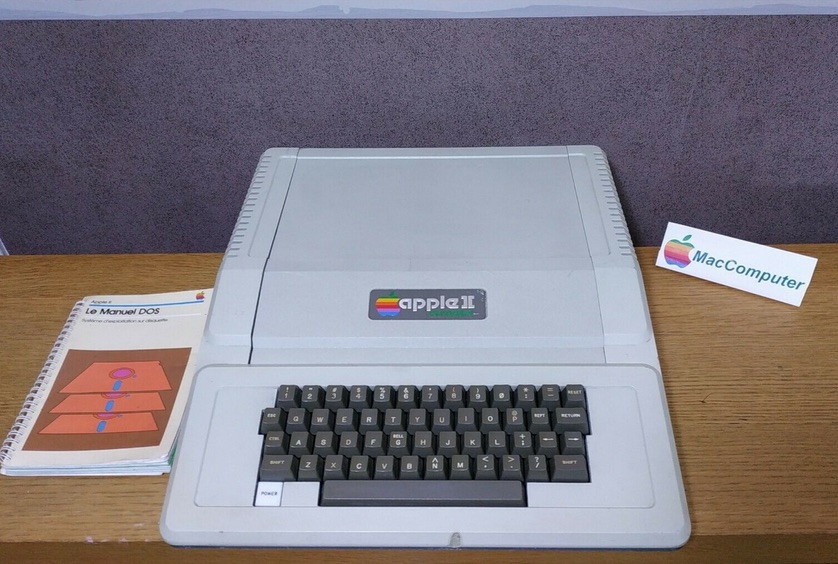
In a previous article we explained how to install and run the Bol Processor ‘BP1’ on a virtual Apple IIe. BP1 is the earliest version of Bol Processor implemented on Apple II computers in 1981, as a requirement for Jim Kippen’s fieldwork in India — see At the heart of Indian rhythms and their evolution.… We will now show its operation in a real musical context: the modelling of a 'theme-and-variations' piece of drumming (called q‘aida) taught by Ustad Afaq Husain Khan, an expert in the Lucknow style of tabla in India.
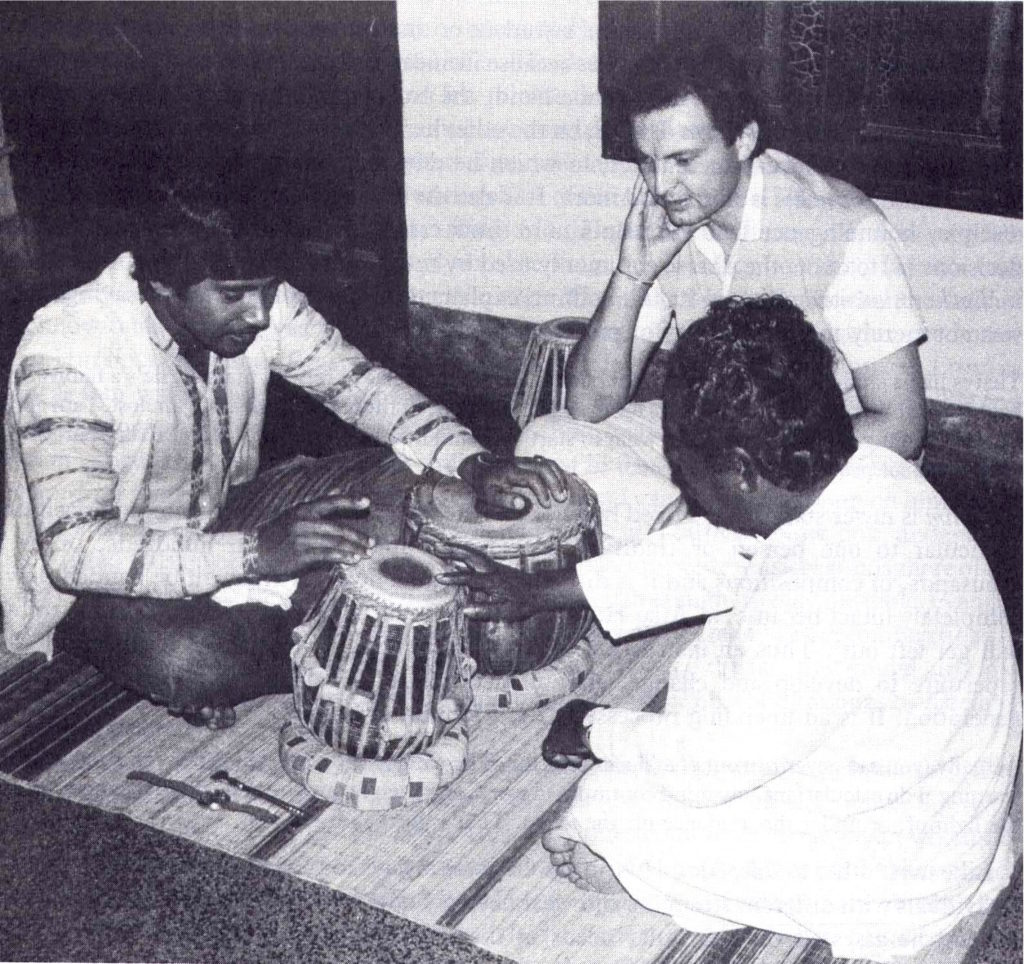
Pankaj Chowdhury, Jim Kippen, Afaq Husain Khan (c. 1982)
A large part of the tabla repertoire is improvisation. Any sequence of strokes can be seen as a finite string of symbols whose organisation is related to an implicit formal system. Automatic sequences (i.e. sequences generated by finite-state automata) have properties that place them somewhere between periodicity and chaos, but closer to periodicity. Since both strict and approximate periodicity are essential features of music, it is realistic to think that sequences of musical events can be adequately represented by automata or formal grammars. In other words, the most fundamental reason for us to consider formal language models as relevant models of music lies in properties that are intrinsic to music, rather than in analogical links between music and natural languages.
The theme of this q‘aida is the following sequence:
dhatidhage
nadhatrkt
dhatidhage
dheenagena
dhatidhage
nadhatrkt
dhatidhage
teenakena
tatitake
natatrkt
tatitake
teenakena
dhatidhage
nadhatrkt
dhatidhage
dheenagena
Theme of q‘aida associated with grammar Q2.7
Strokes on the drum — bols like 'dha', 'ti', 'ge', 'na'… — belong to the (terminal) alphabet of the formal grammar. This sequence should be read linearly from left to right. Each group represents a beat of 4 units ('trkt' is a compound stroke of 2 units). Thus, the theme and its variations are framed on a 16-beat rhythmic model called tintal in North-Indian music.
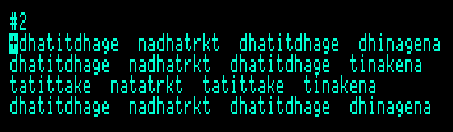
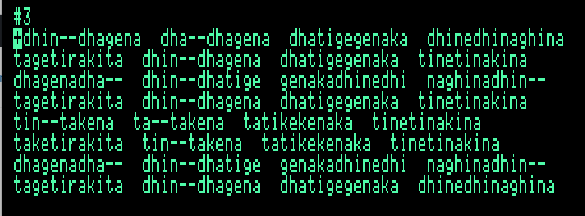
The grammar and examples of this qa‘ida are stored as "Q2.7" on disc "BP-JULY87.DSK" which can be loaded after starting the Bol Processor (BP-PRG.DSK). We recommend that you set the virtual Apple II to maximum speed to save time when reading (virtual) discs! After loading the Q2.7's grammar and data, the theme can be displayed as data item #2:
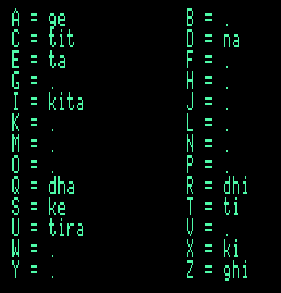
Keyboard mapping for this q'aida
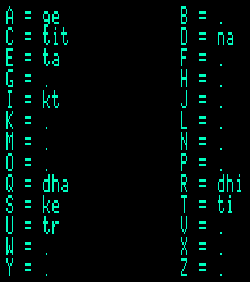
Note that the terminal alphabet used on BP1 is not exactly the same as in the publication. For example, 'dhee' has been replaced by 'dhi', 'tee' by 'ti', substantial changes for readers who prefer a transliteration of Hindustani phonemes to the rendering of syllables in English.
In addition, syllable 'ti' can be rendered as 'tit'. These subtleties are governed by the keyboard mapping, which can be viewed (and modified) by selecting "Alphabet" then "Modify" from the main menu.
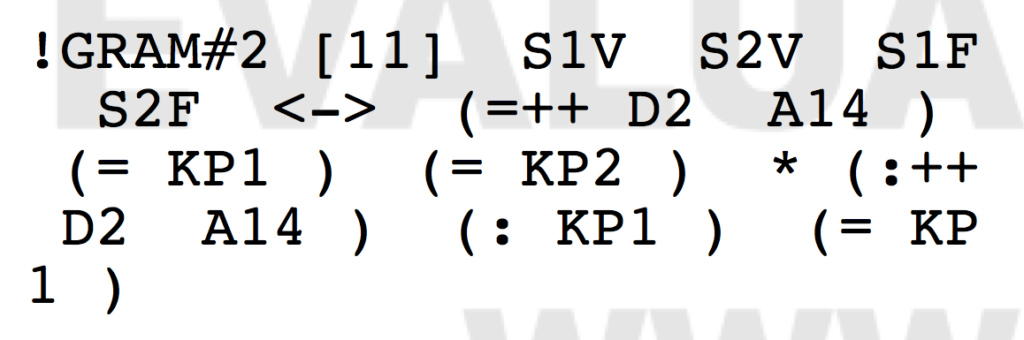
The grammar implemented in BP1 is the same as that shown in Appendix 2 of the publication, except for spelling variants of some bols and different glyphs used to mark patterns - "master" and "slave" markers, see our Pattern grammars article — and the bol density instruction, as explained in a previous article. For example, the rule
The bol density marker "6" is now written as "/6" and "4" as "/4". The plus sign '+' is used as a context marker.
In later versions of the Bol Processor, we created a "_tempo()" tool which is more flexible than bol density. For example, "_tempo(8)" would have the same effect as "/8" in a simple sequence. However, in polyphonic structures, "/8" is an absolute value whereas "_tempo(8)" is relative to the current tempo. This makes it possible to calibrate the durations of several sequences contained in a polymetric expression — see Two Algorithms for the Instantiation of Musical Structures (1994) for details. Furthermore, expressions such as "_tempo(7/4)" and even "_tempo(0.476)" are permitted…
Templates
Subrammar #7 contains the templates of this grammar:
[1] TEM [2] (=+.….….….…+.….….….…+ * (=+.….….….…+) +.….….….…;) [3] (=+.….….….…+.….….….…+ * (=+.….….….…+) +/8+.….….….….….….….…;/4;) [4] (=+.….….….…+.….….….…+ * (=/6+.….….…/4.….…+) +.….….….…;) etc.
These templates are the complete list of patterns produced by (presumably) all variations of the q‘aida. They contain parentheses surrounding reference strings with the "=" marker (displayed as "◆" in BP1), bol density numbers, and arbitrary "+" and ";" symbols used as context in the rule, as explained in the publication. Technically, patterns are similar to regular expressions against which a variation is checked before being parsed by the grammar.
Any grammar that contains patterns and/or bol density figures must be supplemented with templates in order to assess the grammaticality of variations. Fortunately, these templates are automatically generated by the grammar!
Producing items
To create variations based on this grammar, select "Grammars" from the main menu, then go to subgrammar #1, "Edit", and move to rule #2, for example:
<100> S <—> (=+ S64 ;)
This will produce variations of 64 bols as suggested by the name of the variable "S64". Rule #3 would produce variations of 128 bols as suggested by "D128".
Type ctrl-C ([C]ompute). You will be asked to specify the first subgrammar (1) and the last subgrammar (6). For example, if you are starting to compute from a rule of subgrammar #3, it makes sense to specify #3 as the first subgrammar. If a subgrammar lower than 6 is specified as the last, some variables may not be rewritten as strings of terminal symbols. This can be useful for checking sub-processes in the production of variations.
The options offered are A)nalyse, S)ynthesize, D)estroy structure and Q)uit. Select "Synthesize". Say 'no' to "Create templates" and "Systematic tree-search". You may answer 'yes' to "Step by step?" to see all the derivation steps, so you can familiarise yourself with the grammar. Example of a result:
Example of producing a variation based on grammar Q2.7
This is an interesting example: in the third line, the bol density is doubled (8 instead of 4).
You are now offered the option to "Append" the variation to the data set, "Repeat" the production process, "Print" (on the virtual printer), create "More" variations or "Verify" this variation. It is not obvious that the grammar will accept this variation if it is poorly designed. (This is unlikely in this example.) The "Verify" option should quickly end up with "S", the start string, if the variation is correct.
If some variations have been added to the data set, editing Data will display them at the end of the set.
This process of producing variations is called "modus ponens" in expert systems jargon. Variations produced in this way were read by the analyst (Jim Kippen) to the expert musician to check their acceptance as legitimate variations of the q‘aida.
Analyzing variations
Now imagine the expert musician playing a variation that is typed into the data set. It is clear that fast and accurate typing was crucial to this field research… Use keyboard mapping to learn to type at high speed; it is less difficult than playing the drums!
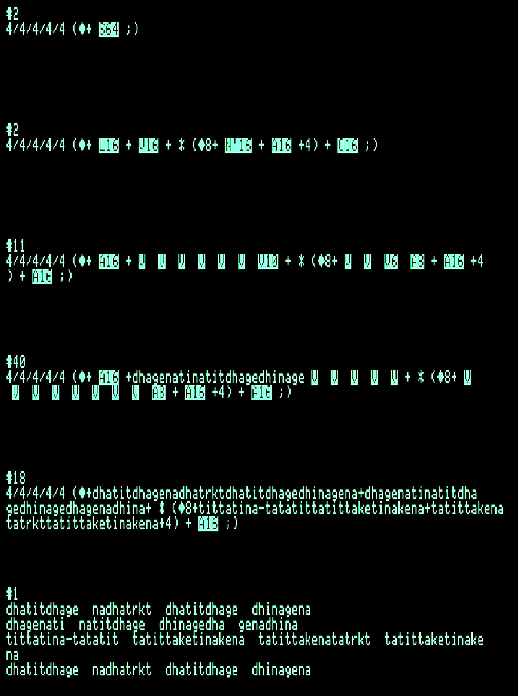
When a variation is displayed in the data set, type ctrl-C for "[C]ompute". Answer 'yes' to "Revise processing?". Now the first grammar is #1 but the last grammar should be #7 so that templates are taken into account. Select "Analyse", say 'no' to "Display probability?" and 'yes' or 'no' to "Step by step?".
If you are analysing step by step, use the right arrow to go forward or the left arrow to go back. The subgrammar currently used for derivations is shown at the bottom of the page, and the index of the latest candidate rule appears at the top. In this way it is possible to visualise all the details of the calculation for the production or analysis of a variation.
You can check the entire data set against the grammar by selecting "Verify grammars" from the main menu.
If the variation matches more than one template, each template is used to parse it. If the parsing is successful with multiple templates, the structure of the piece is ambiguous. This is analogous to parsing the sentence "Mary said John is a liar", which requires the placement of either two commas or a semicolon, with each "template" giving an opposite meaning…
Weights
Currently, in the grammar, all rule weights are set to 100 except for rule #3 of subgrammar #1. We can use the 12 variations in the data set to infer rule weights: each of them is analysed and each rule has its weight increased by 1 unit.
Select "Weights" from the main menu, then "Emulate learning" and "Reset weights to 0". From item #2 to item #13. The last grammar is "7" (as templates are required).
The result can be printed. Note that all weights in subgrammar #6 are set to 100 because it is an "ORD" grammar: no random selection of the candidate rule.
The input of new data sets allowed "learning" from more examples and improving the stochastic model, which would produce more "aesthetically acceptable" variations.
Intermediate alphabet
Accessed from the main menu. This procedure is used to changie the names of variables. This procedure has proved useful in creating grammars that make sense to humans, not just machines…
Creating templates
To check this, it is recommended to quit and reload the current project, as some procedures may have been saved in memory. Load only the grammar, no data, to keep enough free memory.
Select "Grammars" from the main menu, then go to subgrammar #7 (the current templates) and delete it by selecting "Remove from series". (This may not be necessary as the machine never duplicates a template, but it makes things clearer.)
Then create a new subgrammar #7, select "Compute" and "Create templates". You will be asked for the "last grammar defining structures". This choice is very important for the speed of the computation, because the production of templates implies the production of "all variations". If your answer is "6", the machine can work extremely long. Looking at the grammar, we can see that subgrammar 3 is the last to contain structural markers. So the correct answer is "3".
This process takes a long time, even at the highest speed. Its progress is indicated by '+' signs printed on the line below 'WAIT'. Since this grammar produces 21 templates, you have to wait for 21 '+' signs. Fortunately, in most grammars, the generation of templates is done once and for all…
Conclusion
This demo is an attempt to illustrate the use of the Bol Processor BP1 in the early 1980s as an expert system for modelling compositional/improvisational processes in the q‘aida genre of tabla drumming. Of great importance was the development of an editor that facilitated the rapid and accurate writing of bols (representations of drum strokes) and the creation of pattern rules that took into account the implicit syntactic structures of these musical pieces.
Later, the Bol processor was implemented on Macintosh computers. Versions of 'BP2' compatible with system versions up to MacOS 10.14 (Mojave) can be dowloaded from SourceForge.
BP2 reproduces all the procedures of BP1, in particular those described in Kippen & Bel's paper Modelling music with grammars: formal language representation in the Bol Processor (1992). However, its editor is not as sophisticated in terms of pattern editing. Also, the "smart keyboard" option allows terminal symbols to be mapped to individual keys, but the cursor does not "jump" over terminal symbols, variables and reserved words.
BP2 introduced the possibility of polyphonic/polyrhythmic representation. Polymetric structures are an unsurpassed model for representing musical time and, by extension, the structure of "time objects": music, speech, noise, video, robot movements, etc. This model is able to deal with incomplete definitions and performs all terminal time calculations accurately, using integer ratios. The results are simplified to avoid integer overflow and to match the quantization required for real performance.
Current work
A new version of Bol Processor compatible with 64-bit processors on various systems (MacOS, Windows, Linux…) is currently under development. It works with a PHP/JavaScript interface. We invite software designers to join the team and contribute to the development of the core application and its client applications. Please join the BP open discussion forum and/or the BP developers list to stay in touch with the progress of the work progress and to discuss related theoretical issues.
‘BP1’ is the earliest version of Bol Processor implemented in 1981 on Apple II computers… This development was associated with Jim Kippen’s fieldwork in India — read At the heart of Indian rhythms and their evolution.
The name ‘Bol processor’ is analogous to ‘word processor.’ Its development was prompted by the need to type rapidly and accurately transcriptions of North Indian tabla drum's sets of variations, typically expressed in semi-onomatopoeic syllables: bols. The solution lay in the customization of the computer’s keyboard, assigning a single key to every bol.
Bols are onomatopoeic representations of strokes on the drum, or the gestures and movements of Kathak dancers. For instance, ‘dha’ would be assigned to the ‘Q’ key instead of typing ‘d’, ‘h’, ‘a’. With this device, it became possible to type variations of tabla compositions near the speed they were played or recited. This also eliminated the misspelling of symbols and rendered a formal analysis feasible. The next stage of development was triggered by the need for a “search and replace” feature in the Bol Processor. We soon discovered that modelling the theme-and-variations construction involved more than replacing variables with chunks of bols. This construction (qaida in Urdu) was based on implicit rules that could be rendered explicit using formal grammars. Thus, Bol Processor became an expert system able to model the production (modus ponens) of strings of symbols as well as the analysis (modus tollens) of variations created by musicians to assess their compliance with the formal grammar. Furthermore, the repetitive nature of musical structures led to the implementation of pattern grammars. This approach has been described in Kippen and Bel’s Modelling music with grammars: formal language representation in the Bol Processor (1992).
It appeared that keyboard mapping was not possible in 1981 using the then Apple Writer II word processor. Moreover, in a way it was very fortunate because it prompted us to design a tool which for 40 years has gone way beyond the objective of a customized keyboard. We planned to create a bicycle but in the end it turned out to be a spaceship!
Recently we discovered with delight that BP1’s program, source code, compiler and data floppy disks used for this project had been safely stored. After more than 37 years these diskettes were easily copied and transferred to a hard disk in the DSK format with the kind support of Philippe M., a collector of old computers and software in Marseille. This means that BP1 can be run on any Apple II emulator running on MacOS, Linux, and Windows machines.
The source code could even be recompiled to run under better conditions, notably exploiting memory space beyond the original 64 kilobytes – indeed, kilobytes! Currently, even setting the RAM of the virtual machine at 1Mb does not increase the memory space for BP1.
This first article is about installing an emulator and editing grammars/data in BP1. The next one explains the full usage of this program in its original musical context.
➡ For those unfamiliar with the project, Bol Processor (BP2) also exists as a Mac application for system versions up to MacOS 10.14 (Mojave) — read the home page of this site. We are currently developing a new version compliant with MacOS, Linux, and Windows with both 32-bit and 64-bit Intel processors.
Choosing an emulator
So far we have run BP1 on the following emulators:
Given that all these emulators proved satisfactory, we assume that any emulator creating an Apple IIe or Apple IIc virtual machine will do the job. You may therefore install as well:
The setup of any Apple II emulator is roughly the same procedure. In this article we describe it for VIRTUALII with a "limited license" (costing less than 20 USD). Other emulators listed above are free of charge.
Installing a ROM
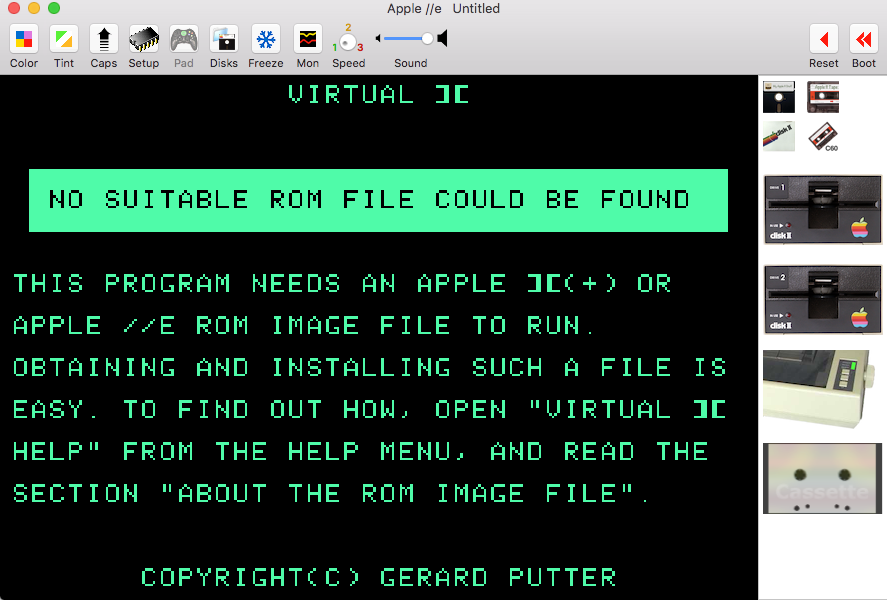
In Apple II computers, the core system was stored in a solid device (Read-Only Memory) which made it almost impossible to clone these machines. On the virtual Apple II created by an emulator, the ROM is a piece of software which (for commercial reasons) cannot be supplied along with the emulator. You need to download it from an authorized site. The good news is that this is free of charge.
Download and unzip "apple2_roms.zip". In the "apple2_roms" folder, "apple_iie_rom.zip" and "apple_iic_rom.zip" need to be unzipped to produce APPLE2E.ROM and APPLE2C.ROM. Both are suitable to BP1. No need to create an older Apple II because you would miss 80-column display and upper/lower cases!
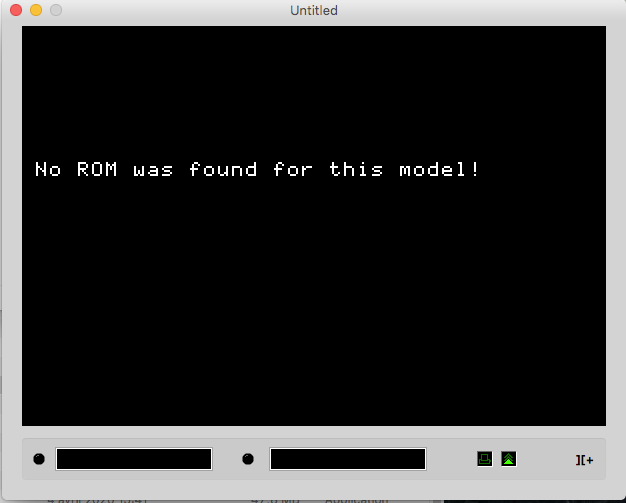
Starting VIRTUALII on MacOS makes it clear that a ROM file is missing:
The ROM file(s) you downloaded shall be placed in a specific folder. Select "Show ROM folder" in the "File" menu to open it, then drag APPLE2E.ROM into this folder and restart the emulator. Include APPLE2C.ROM if you plan to emulate an Apple IIc.
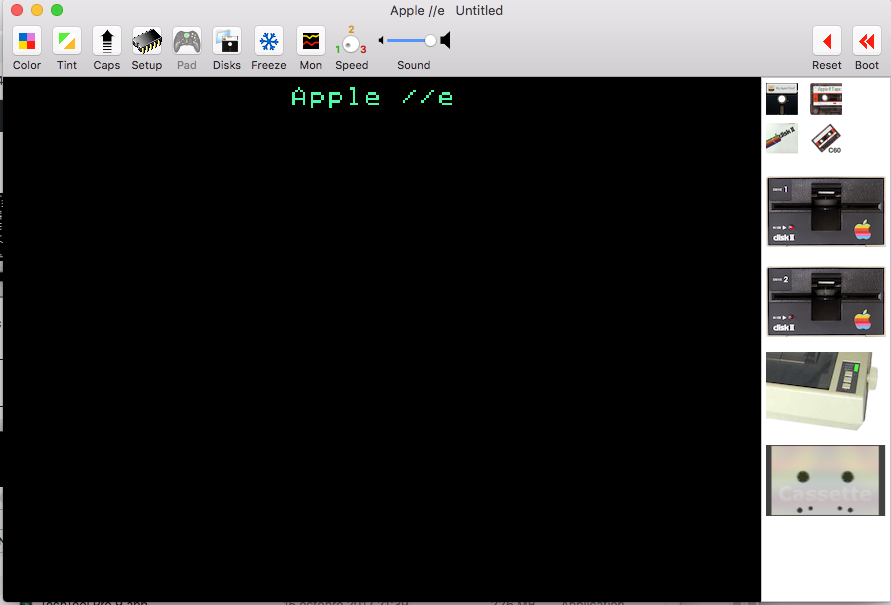
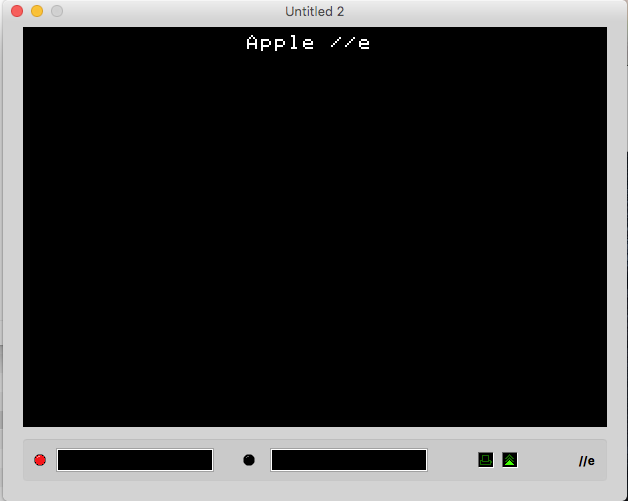
You may need to select "Create a New Machine" in the "File" menu until you get the true Apple IIe startup screen:
Starting an Apple IIe on VIRTUALII
CATAKIG's blank screen
The same procedure applies to CATAKIG emulator on MacOS. An amusing (or irritating) feature, however, is the display of a blank TV screen with white noise. Those born in the age of cathodic television will guess that this indicates the computer has not yet been switched on… No hope finding the switch. 😣 Young geeks will dive into the documentation to find out that it is switched on by hitting the space bar! 😀
Again you will be told that a ROM file is missing. The "ROMs" folder lies near the application "Catakig.app". Drag APPLE2E.ROM and restart CATAKIG. You still need to hit the space bar and select "New Apple II" in the "File" menu, Choose "Apple IIe"… and once again hit the space bar!
At last, the old good Apple IIe startup screen is displayed:
CATAKIG's Apple IIe startup screen. I prefer the version of VIRTUALII reproducing the green color of monitors in the 1980s. 😉
Setup procedures are probably identical when running emulators on Windows and Linux machines.
All we need now is to "insert a disk"! This is done by selecting "Insert Diskette Image" in the "Media" menu of VIRTUALII, or "Load Disk Drive 1" in the "Peripherials" menu of CATAKIG .
Available floppy disk images
All BP1 floppy disks can be downloaded from this folder:
BP-PRG.DSK is BP1's program disk that needs to be inserted first.
BP-BB.DSK, BP-JULY87.DSK, BP-OCT88.DSK and BELFAST.DSK are grammar/data disks used by the program.
BPSOURCES.DSK contains the assembly 6502 source code which may be recompiled using BIGMAC.DSK.
Running BP1
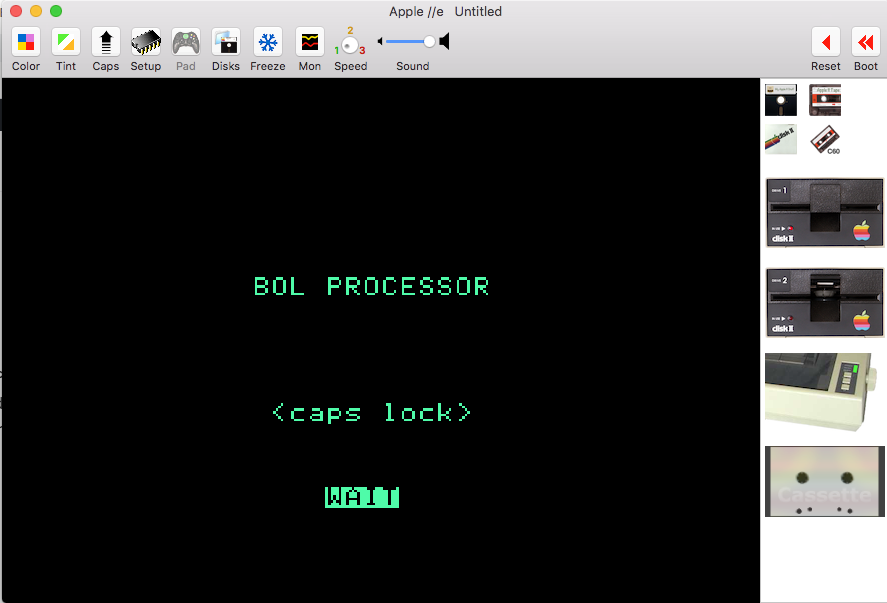
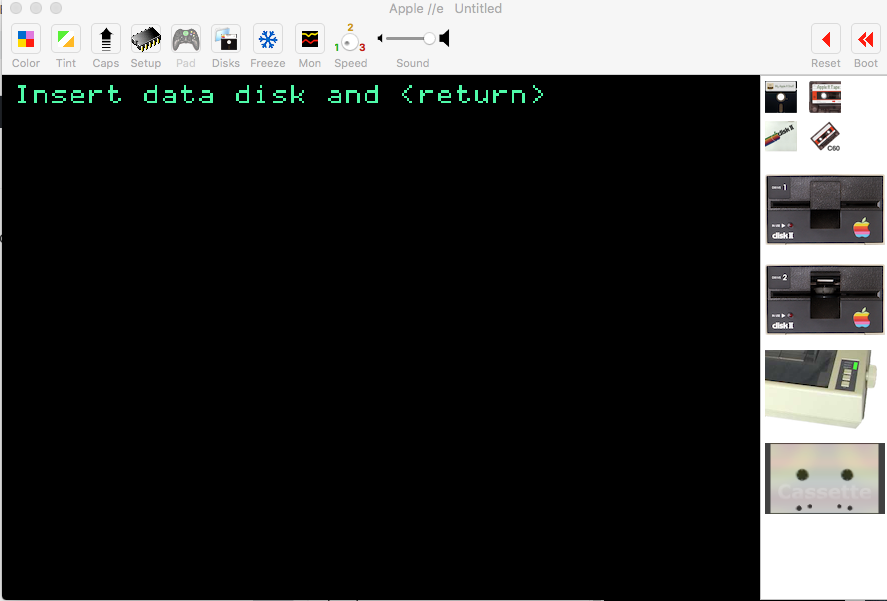
Insert BP-PRG.DSK. This will immediately launch BP1. After "Loading DOS in high memory" (which old goats will understand) you get the rewarding message:
Press the CAPS LOCK key because most commands require uppercase hits.
You are told to "wait"… It really takes time because the emulator is running at the speed of a real Apple II. On VIRTUALII you even hear sounds of floppy disks! Fortunately, all emulators offer the option of running applications at high speed. This is most convenient for BP1 unless you are nostalgic for the squeaks of diskette drives!
Once the disk has stopped spinning you will see:
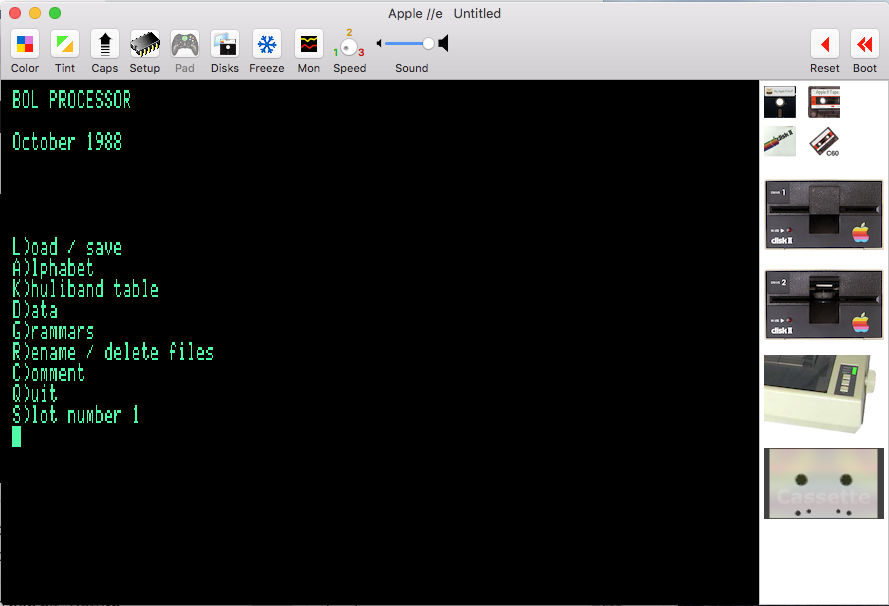
BP1 ran on a single disk drive — the in-built drive of the Apple IIc we used in field research. This means that the entire program stays in memory. So, you can remove the startup disk and insert a data disk. On VIRTUALII you first need to select "Eject Disk" in the "Media" menu to make the first drive available. Once this is done, select "Insert Diskette Image" in the "Media" menu and take for instance "BELFAST.DSK". Then hit <return>… BP1's main menu is displayed:
All commands are activated with uppercase keys. The "Slot number" option should remain "1" since we are using a unique disk drive.
We will now visit basic editing commands in BP1. A detailed explanation of its operation as an "expert system" will be posted shortly.
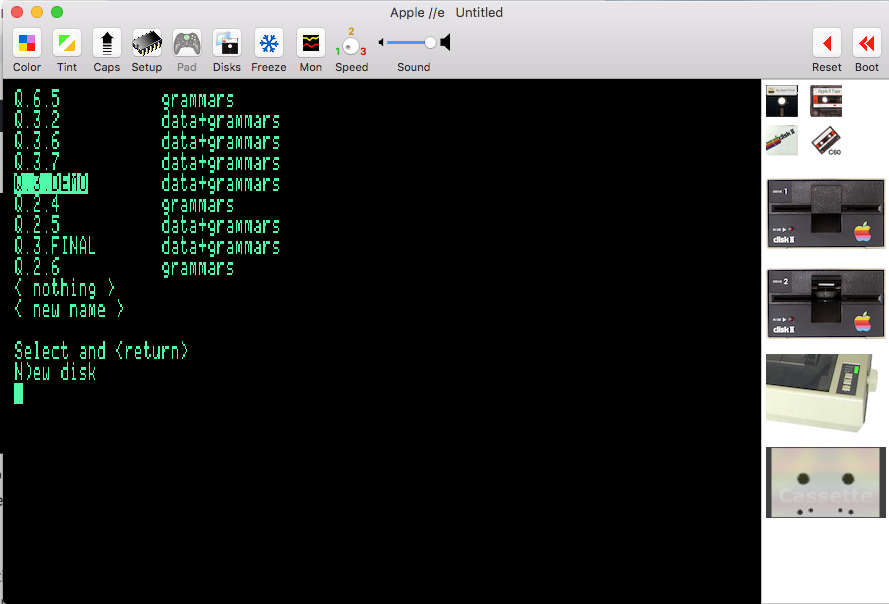
Since a grammar/data disk has been loaded you can hit the "L" key, yielding again Load/Save/Quit options, then displaying the content of the BELFAST disk:
Content of 'BELFAST.DSK'
Hit up/down arrows then <return> to select, for instance, "Q.2.4" (grammars). Unless you opted for high speed, it will take some time to read the files… You will be offered the option of loading data. Say "No".
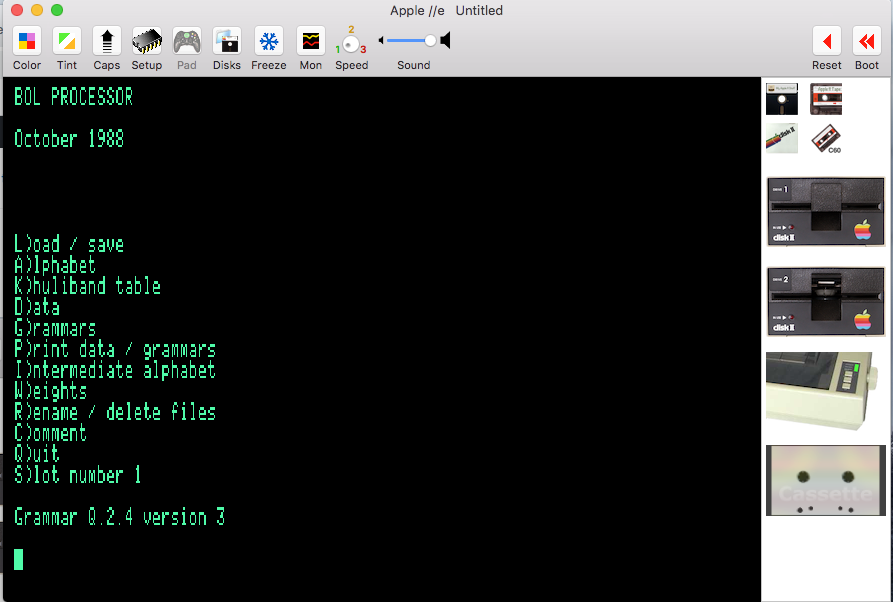
Now the menu is more detailed:
Menu for grammar Q.2.4 of 'BELFAST.DSK'
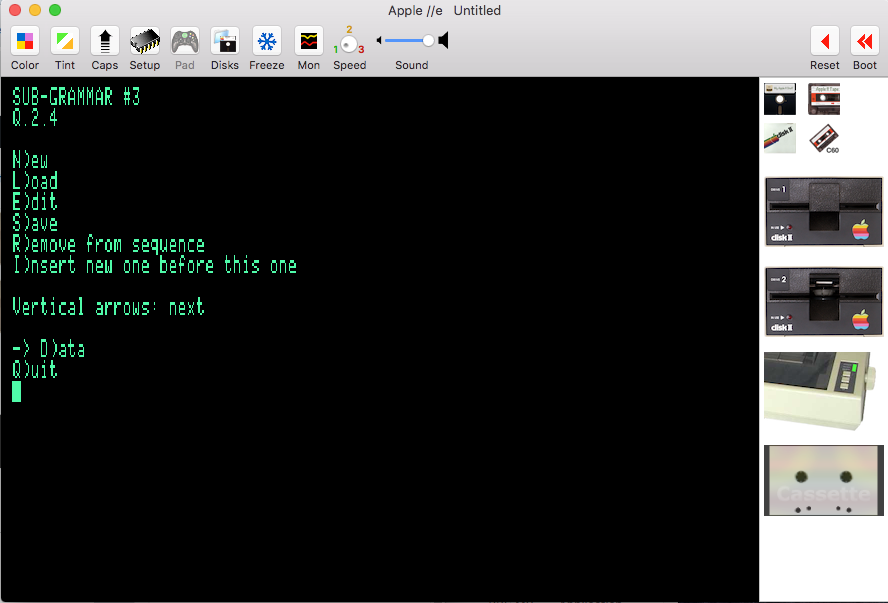
At this stage we will only check how to edit a grammar. Hit the "G" key, then the "down" arrow until "SUBGRAMMAR #3" appears at the top of the menu:
Menu for editing sub-grammar #3 of grammar Q.2.4
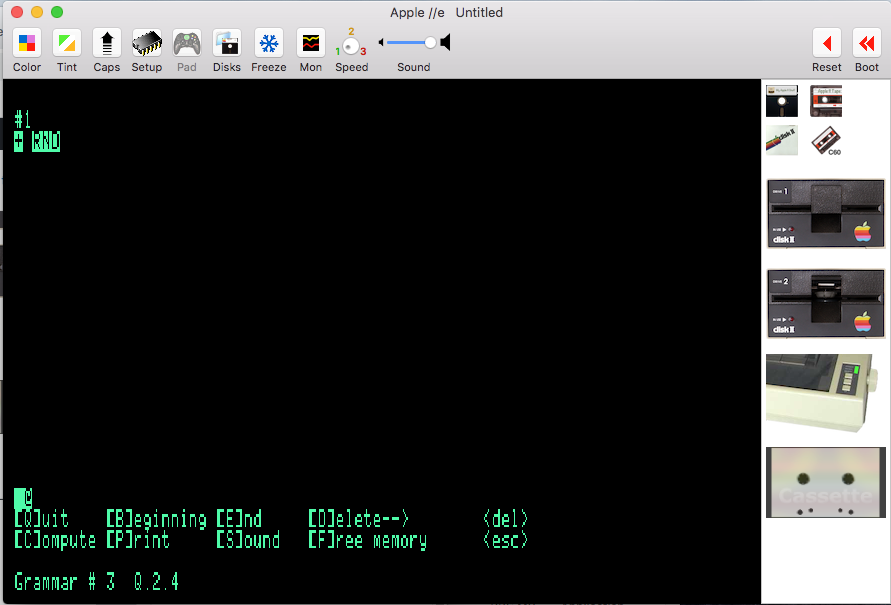
Technical detail: until now we have been running a framework of BP1 written in AppleSoft BASIC language. We will next enter pure 6502 code after hitting the "E" key:
Entering BP1's editor (in pure 6502 code)
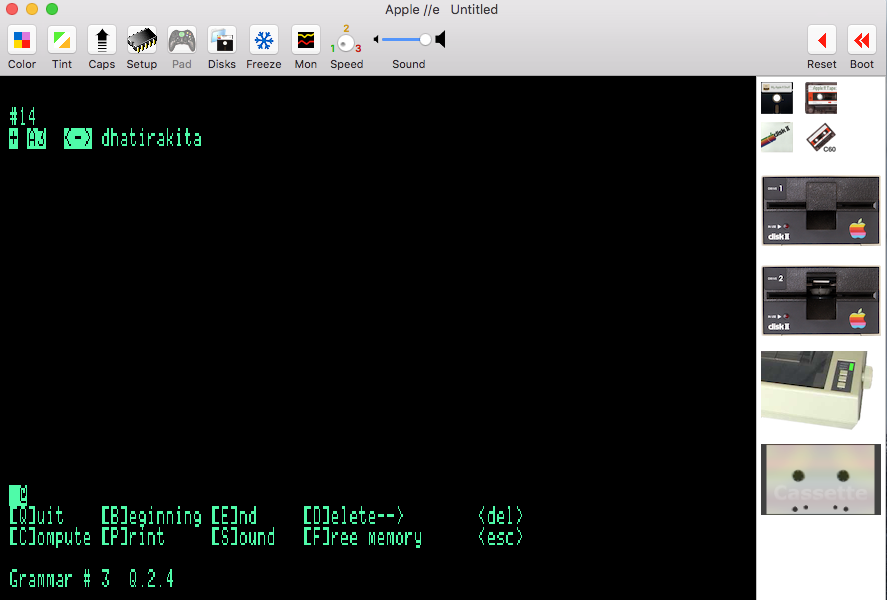
The editor displays one rule at a time. At the top we find the "RND" instruction telling the inference engine that the following rules should be picked up randomly. Hit the "down" arrow to reach rule #14:
Commands [B]eginning, [E]nd etc. are accessed via the "control" key — leftmost down a Mac keyboard. When using VIRTUALII, all "Print" commands produce a PDF file that can be displayed and exported: click the ImageWriter printer on the right side of the screen.
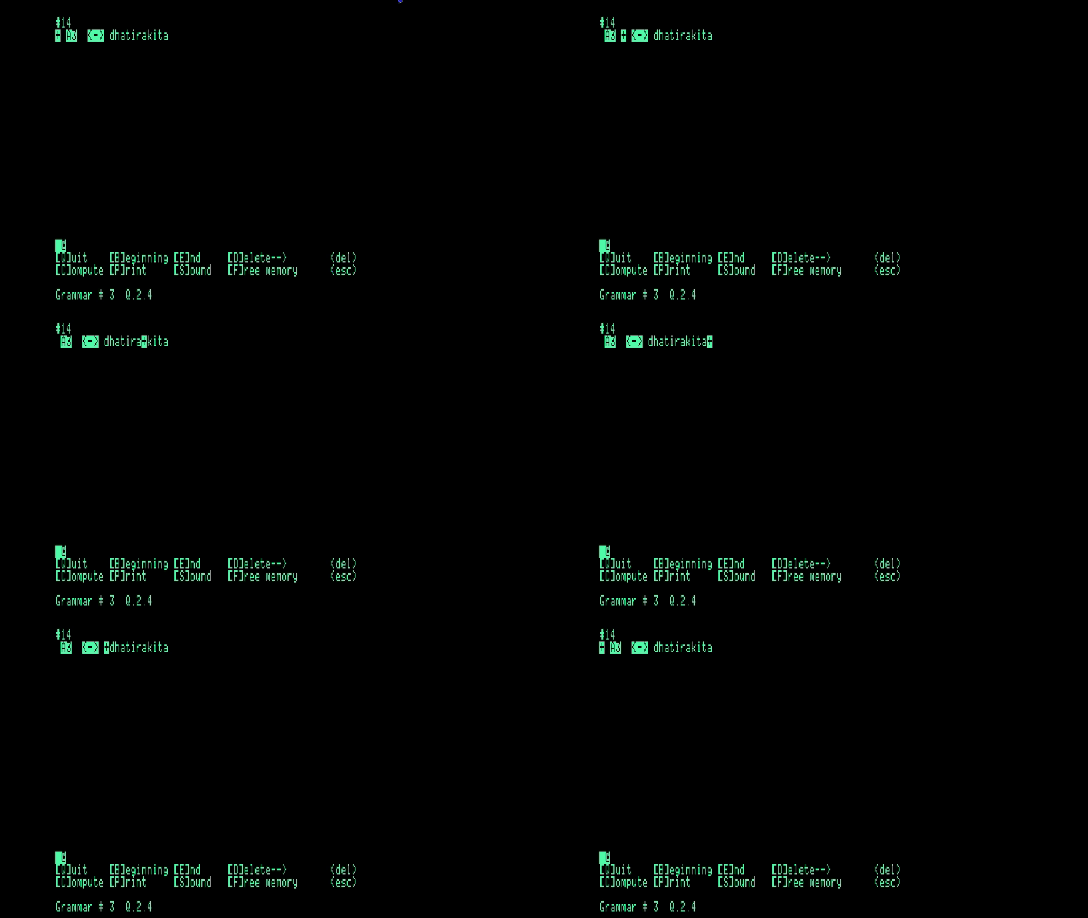
Left and right arrows move the cursor to insert or delete symbols. Note that the cursor jumps over reserved words and terminal symbols such as "dha", "tira", "kita" etc., which was the initial raison d'être of a Bol Processor:
Cursor movement in BP1's editor
In this example, "A3" is a variable. Variables appear in inverted contrast and are generally displayed in uppercase (though this is not compulsory) whereas terminal symbols are displayed in lowercase with normal contrast. To type a variable, first hit the <quote> key, then type its name and hit <return> or <quote> once again. There was more flexibility in naming variables in BP1 than in BP2 because they were tokenized… For instance:
Since BP1 was first developed on the Apple II (not Apple IIe), it expects only uppercase keyboard input for commands. The "caps lock" key will definitely be helpful to this respect.
Note that typing "Q" in the editor inserts "dha", "Z" inserts "ghi" etc. To see (and modify) the keyboard mapping, first quit the grammar editor (typing ctrl-Q) then "Q" again to return to the main menu. Select "Alphabet", then "Modify":
Keyboard mapping in BP1
At the bottom of the screen, the "Which key?" message prompts you to select a key and change its mapping. Unmapped keys are assigned a period which is a blank symbol in BP1 syntax. Hitting <return> or the space bar quits the keyboard mapping editor. Mappings can be saved. This makes it possible for instance to assign "dha" to "Q" on an English keyboard and to "A" on a French keyboard. Keyword mapping has no effect on grammars and data. It is only used to facilitate typing.
Now you can try to load "Q.3.2 (data+grammars)" and reply "Y" to "Load data?". Back to the main menu, select "Data", then "Edit/compute". Move down to data #3:
If you are using VIRTUALII, for fun you can check "Speak Text Screen" in the "View" menu. The whole piece will be recited in English pronunciation which has little in common with its rendering by tabla players!
More seriously, note that terminal symbols are chunked and spaced by groups of 6 units reflecting the "speed" of this musical piece. How is this set up? The trick is revealed after hitting the right arrow:
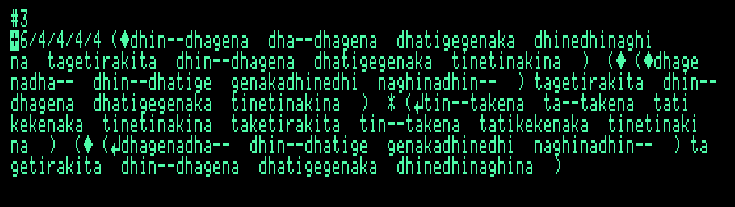
Now the rhythmic and syntactic structure of this item are explicit:
"6" in the beginning means that chunks of 6 terminal symbols should be displayed. This was called bol density.
"/4/4/4/4" indicates that 4 chunks should be placed on every line, thereby matching the rhythmic pattern called tintal in India music.
These rhythmic conventions have been revised in BP2. Today we should write "4+4+4+4/6" instead of "6/4/4/4/4". This is the convention followed in our paper.
Printed example: pattern rule
Brackets, diamond signs (◆) and return (↵) signs denote the syntactic structure of the piece. A diamond sign is the marker of a "master" string and a return sign a marker of its "slave" copy. Their association is called a pattern. In printed versions of grammars and in Mac versions of Bol Processor, these signs have been replaced with "=" and ":" respectively.
The asterisk sign (*) tells that the content of the following bracket is a homomorphic transcription of its master. For instance, the voiced "dhin--dhagena" is reproduced as the unvoiced "tin--takena". Tabla drummers name this transformation khuli/band which means "open" and "closed", referring to the resonance that makes a phoneme "voiced". In BP2, several homomorphisms can be defined on the same alphabet.
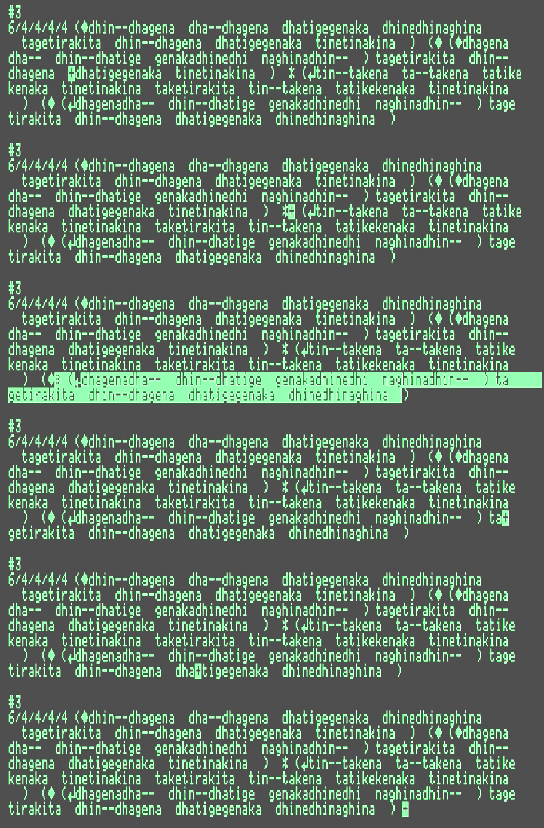
Moving the cursor over the structured piece highlights the reference ("master") string ruling every "slave" copy as shown on the picture below. Changing a "slave" string is impossible as it would break the pattern. There is actually no space in memory for "tin--takena ta--…":
When the cursor reaches the marker of a "slave" string, its "master" reference is highlighted…
Editing patterns
As shown in the preceding image, strings delimited by brackets can be copied or "mirrored" automatically using "master" and "slave" markers. A string starting with a diamond sign (◆) is a "reference". This sign is produced by default when typing an opening bracket. To create a mirror of this expression, open a bracket and hit the "<" and ">" keys until the desired reference is highlighted.
The reference can be anywhere on the left of the "slave", and it may in turn be a pattern containing other references. In the following example, choice is given to copying "dha--", "dhagena", "dhin--" as well as "dhagena dha--":
If the mirror is a homomorphic transcription of its reference, type "*" before the opening bracket.
Once a pattern has been defined, any modification of a reference expression ("master") is immediately mirrored in its copies ("slave").
Patterns are defined in subgrammars generally at a high level of the structure. For this reason, Bol Processor grammars are a class of pattern grammars.
Pattern editing was a great achievement of BP1's interface. Entirely designed in 6502 machine language, its implementation took more than 3 months full-time, associated with instant memory defragmentation… Memory was a critical limitation: type ctrl-F in the editor to check the few "bytes left"!
Keyboard shortcuts
Keyboard shortcuts depend on the computer settings. The following have been checked on a Mac French (AZERTY) keyboard:
ORD is entered asalt+/ or "ORD"
RND is entered as ¨RND"
LIN is entered as alt+j or "LIN"
<-> is entered as alt+,
<-- is entered as alt+c
--> is entered as alt+b
S is entered as alt+i or "S"
TEM is entered as alt+h or "TEM"
More fun?
Explaining the intricacies of rhythmic and syntactic patterns of tabla compositions is beyond the scope of this article. Read for instance Kippen and Bel's paper for a detailed presentation of Bol Processor referring to the musical context of drum players. We hope that this introduction will be sufficient for mastering the editing procedures of BP1.
DOS 3.3 commands are documented on this page. After quitting BP1 you may for instance restart it with the command "RUN BOL PROCESSOR", or type "CATALOG" to list the content of the disk.
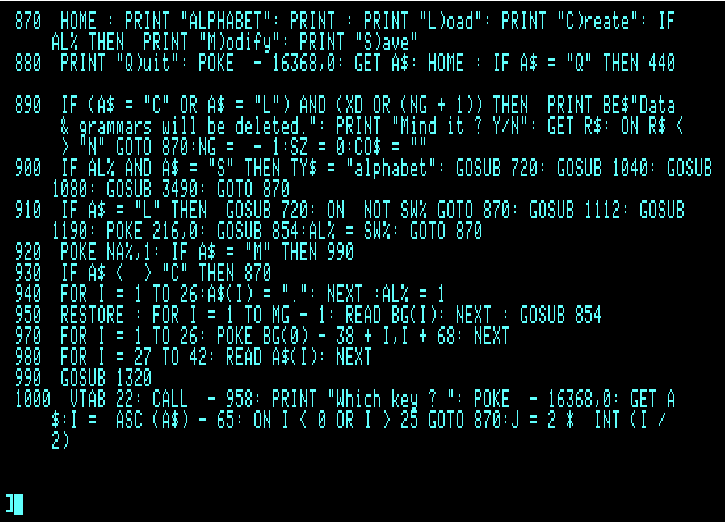
Type "LOAD BOL PROCESSOR" then "LIST" to display the BASIC framework of BP1. For instance:
Part of the AppleSoft BASIC code of BP1's framework, after typing LIST 100-1000.