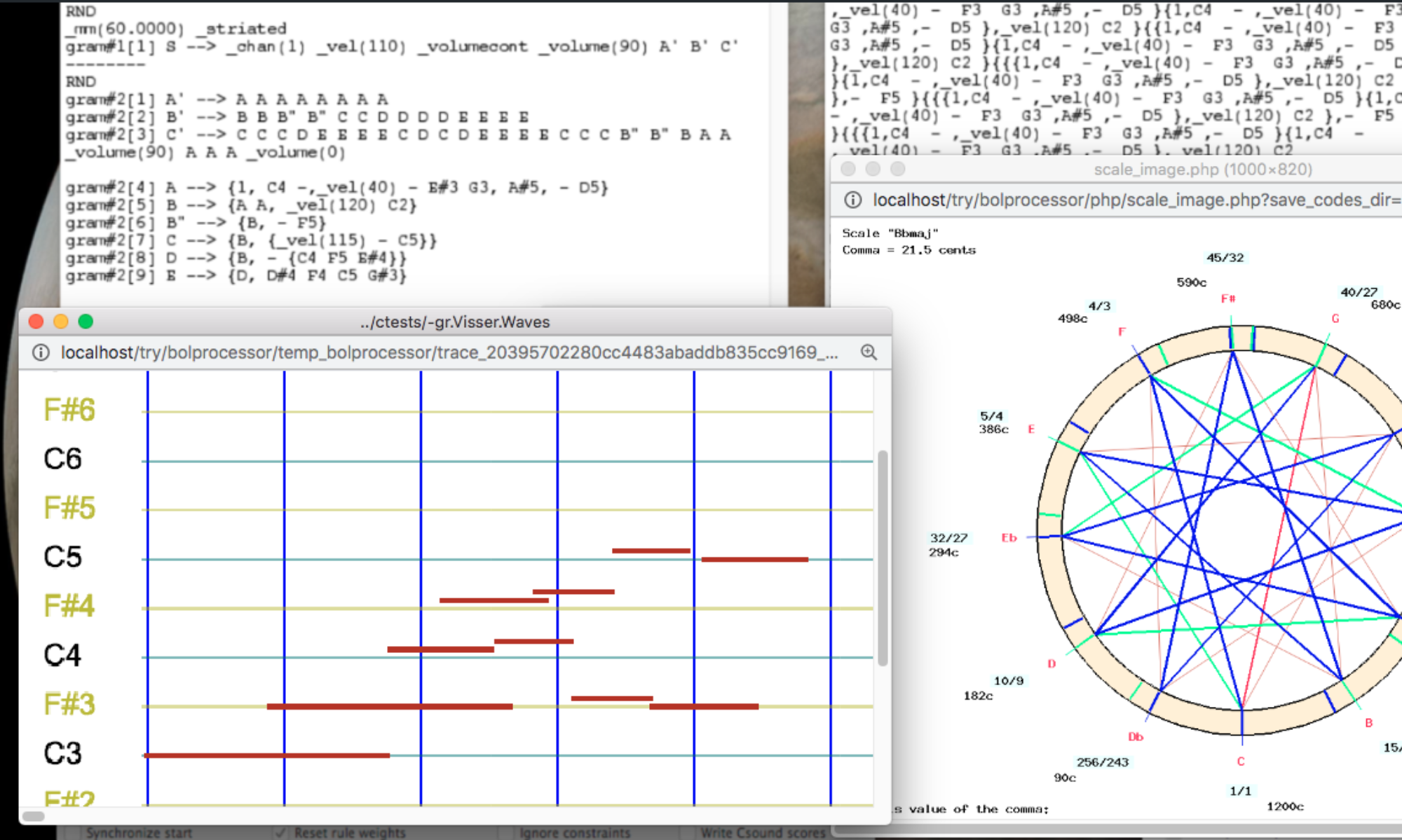
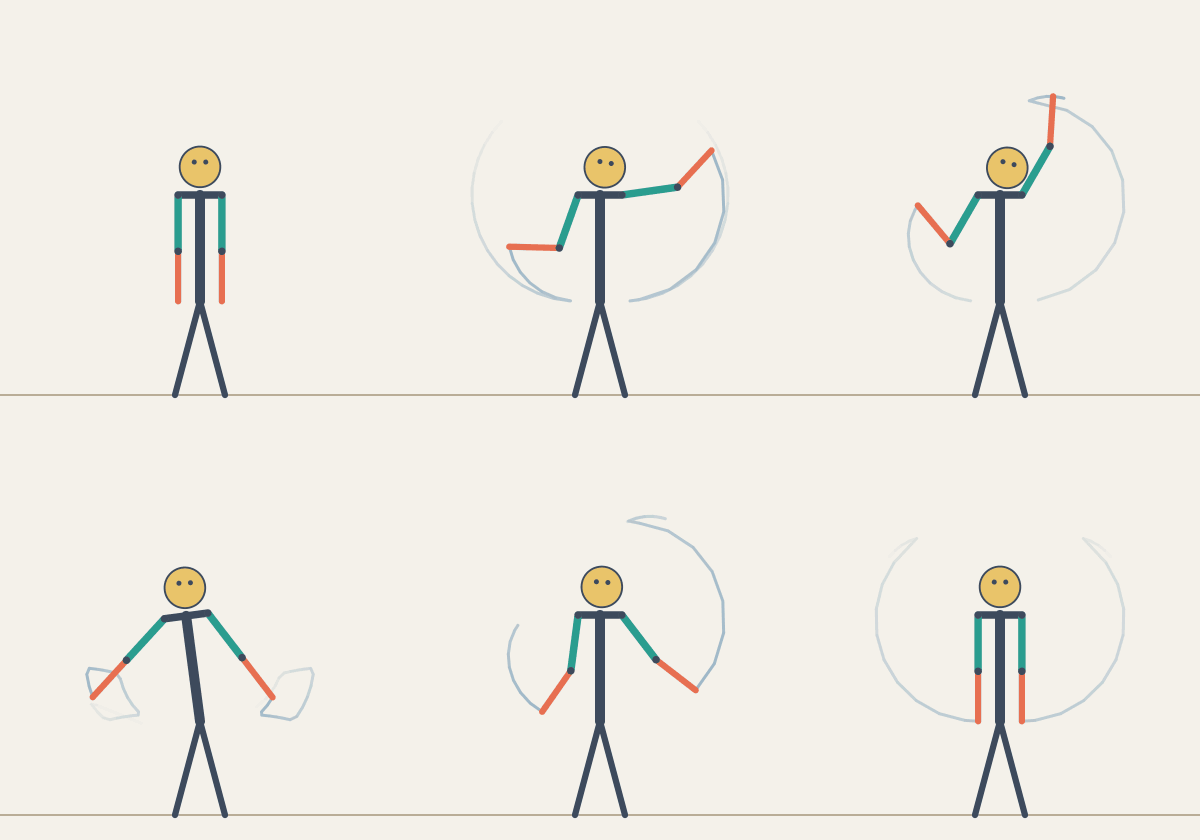
This example shows the Bol Processor piloting a robot. The robot is simulated: a puppet drawn in a window, whose six joints (torso, head, arms and forearms) are moved by the notes of a grammar.
The Bol Processor sends its notes in real-time OSC, the protocol it uses for Max, Pd and other programs, and a small Python program receives them and moves the puppet.
The same messages could drive real motors. The reasons for this choice and the languages used for robots are discussed on the page Usage in robotics.
What you need
- The Bol Processor, installed on MacOS, Windows or Linux. The demo uses three of its files: the grammar
-gr.robot_dance(folderctests), the instruments-cs.Robot(Csound resources) and the programdancer.py, the puppet. A second program,dancer-with-flags.py, is the same puppet holding two flags. Both are in the OSC resource folder (osc_resources). - Python 3 with its graphic library tkinter (Tk version 8.6 or later). Nothing else needs to be installed: the program uses only the standard library of Python.
The Bol Processor itself needs no change: in real-time OSC, it sends its messages whether or not a program is listening to them. The puppet and the Bol Processor are two separate programs, which may even run on two different computers.
Step 1: install Python (once)
MacOS
MacOS has a python3 command (/usr/bin/python3, installed with Apple's developer tools), but it comes with an old version of Tk (8.5) whose window hangs on recent versions of MacOS. The puppet program refuses to start with it and explains why. Download and install Python from python.org: its installer includes a suitable Tk. It is then /usr/local/bin/python3, which the Bol Processor finds by itself.
If you use Homebrew's Python, install its Tk with brew install python-tk
Windows
Download and install Python from python.org. Keep the option "tcl/tk and IDLE" checked (it is checked by default). The Bol Processor also finds Python installed by the Microsoft Store or by the Python install manager.
Linux
Python 3 is usually installed, but tkinter is a separate package. On Ubuntu, Debian, Linux Mint or Linux Lite:
sudo apt install python3-tkOn Fedora: sudo dnf install python3-tkinter
On Linux, XAMPP's web server runs as the user daemon, which your desktop doesn't allow to open windows. Allow it once by typing in a terminal (without sudo):
mkdir -p ~/.config/autostart && printf '[Desktop Entry]\nType=Application\nName=Bol Processor robots\nExec=xhost +SI:localuser:daemon\n' > ~/.config/autostart/bolprocessor-xhost.desktopthen log out and in again (or type xhost +SI:localuser:daemon to allow it right away).
You don't need to remember any of this: when a project uses a puppet, its page checks that a suitable Python is installed. If none is found, it shows why, with a button leading to the installation (the commands on Linux). If Python is installed in an unusual place, type its path, or the command that starts it in a terminal (e.g. py on Windows), in the field shown there, and click TRY.
Step 2: start the puppet
- In the Bol Processor, open the grammar
-gr.robot_dancein thectestsfolder. - Select the output format Real-time OSC (Max, Pd…). Below it, the destination should be host
127.0.0.1and port7400(the defaults; click "Show/hide settings" to check or change them). - The line
-py.danceron top of the grammar names the program receiving the messages. The page shows it as the "Receiving program"dancer.py, with a START THE ROBOT button. Click it.
A window opens with the puppet at rest and the message "Waiting for the Bol Processor…". It listens to the port of the OSC destination. Leave it open: closing the window stops the puppet, as does the STOP button next to START THE ROBOT. If Windows asks whether Python may use the network, allow it.
The "Change" button chooses another program among the Python programs of the OSC resource folder, which it writes as the -py. line of the project. These programs are listed on the page of the OSC resource folder, opened by the link "OSC resource folder" next to the Csound box. The programs of the distribution can't be changed, but their "Duplicate" button makes a copy that you can edit, in the folder osc_resources_private, which updates of the Bol Processor leave untouched. You can also import your own programs there.
Step 3: play the grammar
Click PRODUCE ITEM(S). The puppet says hello, dances four figures and waves goodbye. The figures are chosen at random, so each production gives a different dance.
STOP, PAUSE and PANIC freeze the puppet where it is.
Starting the puppet in a terminal
The puppet can also be started by hand, for instance with options (see below), or on another computer. Open a terminal (Terminal on MacOS, Command Prompt or PowerShell on Windows), go to the osc_resources folder of the Bol Processor and start the program. The paths are those of a standard installation: adapt them if the bolprocessor folder is elsewhere.
| Installation | Commands |
|---|---|
| MacOS with MAMP | cd /Applications/MAMP/htdocs/bolprocessor/osc_resources/usr/local/bin/python3 dancer.py |
| MacOS with XAMPP | cd /Applications/XAMPP/xamppfiles/htdocs/bolprocessor/osc_resources/usr/local/bin/python3 dancer.py |
| MacOS, application BolProcessor | cd /Applications/BolProcessor.app/Contents/Resources/www/osc_resources/usr/local/bin/python3 dancer.py |
| Windows with MAMP | cd C:\MAMP\htdocs\bolprocessor\osc_resourcespy dancer.py |
| Windows with XAMPP | cd C:\xampp\htdocs\bolprocessor\osc_resourcespy dancer.py |
| Linux with XAMPP | cd /opt/lampp/htdocs/bolprocessor/osc_resourcespython3 dancer.py |
How it works
Each joint of the puppet is an instrument of the Csound resource file -cs.Robot: torso, head, leftarm, leftforearm, rightarm and rightforearm. Csound itself is not used: the file only gives names to the instruments and to their parameters. Each instrument has a parameter named like it, which is the angle of the joint in degrees. Arms hang down at 0, are horizontal at 90 and raised at 180. Forearms are straight at 0.
Each note is a movement of a joint: its angle goes from the value of the parameter at the beginning of the note to its value at the end. With _cont(leftarm), the angle changes continuously from one _value(leftarm,...) to the next. In the following line, the left arm is raised to the horizontal, then above the head, back to the horizontal and down, in four movements:
_ins(leftarm) _cont(leftarm) _value(leftarm,0) C4 _value(leftarm,90) C4 _value(leftarm,170) C4 _value(leftarm,90) C4 _value(leftarm,0)The pitch of the notes (C4) is ignored. The joints of the body move together in a polymetric structure such as {Still4, Head4, Arms4, Forearms4}, where each field is the part of one or two joints. Polymetry makes it easy to write movements in different rhythms, such as three movements of the left arm against four of the right arm in the figure "Stretch".
A _value() placed inside a prolonged note bends its movement. In the figure "Wave", a single note of the right forearm goes back and forth:
_ins(rightforearm) _cont(rightforearm) _value(rightforearm,0) C4 _ _value(rightforearm,60) _ _value(rightforearm,10) _ _value(rightforearm,60) _ ...Repeating a value, as in C4 _value(rightarm,150) _ _ _value(rightarm,150), holds the position.
The puppet receives each note as a message /bp/note giving the instrument (joint), the duration and the start and end values of the angle. A bent movement is followed by a message /bp/env listing its intermediate positions with their times. These messages are described on the page Real-time OSC. Like a real robot, a joint cannot move faster than a maximum speed (400 degrees per second by default): when a movement starts far from the current position, the joint catches up as fast as it can.
A second dance: gestures as time-objects
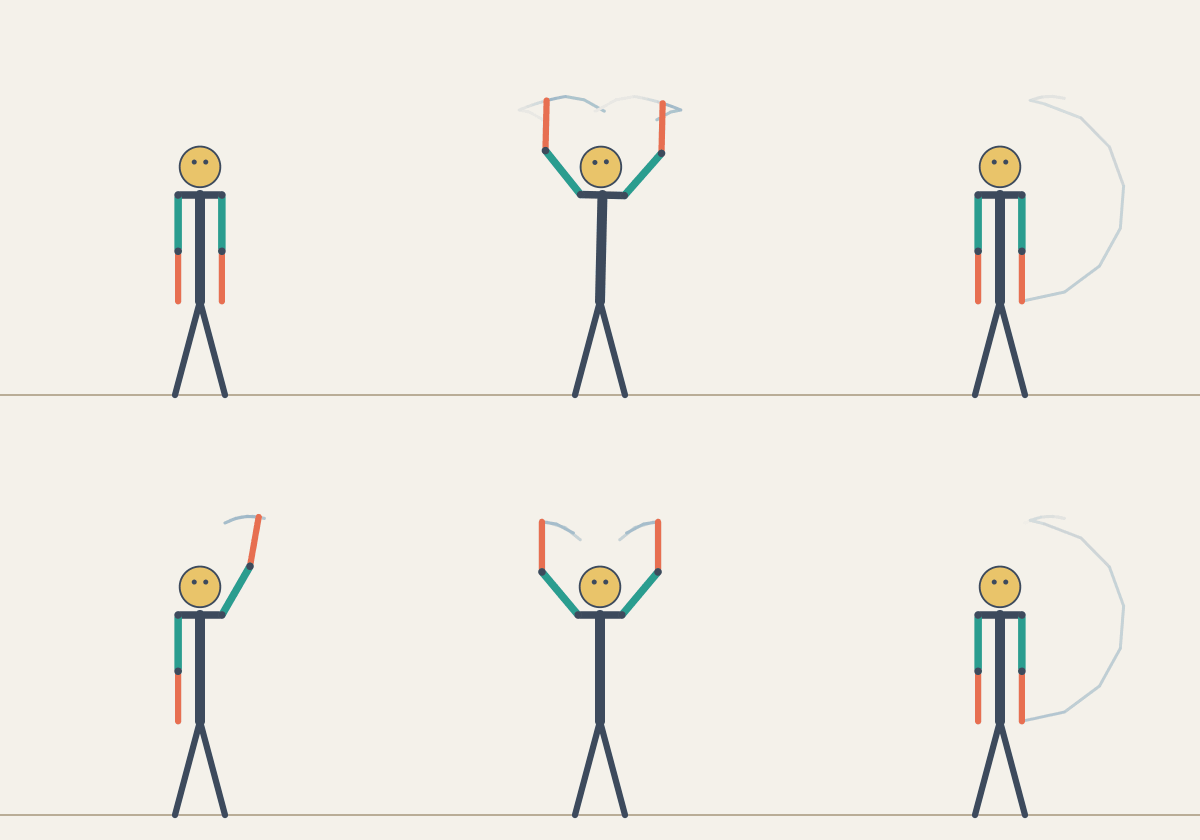
In -gr.robot_dance, every movement is written as a note. A robot, like a musician, rather thinks in gestures: a clap, a wave, a nod. The grammar -gr.robot_objects (folder ctests) packages each gesture as a time-object (also called a sound-object), as explained on the page Usage in robotics. It is played in the same way: open the grammar, select "Real-time OSC", click START THE ROBOT (its line -py.dancer names the same puppet) and PRODUCE ITEM(S).
The graphic display produces an image which tells precisely the sequence of gestures, as you can see in this image.
The gestures armsup, armsdown, clap, wave, waveoff and nod are the prototypes of the file -so.robot_objects, declared as terminal symbols in the alphabet -al.robot_objects. Each prototype contains a Csound score whose lines are movements of the joints, with the fields of -cs.Robot: instrument (joint), start date, duration, pitch (ignored), angle at the beginning and angle at the end. This is the score of wave:
i5 0.000 0.500 261.626 0 150 0 ; rightarm
i6 0.000 0.500 261.626 0 60 0 ; rightforearm
i6 0.500 0.250 261.626 60 10 0 ; rightforearm
i6 0.750 0.250 261.626 10 60 0 ; rightforearm
The right arm is raised in 0.5 second while the forearm bends, then the forearm waves once. The score can be edited on the page of the prototype, which also displays its metrical and topological properties. The grammar only places the gestures on beats. The time-setting algorithm adapts each of them according to its properties:
| Gesture | Properties | What the puppet does |
|---|---|---|
clap | pivot set at 150 ms, never rescaled | The pivot, the point of the object placed on the beat, is the impact of the hands rather than the beginning of the gesture. The hands meet exactly on the beats, each clap starting 150 ms before its beat. At double tempo, the claps keep their speed and their impacts stay on the beats. |
wave | cyclic after 500 ms, never rescaled | After raising the arm, the waving part is repeated as long as the gesture lasts, rather than slowed down: 3 waves in 2 beats, 11 waves in 6 beats, always at the same speed. |
nod | expanded or compressed between 0.5 and 2 times | The nod follows the tempo within the limits of a motor: three nods against four claps are stretched, and at double tempo they are compressed to half, their limit. |
armsup, armsdown, waveoff | rescaled freely | These movements follow the tempo. |
Gestures and notes can be combined: while the arms clap and the head nods, the torso sways with notes and _cont(torso), as in the first dance:
Claps --> {armsup clap clap clap clap armsdown, - {4, nod nod nod} -, Sway6}Writing the same dance with notes would require computing the date of every movement for each tempo. With time-objects, a gesture is designed once, with its physical constraints, and the Bol Processor works out where its movements fall.
A third example: the semaphore alphabet
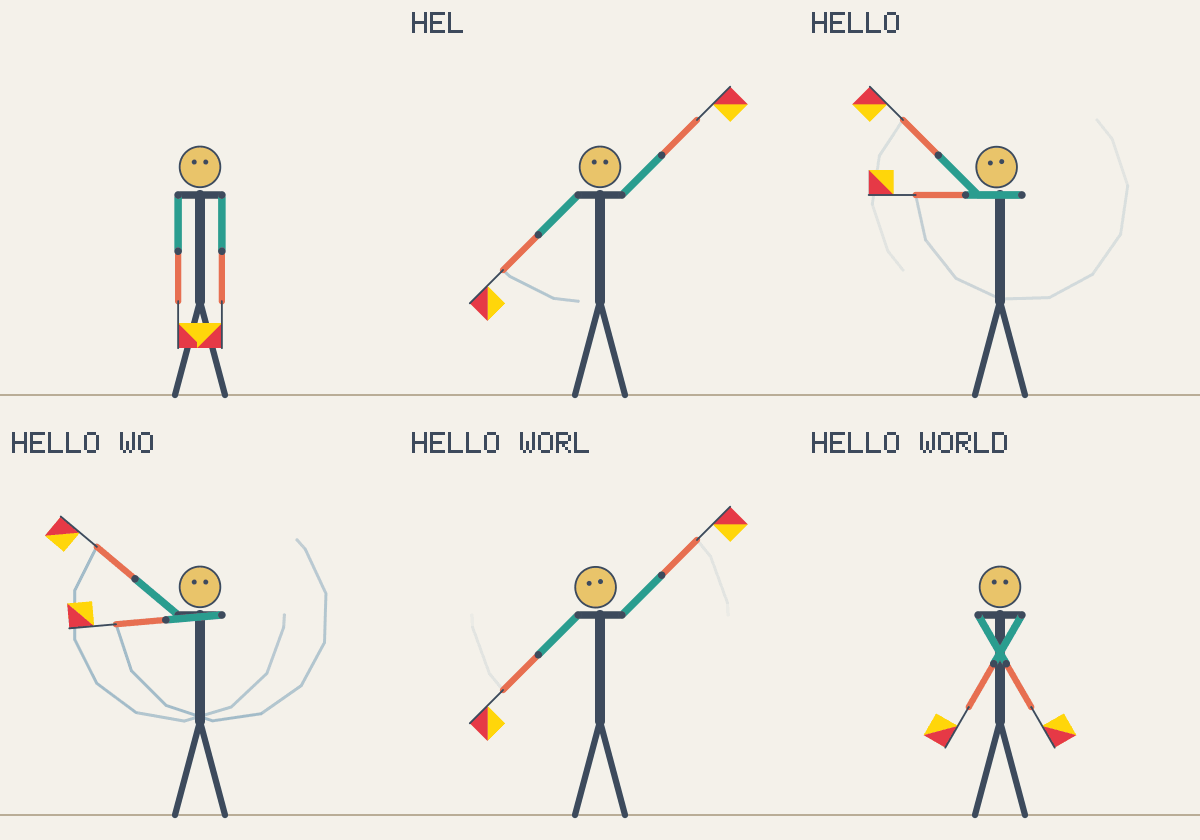
In the flag semaphore alphabet, once used by sailors, each letter is a position of the two arms, each one pointing in one of 8 directions.
The data project -da.robot_semaphore (folder ctests) contains sentences written with the letters A to Z and space between words:
H E L L O space W O R L DEach letter is a time-object of -so.robot_semaphore, declared in the alphabet -al.robot_semaphore.
Its Csound score holds both arms at the angles of the letter for its whole duration, here the letter R (both arms horizontal):
i3 0 1 261.626 90 90 0 ; leftarm
i4 0 1 261.626 0 0 0 ; leftforearm
i5 0 1 261.626 90 90 0 ; rightarm
i6 0 1 261.626 0 0 0 ; rightforearm
i2 0.75 0.125 261.626 0 12 0 ; head
i2 0.875 0.125 261.626 12 0 0 ; head
A letter doesn't need to know the previous one: since the joints of the puppet have a maximum speed, like the motors of a robot, the arms go from one letter to the next as fast as they can, then hold the position. At the end of each letter the head nods, which makes double letters visible, as in "HELLO". The space crosses the arms low in front of the body. Positions are drawn as seen by the observer.
To play it, open -da.robot_semaphore and select "Real-time OSC". Its line -py.dancer-with-flags names the puppet holding a flag in each hand: click START THE ROBOT, then the PLAY button next to a sentence. You can type your own sentences on the data page. The metronome is set to 40 beats per minute, one letter in 1.5 second; the last example spells a pangram twice as fast with _tempo(2).
Options and variations
The program accepts options after its name, for example:
py dancer.py --max-speed 200
START THE ROBOT gives the program only the port of the OSC destination: other options require starting it in a terminal, as shown above. Option --help lists them:
| Option | Effect |
|---|---|
--port 7400 | the UDP port to listen to; it must be the port set in the Bol Processor |
--host 0.0.0.0 | listen to messages from other computers (by default, only from this computer); in the Bol Processor, set the host to the address of the computer running the puppet |
--max-speed 400 | the maximum speed of the joints in degrees per second (0 = no limit) |
--verbose | print the messages received in the terminal |
--no-window | no window: print the messages, and the angles of the joints every half second. This works with any Python 3, even without tkinter. |
You can change the dance by editing the grammar: add figures to subgrammar 2, or change the angles and rhythms of subgrammar 3. Every figure starts and ends at rest (all angles 0), so that they can follow each other in any order.
To drive a real robot, duplicate dancer.py on the page of the OSC resource folder, and in the copy write the angles to its motors in the function send_to_hardware(). Then choose the copy with the "Change" button of your project, so that START THE ROBOT starts it. The function is called about 60 times per second with the angle of each joint, and contains an example for servo controllers reading a serial port.
Note: This page, the puppet program, the grammar and the animation were partly composed by Claude Opus 5.5 on 23 November 2026, and updated on 24 November 2026.